Digital Ally, Inc. | Introduction
1-1
FirstVu HD Operation Guide | 860-00177-00 Rev J
Go Back To Table of Contents
1.1 Overview
• Easy to Operate – One button start/stop record
• Small and Lightweight
• Easily and securely mounts almost anywhere
• High Quality 720p Video – H.264 codec – 1280 x 720 resolution, 30 frames per
second (congurable for lower settings)
• Wide 130° Field of View
• Encoded videos may easily be viewed on standard PC video player software or
by using Digital Ally software to take full advantage of extensive Metadata
• Saves Metadata along with Video
• Up to 60 Seconds Pre-Event Record (when congured) – Capture the action
before activating a recorded event
• 0.08 Lux Low light sensitivity for night time operation
• Instant Record ON while in Stand-by Mode
• User can insert ‘Marks’ during a recording which records to Metadata
• Covert Mode – Vibratory notications
• Secure 32GB of event record memory with easy download thru USB port
• Software Upgradeable via USB
• Up to 4.5 hours of continuous recording on a single charge with standard
battery or 8 hours with the extended battery
• Integrates with VuLink
®
wireless in-car video link
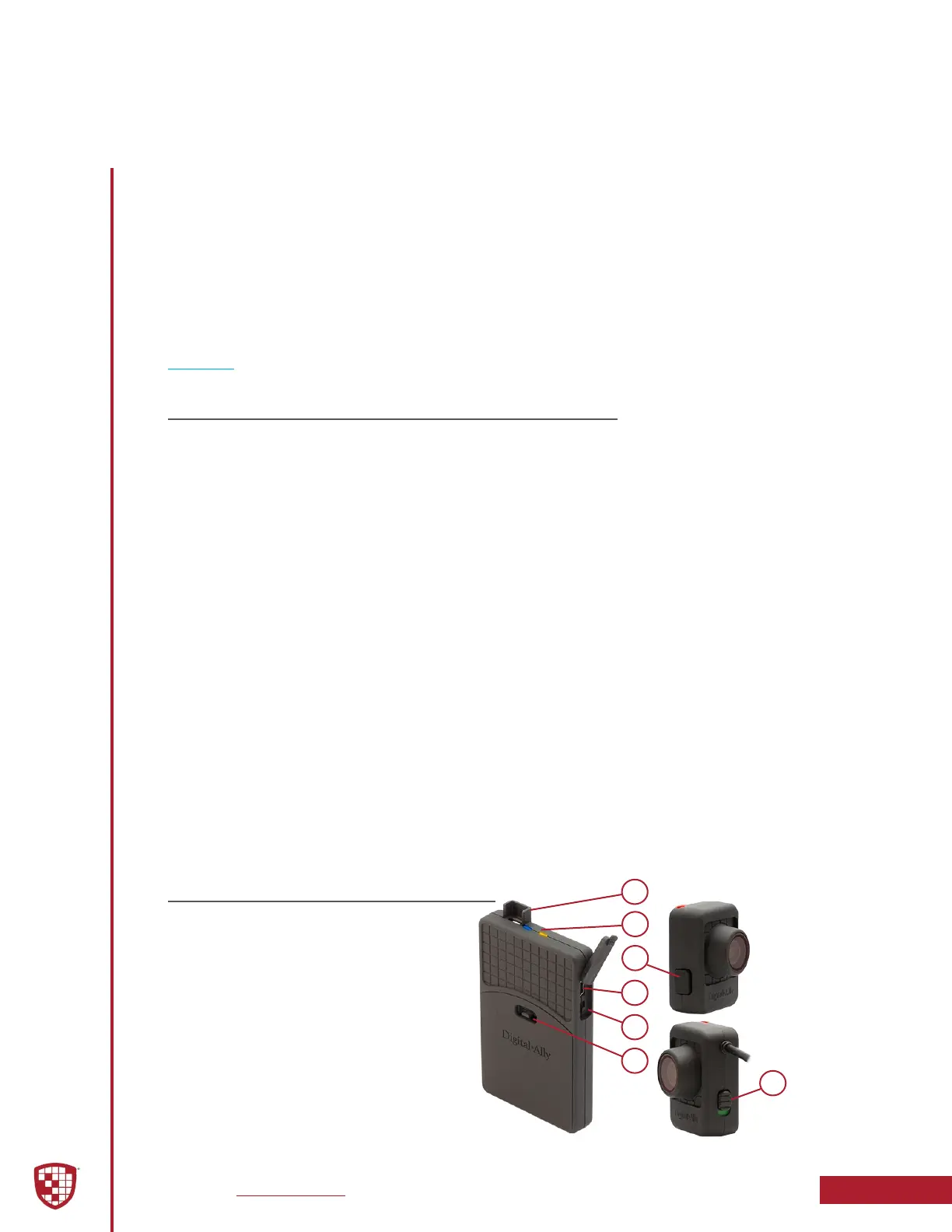
1 Camera Port
2 Status LED’s
3 Record Start/Mark/Record Stop
4 USB Port
5 Power On/O
6 Battery Cover
7 Microphone On/O
Section 1
Introduction
The FirstVu HD is a Professional, Evidentiary, Wearable, Mountable, and Weather-
Resistant Digital Video System.
Record video, audio, and evidence wherever the job requires, day or night while also
collecting useful information such as a date/time stamp, and marks (video bookmarks).
This Operation Guide is designed to get you up and running quickly with its basic
features. For integration within the VuVault
®
back oce software, please refer to
Section 3. For integration with Digital Ally’s VuLink
®
in-car wireless link, please consult
the “Vulink
®
Operation and Installation Guide.”
1
2
3
4
5
6
7
1.2 FirstVu HD Features & Controls


 To Next Page