Installing Brackets on the DECserver 2-3
Installing the Rack-Mounting Brackets to the DECserver
Installing the Rack-Mounting Brackets to the DECserver
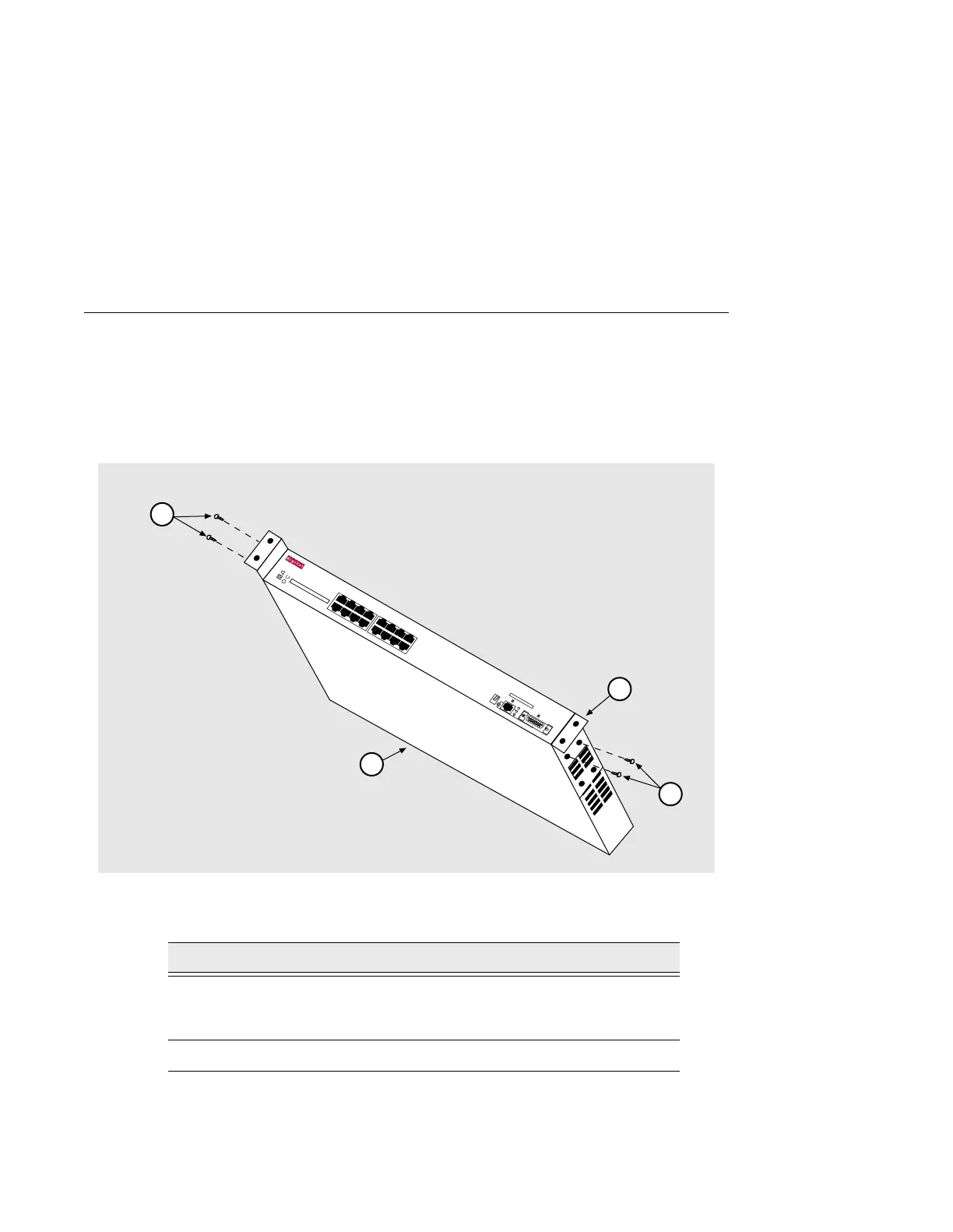
The DECservers can be used as standalone devices or installed in a standard 19-inch
rack using the rack-mounting kit part number 9061218. Table 2-1 describes how to
assemble the rack-mounting kit as illustrated in Figure 2-1.
Figure 2-1: Rack-Mounting Brackets
Table 2-1: Rack-Mounting Bracket Description
Step Action
1 Attach (either flush or receded) the two rack-mount brackets (1) by
inserting the tab on the bracket into the slots on the side of the
DECserver (2).
2 Secure the bracket using two #6-32 screws (3).
3505-05
3
1
2
LNK
DECserver 716
24
68
1
357
10 12 14 16
9
11 13 15
3



 To Next Page