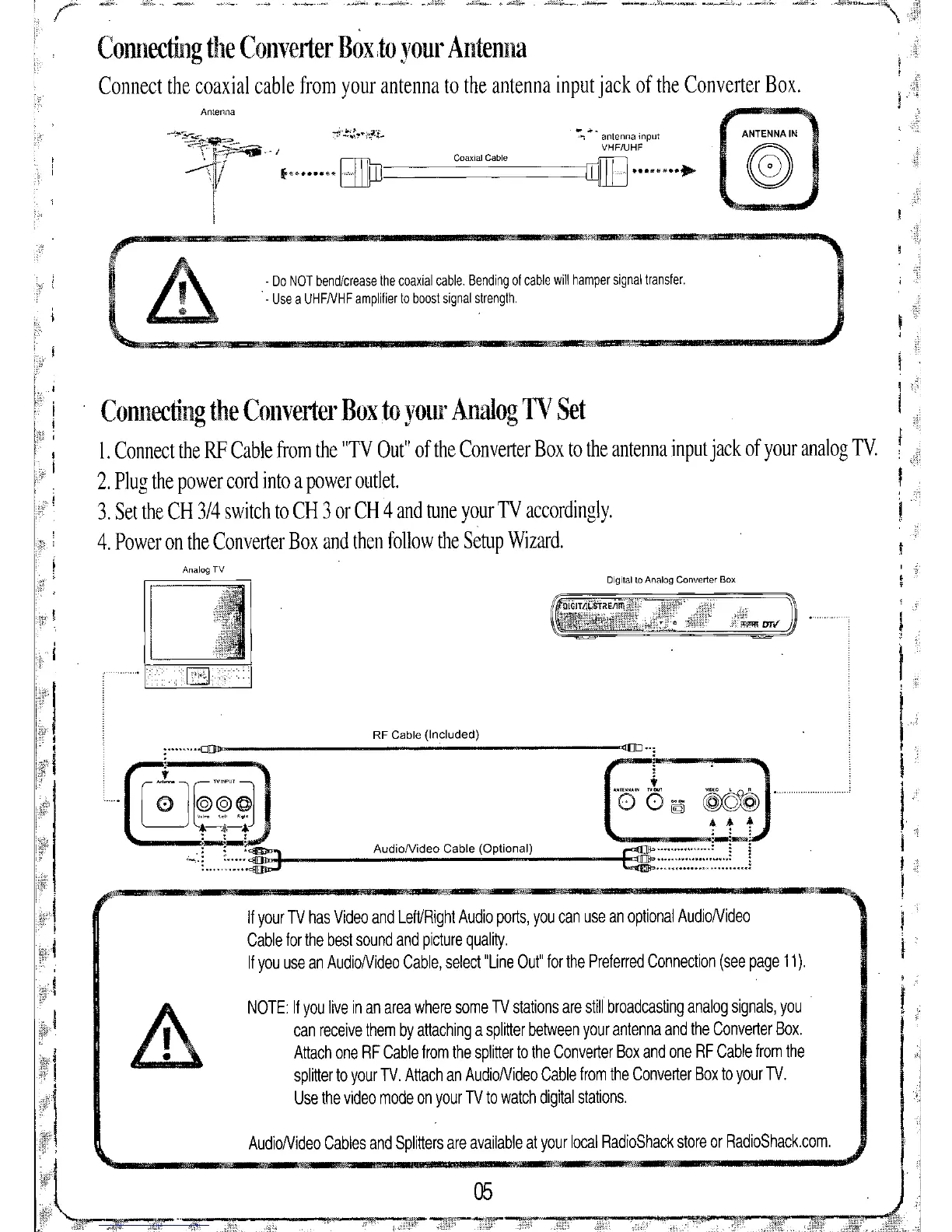
Connecting the Convel1er Bodo your Antenna
Connect the coaxial cable from your antenna to the antenna input jack of the Converter Box.
Antenna
ANTENNA IN
Digital to Analog Converter Box
AudioNideo Cable (Optional)
AudioNideo Cables and Splitters are available at your local RadioShack store or RadioShack.com.
RF Cable (Included)
- Do NOT bend/crease the coaxial cable. Bending of cable will hamper signal transfer.
. - Use a UHFNHF amplifier to boost signal strength.
NOTE: If you live in an area where some TV stations are still broadcasting analog signals, you
can receive them by attaching a splitter between your antenna and the Converter Box.
Attach one RF Cable from the splitter to the Converter Box and one RF Cable from the
splitter to your TV. Attach an AudioNideo Cable from the Converter Box to your TV.
Use the video mode on your TV to watch digital stations.
If your TV has Video and Left/Right Audio ports, you can use an optional AudioNideo
Cable for the best sound and picture quality.
If you use an AudioNideo Cable, select "Line Out" for the Preferred Connection (see page 11).
AfIIlI' OIiG"" MlI_'"""'1It..
Connecting the Converter Box to your Analog TV Set
I. Connect the RF Cable from the "TV Out" of the Converter Box to the antenna input jack of your analog TV.
2. Plug the power cord into a power outlet.
3. Set the CH 3/4 switch to CH 3 or CH 4 and tune your TV accordingly.
4. Power on the Converter Box and then follow the Setup Wizard.


 To Next Page