
 Need help?
Do you have a question about the DigiTech Bass Whammy and is the answer not in the manual?
Controls pitch bending amount of selected effect.
Bends signal pitch up or down based on selected effect setting.
Adds a harmony note mixed with the input signal.
Mixes a detuned copy of the signal with the original.
MIDI Program Change commands for Classic mode effect selection.
The DigiTech Bass Whammy™ Pedal is a specialized pitch-shifting effect designed for bass guitars, offering a range of classic Whammy effects alongside modern enhancements and true bypass operation. This pedal is engineered to provide robust and precise pitch shifting for bass players, whether they are bending single notes or entire chords. Its intuitive interface draws from the legacy Bass Whammy, while also incorporating additional pitch bend settings found in its guitar counterpart, making it a versatile tool for creative bassists.
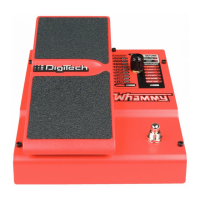
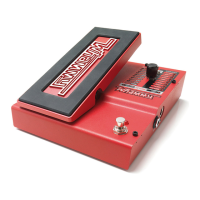
At its core, the Bass Whammy functions by bending the incoming signal's pitch either up or down, depending on the selected effect. The amount of pitch bending is dynamically controlled by the expression pedal. When the pedal is rocked forward (toe down), the pitch bending increases, moving towards the pitch specified by the chosen effect setting. Conversely, rocking the pedal back (toe up) decreases the pitch bending, returning the signal to its original input pitch. This allows for expressive and real-time manipulation of the bass sound, from subtle shifts to dramatic dives and rises.
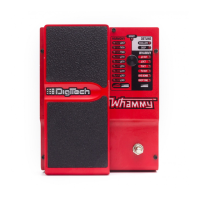
The pedal features a "Classic/Chords" switch, which is a key enhancement. This switch allows users to toggle between two distinct algorithms: the classic Whammy algorithm and a modern chordal algorithm. The "Classic" setting is optimized for single-note playing, delivering the iconic Whammy sound with clarity and precision. The "Chords" setting, on the other hand, is specifically designed for bending full chords, ensuring that all notes within the chord shift together without unwanted artifacts or dissonances, providing a rock-solid pitch-shifting experience even with complex harmonies.
The Bass Whammy offers three main categories of effects: Whammy, Harmony, and Detune. Whammy Effects are pure pitch-bending effects, meaning no dry signal is mixed with the effect signal. These effects include:
Harmony Effects add a harmony note to the incoming signal, mixing it with the original input. This creates the impression of two basses playing simultaneously. With Harmony effects, the input signal remains unchanged, while the harmony note bends between two intervals specified by the selected effect setting as the expression pedal is rocked. Examples include:
Detune Effects create a copy of the input signal, shift its pitch slightly, and then mix it back with the original signal. The expression pedal controls the level of this detuned signal mixed with the dry signal.
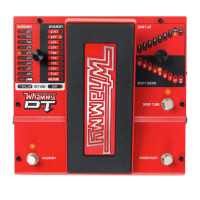
The user interface includes a Selector Knob to choose between the various Whammy, Harmony, or Detune effects. LEDs next to each effect category (Harmony, Whammy, Detune) illuminate to indicate the currently selected type. A Status LED lights up when the effect is active and turns off when bypassed. The Effect On/Off Footswitch allows for easy toggling of the effect.
For remote control, the Bass Whammy is equipped with a MIDI Input. This allows an external MIDI device to select effects, activate or bypass the effect, and control the expression pedal position using MIDI Continuous Control (CC) messages. Specifically, MIDI CC11 adjusts the expression pedal position, with a value of 0 corresponding to toe-up and 127 to toe-down. The MIDI channel can be configured by holding the Effect On/Off Footswitch while reconnecting power, then using the Selector Knob to choose the desired channel, indicated by a flashing Effect LED.
Maintenance features primarily involve calibration. In the event that the expression pedal does not respond correctly or the pitch bending is inaccurate, the pedal can be re-calibrated. This process involves disconnecting power, holding the Effect On/Off Footswitch while reconnecting power, then rocking the expression pedal fully forward and back at least twice. During calibration, the Harmony LEDs will light back and forth. After calibration, pressing the footswitch again exits the setup mode.
The Bass Whammy is designed for straightforward integration into any bass rig. Connections include an Instrument Input, an Output Jack for connecting to an amplifier or other pedals, a Power Input for the included power supply, and the MIDI Input. The true bypass operation ensures that the original signal remains uncolored when the effect is disengaged. This combination of classic effects, modern chordal capabilities, and robust control options makes the DigiTech Bass Whammy a powerful and expressive tool for any bassist.
 General
| Type | Pitch Shifter |
|---|---|
| Power Supply | 9V DC adapter (included) |
| Dimensions | 5.0" (L) x 3.65" (W) x 2.25" (H) |
| Controls | Bypass Footswitch |
| Input | 1 x 1/4" |
| Output | 1 x 1/4" Instrument |
| Outputs | 1/4" Mono (Effect), 1/4" Mono (Dry) |





 To Next Page
