11
Internet Connection Status
• OpenyourBrowser(InternetExplorer,Firefox,Chrome,etc)
• Type192.168.178.1orhttp://fritz.boxintotheaddressbarofyour
selected browser
• EntertheFritz!Boxpasswordasshownonthestickerattachedtothebaseof
your Fritz!Box. The Fritz!Box password “zigzag5481” shown in the example
aboveisforillustrationpurposesonly.ItisNOTyourWi-Fipassword/key.
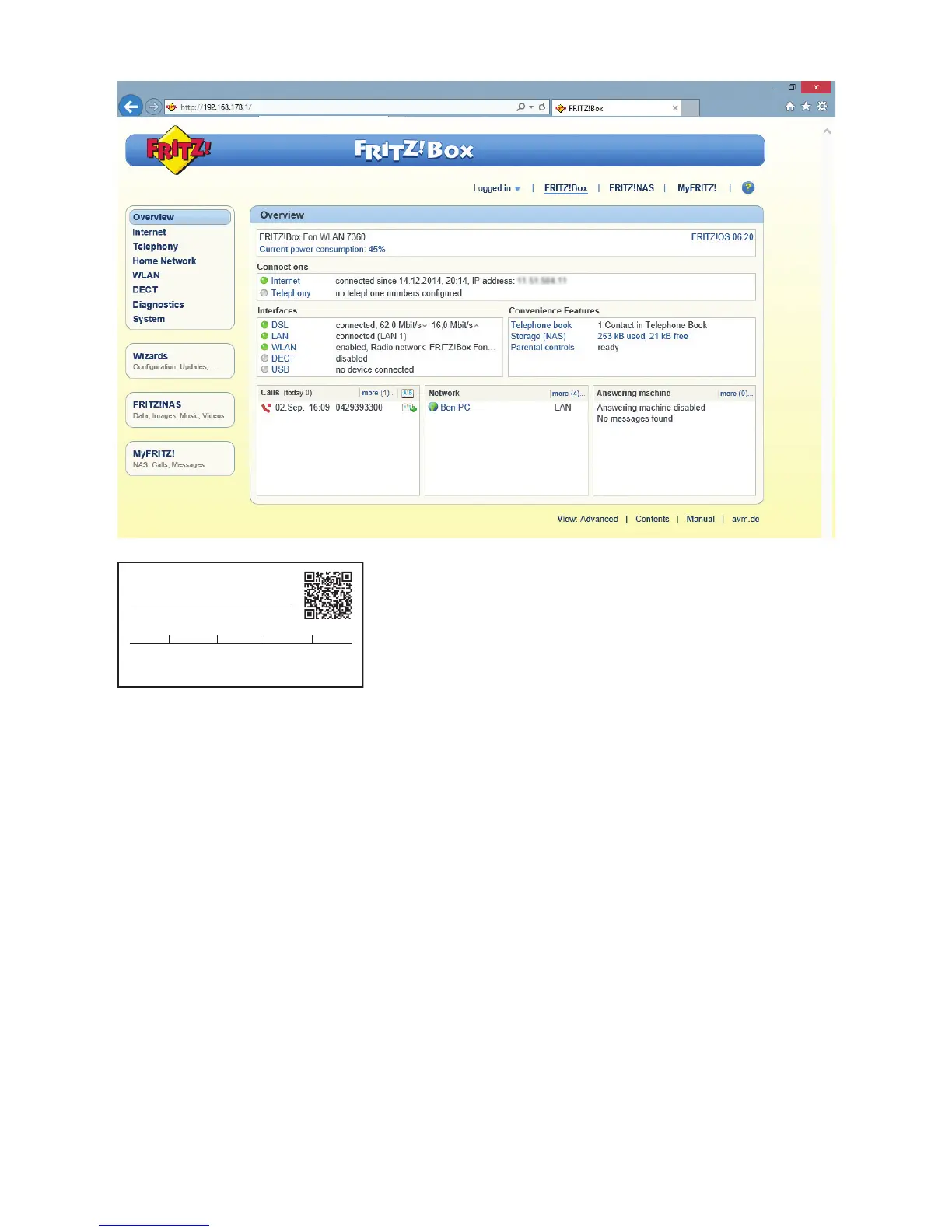
• BydefaultyouarenowlookingattheOverviewscreen.Under
“Connections” you should see a green LED beside “Internet” followed
by “connected since (date/time)”
• IfyouareusingDigiwebBroadbandTalkVOIPservice,under“Connections”,
you should see a green LED beside “Telephony” followed by the
“1 telephone number enabled ” (e.g. 0123456789)
• FornonDigiwebBroadbandTalkVOIPcustomers,under“Connections”,
you should see a grey LED beside
“Telephony” followed by “no Telephone numbers configured”
WLAN Network Key (WPA2)
WLAN Network (SSID)
FRITZ!Box 7430 ON
FRITZ!Box password
zigzag5481
1234 5678 9876 5432 1234


 To Next Page