14 www.dimplex.com
Operation
WARNING: This unit must be
properly installed before it is
used.
There are three different control
options available for the unit:
manual (under the media), tethered
controller (must be connected to the
unit) and a remote control.
The CDFI1000-PRO unit has two
separate internal modules that are
controlled by the settings entered
on the left side (primary). Finer
adjustment can be done using the
controls on the right module to have
both modules operating at the same
level (secondary).
!
NOTE: When the unit is used in
an environment where background
noise is very low, it may be possible
to hear a sound which is related to
the operation of the ame effect.
This is normal and should not be a
cause for concern.
Controls
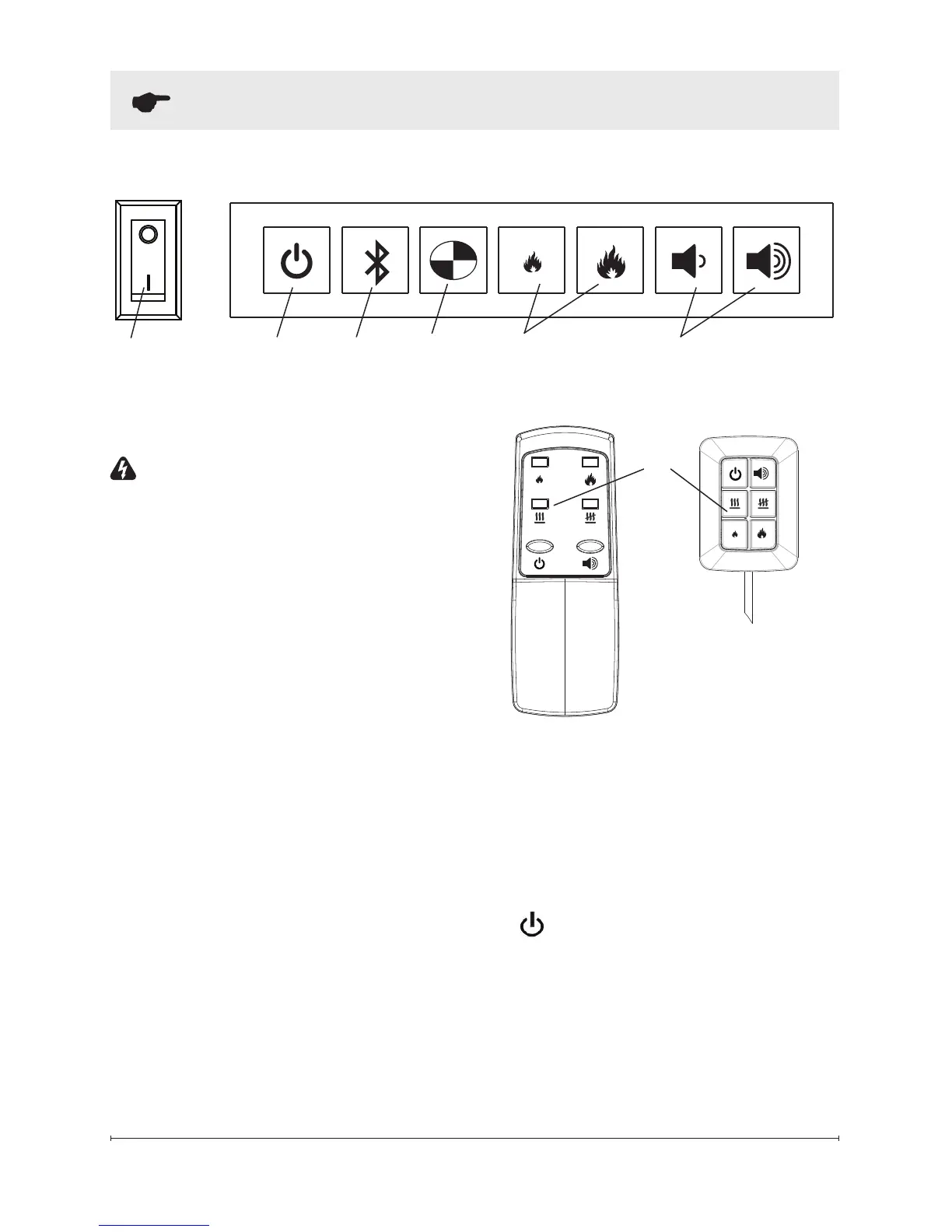
A. On/Off Switch
Supplies power to the unit.
B.
Standby
Turns ame effect on or puts the
unit into standby mode.
!
NOTE: When the unit is rst
turned on the lights will come on
and mist will appear 45 seconds
later.
B
A
C D
Figure 7
E F
Figure 8
Remote Control
Tethered
Controller






 To Next Page