13
1. Ensurethatpowerissuppliedthroughthe
mainservicepanel.
2. Accessthemanualcontrols,(removeglass
doorsorpullgrilldownifapplicable)pullthe
right side steel curtain to the outside of the
unit(ifapplicable).
3. Locatemanualcontrols.
4. Activatemainpowerswitch.
5. PressandholdtheONswitchmarked“
”
forve(5)seconds(redindicatorlightwill
ash).
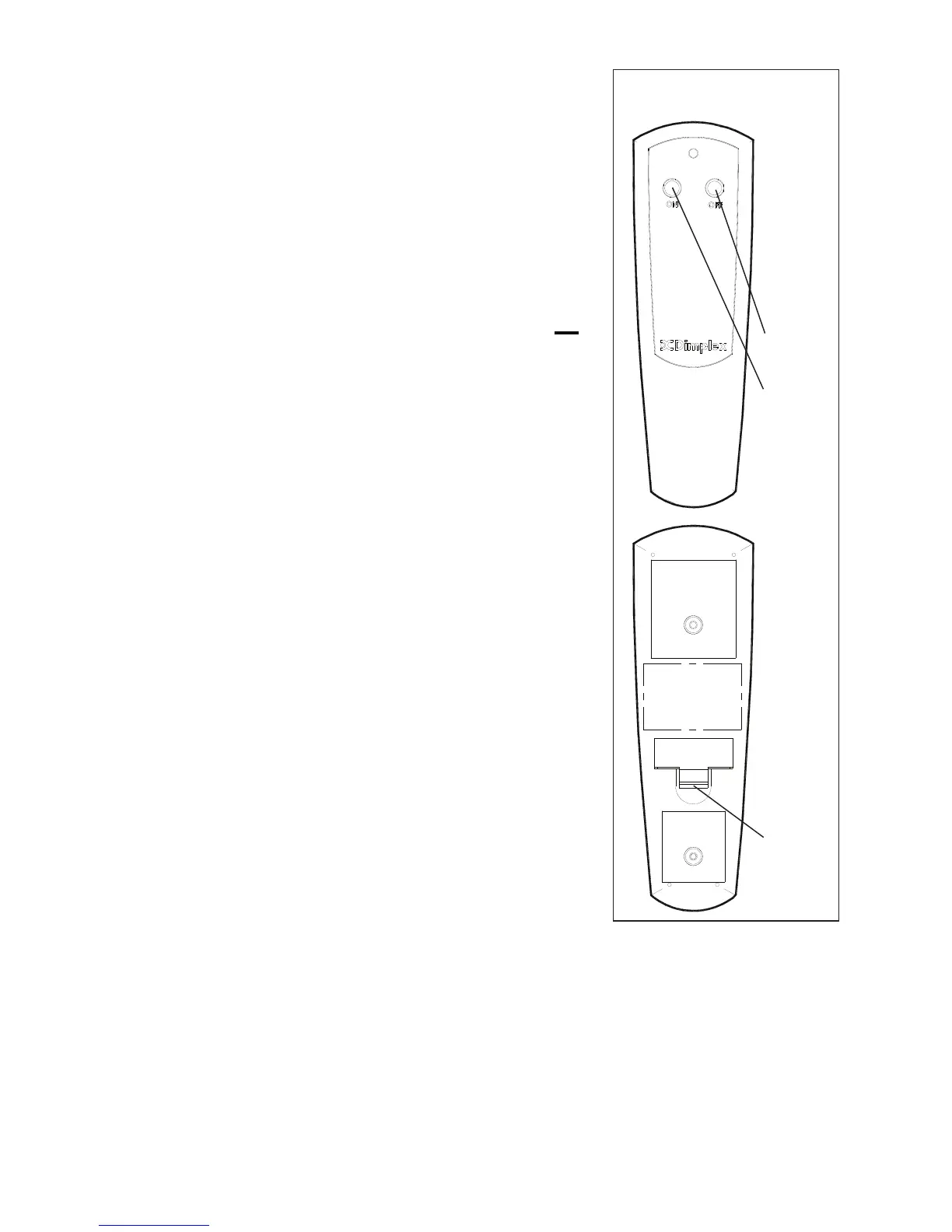
6. PresstheONbuttonlocatedontheremote
controltransmitter.
Thiswillsynchronizetheremotecontrol
transmitterandreceiver.
Remote Control Usage
Theremotecontroloperatesthereplacelevels
sequentially.Thelevelisincreasedeverytime
theONbuttononthetransmitterispressed.
Thereplacecanbeturnedoffatanypointby
pressingtheOFFbuttonontheremotecontrol
transmitter.
Level 1:Theameeffectisturnedonandthe
rstredindicatorlightilluminates.
Level 2:Theameeffectremainson,the
heaterisactivatedtothelowheatsetting,
andtherstandsecondredindicatorlights
illuminate.
Level 3:Theameeffectremainson,theheaterissettothehighheat
setting,andallthreeredindicatorsilluminate.
Battery Replacement (Figure6)
Toreplacethebattery:
1. Slidebatterycoveropenonthehandheldtransmitter.




 To Next Page