3
unit back on.
CAUTION: If you need to continuously reset the heater,
disconnect power and call Dimplex customer service at
1-888-DIMPLEX (1-888-346-7539).
Remote Control
The replace is supplied with a radio frequency remote
control. This remote control has a range of approximately
50 feet (15.25 m), it does not have to be pointed at the
replace and can pass through most obstacles (including
walls). It is supplied with one of hundreds of independent
frequencies to prevent interference with other units.
!
NOTE: Before attempting any operation with the
remote, pull the plastic insulator strip out from between
the remote casing and battery cover (Figure 2).
Remote Operation
The replace is supplied with an integrated on/off remote
control
!
NOTE: Ensure that the replace Main ON/OFF Switch
is set to the remote control setting.
To operate, push the ON button to turn replace on, push
the OFF button to turn the replace off.
Remote Control Initialization/Reprogramming
If the hand held transmitter or receiver board has been
replaced, follow these steps to initialize the transmitter and
receiver:
Set the main power switch to OFF.1.
Wait a minimum of ve (5) seconds and set the 3 2.
Position Switch to the position.
Within 10 seconds of re-acquiring power, press the ON 3.
button located on the remote control transmitter.
!
NOTE: You will have only 10 seconds to perform this
last step. Failure to do so will result in these steps needing
to be followed again.
This will synchronize the remote control transmitter and
receiver.
Battery Replacement
To replace the battery:
Slide battery cover open on the hand held transmitter 1.
(Figure 2).
Install one (1) 12-Volt (A23) battery in the battery 2.
holder.
Close the battery 3.
cover
Battery must
be recycled or
disposed of
properly. Check with
your Local Authority or
Retailer for recycling
advice in your area.
OPERATION
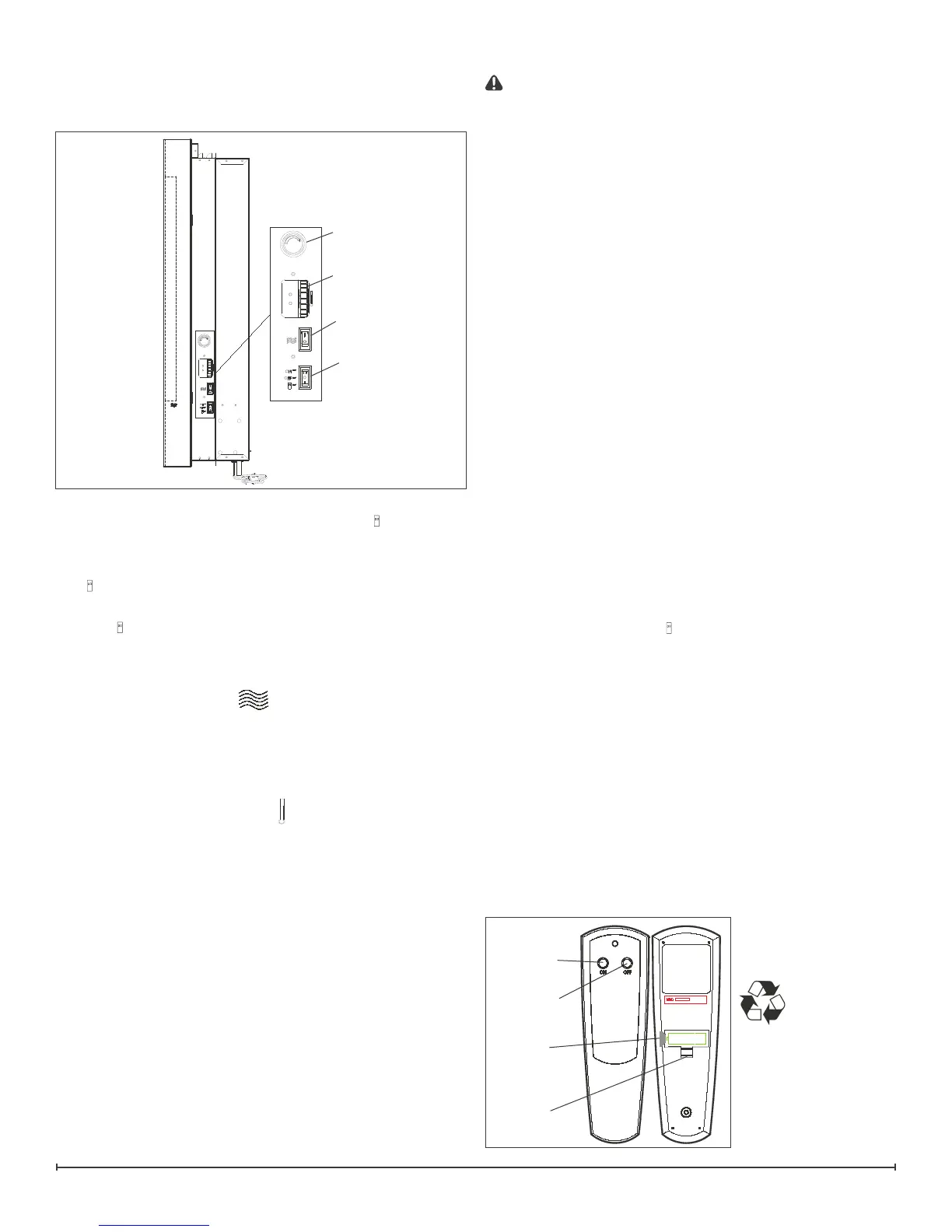
The controls are located on the right hand side of the
replace (Figure 1).
Figure 1
A. Main On/Off Switch
The switch has two ON positions marked with
and “ON”.
The “ON” position is for manual operation. In this position
the built-in remote control is by-passed.
The
position is for operating the unit with the provided
remote control.
When in
position the unit is operated with the ON and
OFF buttons of the remote control.
When the switch is in the center position the unit is off.
B. Heater On/Off Switch
The Heater On/Off Switch supplies power to the heater fan
and the heater element.
When the switch is in the ON position the heater operates if
the thermostat calls for heat.
C. Heater Thermostat Control
To adjust the temperature to your individual requirements,
turn the thermostat control upward all the way to turn on the
heater. When the room reaches the desired temperature,
turn the thermostat knob downward until you hear a click.
Leave in this position to maintain the room temperature at
this setting. For additional heat, turn upward until you hear
the click again and the heater will turn on.
D. Top Light Dimmer Control
The top Top Light Dimmer Control controls the brightness
of the top accent light that is used to illuminate the pebbles
Resetting The Temperature Cutoff Switch
Should the heater overheat, an automatic cut out will turn
the replace off and it will not come back on without being
reset. It can be reset by switching the Main On/Off Switch
to OFF and waiting ve (5) minutes before switching the
Figure 2
Off Button
On
Button
Battery
Cover
Plastic
Strip
D
C
B
A


 To Next Page