USER MANUAL 11
CLEANING CARPETS
USING YOUR STEAM CLEANER
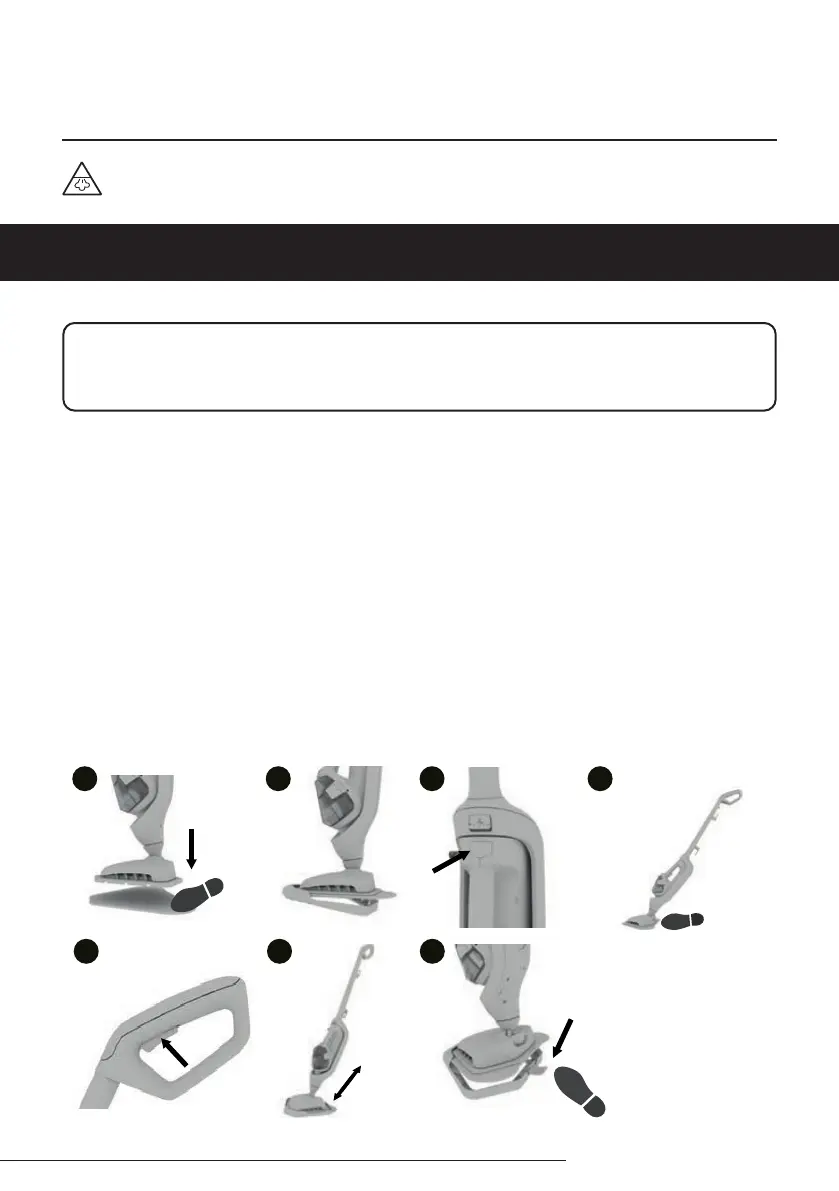
1. Place the microbre mop pad on the oor with the tab side facing up. Place the mop head onto the
microbre mop pad making sure the pad covers the entire mop head.
2. With the microbre mop pad attached, push the mop head into the front of the carpet glider. Then place
the back of the mop head into the clip. The carpet glider should only be used when refreshing carpets.
3. Plug the steam cleaner into the mains. The blue light will illuminate to indicate power on. The green light
will illuminate to indicate that the steam cleaner is ready to use.
4. Place your foot onto the mop head and pull the handle backwards to recline.
5. To produce steam, squeeze the trigger in short bursts. Don’t hold the trigger continuously to prevent
overwetting oors.
6. Move the steam cleaner slowly backwards and forwards across the carpet paying particular attention to
high trac areas. Squeeze/release trigger as required.
7. To release the carpet glider, place your foot on the clip and push down. Lift the steam cleaner to remove it.
Tip: If the area you are cleaning is becoming too wet, squeeze the trigger in short bursts.
1
2
1
4
5
1
3
1
1
6 7
WARNING: Danger of scalding
IMPORTANT: Never use the steam mop without a cleaning pad attached to the mop head. Never
leave the steam mop on one spot for an extended period of time or with a damp or wet microbre mop
pad attached as this may damage the oor surface.


 To Next Page