USER MANUAL 9
FILLING THE WATER TANK
USING YOUR STEAM
CLEANER
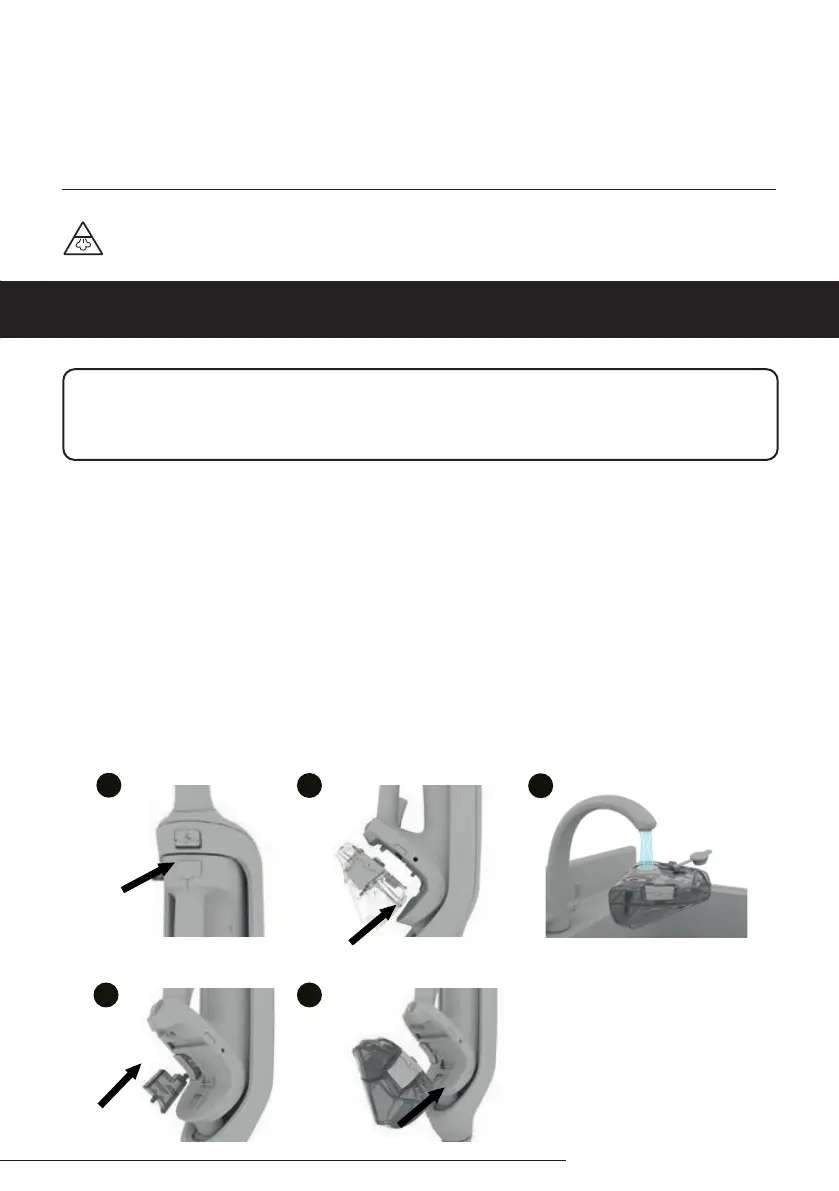
1. Ensure the steam cleaner is turned o.
2. Grip the handle, press the tank release buttons and pull the water tank to remove.
3. Pull the tab on the tank cap to open. Fill the tank with water. Replace the cap and push rmly to close.
4. Before replacing the water tank make sure the hard water lter, which is located behind the tank, is in
place.
5. Line up the water tank with the main body of the steam cleaner and push it until it clicks into place.
If the water tank is not tted correctly there will be a reduction in the amount of steam produced.
Your machine has been designed to be used with tap water. However, if you live in an area with hard water,
limescale build-up may occur. Therefore, to maintain the optimal performance of your steam cleaner, it is
recommended to use distilled, de-mineralised or ltered water. It is recommended that a descaler solution is
used after every 5 hours of usage to prevent limescale build-up.
IMPORTANT
Don’t overll the water tank. Don’t use the steam cleaner without water in the tank. Always top up with
water in good time.
1
2
1
4
5
1
3
1
1
WARNING: Danger of scalding


 To Next Page