DIRTDEVIL.CO.UK18
REPLACING THE HARD WATER FILTER
IMPORTANT: Don’t operate the steam cleaner without the hard water lter in place. The
condition of the lter aects the performance of your steam cleaner. Check and change the lter
periodically. Depending on water hardness and frequency of use, the lter should be changed every
2-3 months.
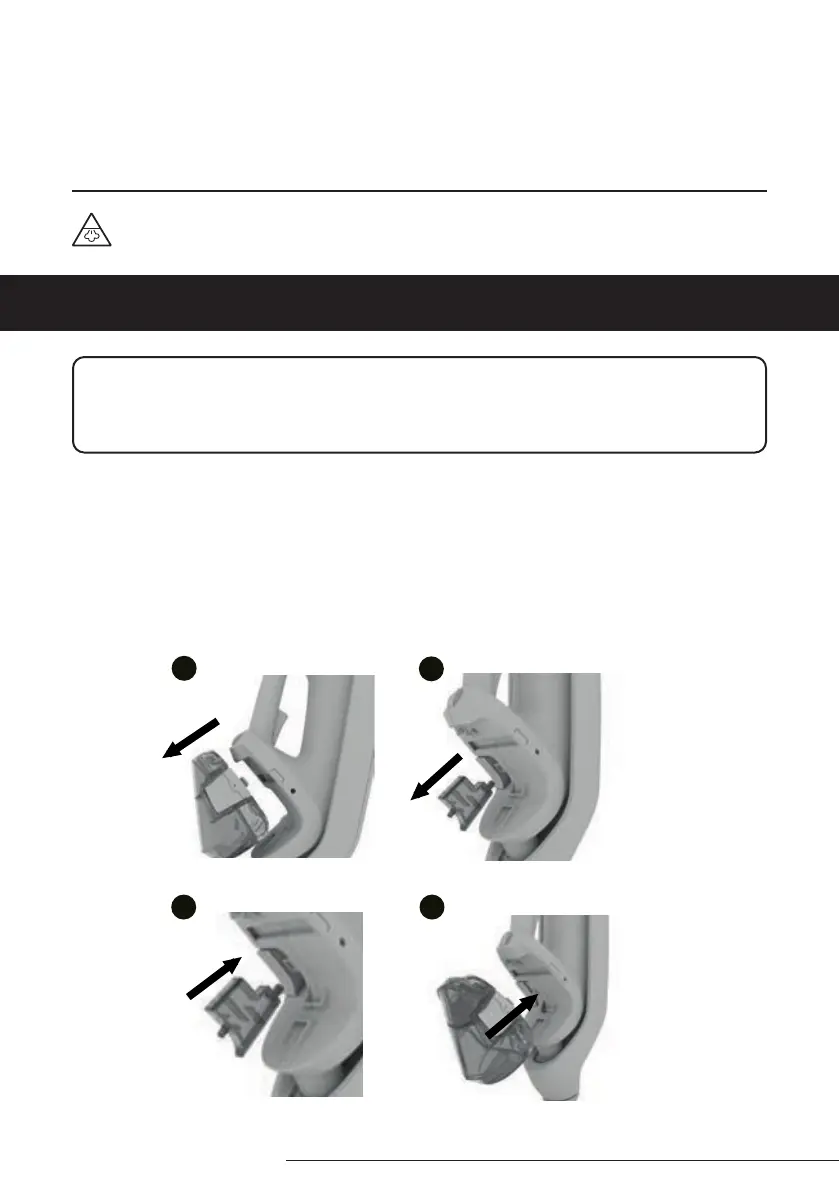
To replace the hard water lter:
1. Grip the water tank, press the tank release buttons and pull the tank to remove.
2. Pull to remove the hard water lter, located on the side, behind the water tank.
3. Insert the new hard water lter into the same place and position.
4. Replace the water tank back onto the steam cleaner.
Repeat the lter replacement process every 2-3 months
1
2
1
4
1
3
1
1
WARNING: Danger of scalding
MAINTAINING YOUR STEAM
CLEANER


 To Next Page