EasyManua.ls Logo

Dish Network Hopper Sling - Page 32

Dish Network Hopper Sling
143 pages
Print Icon
To Next Page IconTo Next Page
To Previous Page IconTo Previous Page
Loading...
22
Controlling Other Components
Chapter 2
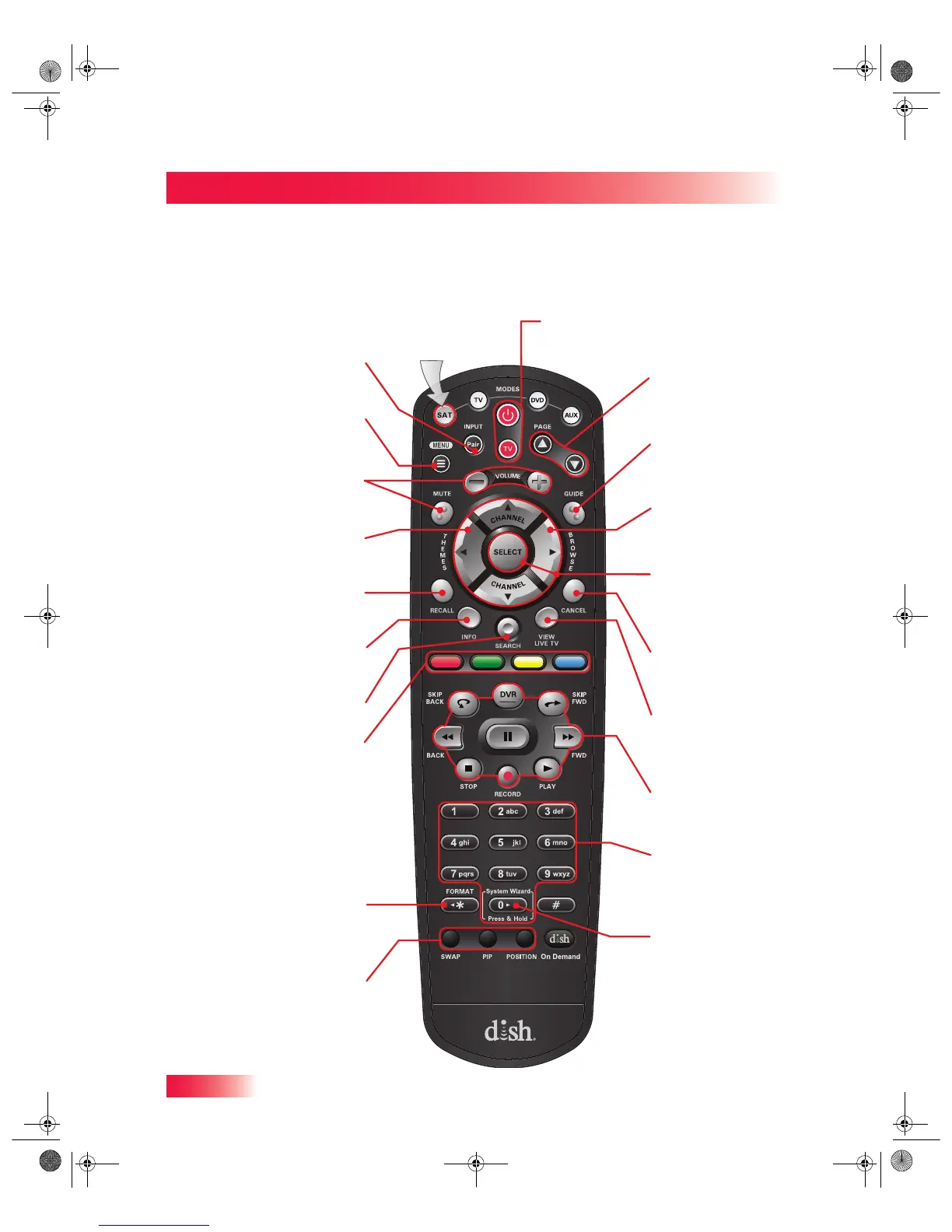
Remote Control Button Map
Press this
button for
SAT Mode
Menu
Access receiver
features and settings
Pair/Input
Access receiver
features and settings
Volume and
Mute Buttons
Control TV volume
Programming required
Themes
Search for programs
using Themes
Recall
Return to previously
viewed TV channel(s)
Info
Retrieve info on
programs or set a timer
Search
Search for a program
Colored Buttons
Provides shortcuts to
frequently used menus
Format
Format the picture to
the desired width to
match the program
you are viewing
PIP (Picture-In-
Picture) Buttons
Watch two separate
programs at the
same time (Hopper
only)
Power & TV Power
Top Button turns the receiver on/off
Bottom button turns the TV on/off
Guide
Display current and
future satellite progra
m
listings
Page Buttons
Page up/down in the
Program Guide and
event content
Browse
See what is on other
channels while
watching TV
Arrow/Select Button
s
Channel up/down,
navigate through
menus, and select a
desired option
Cancel
Return to previous
menu or to watch a
program
View Satellite
Programming
Exit out of any menu
o
the guide and return t
o
viewing live TV
Digital Video Record
e
(DVR) Buttons
Pause live TV and pla
y
or record programmin
g
Number Buttons
Enter a channel
number or navigate
through menus and
the program guide
System Wizard
Press and hold to go
to the backup and
restore screen
SAT Mode
913.book Page 22 Tuesday, January 15, 2013 4:57 PM

Table of Contents

Related product manuals