EasyManua.ls Logo

Dish Network Hopper Sling - Page 33

Dish Network Hopper Sling
143 pages
Print Icon
To Next Page IconTo Next Page
To Previous Page IconTo Previous Page
Loading...
Satellite Receiver
23
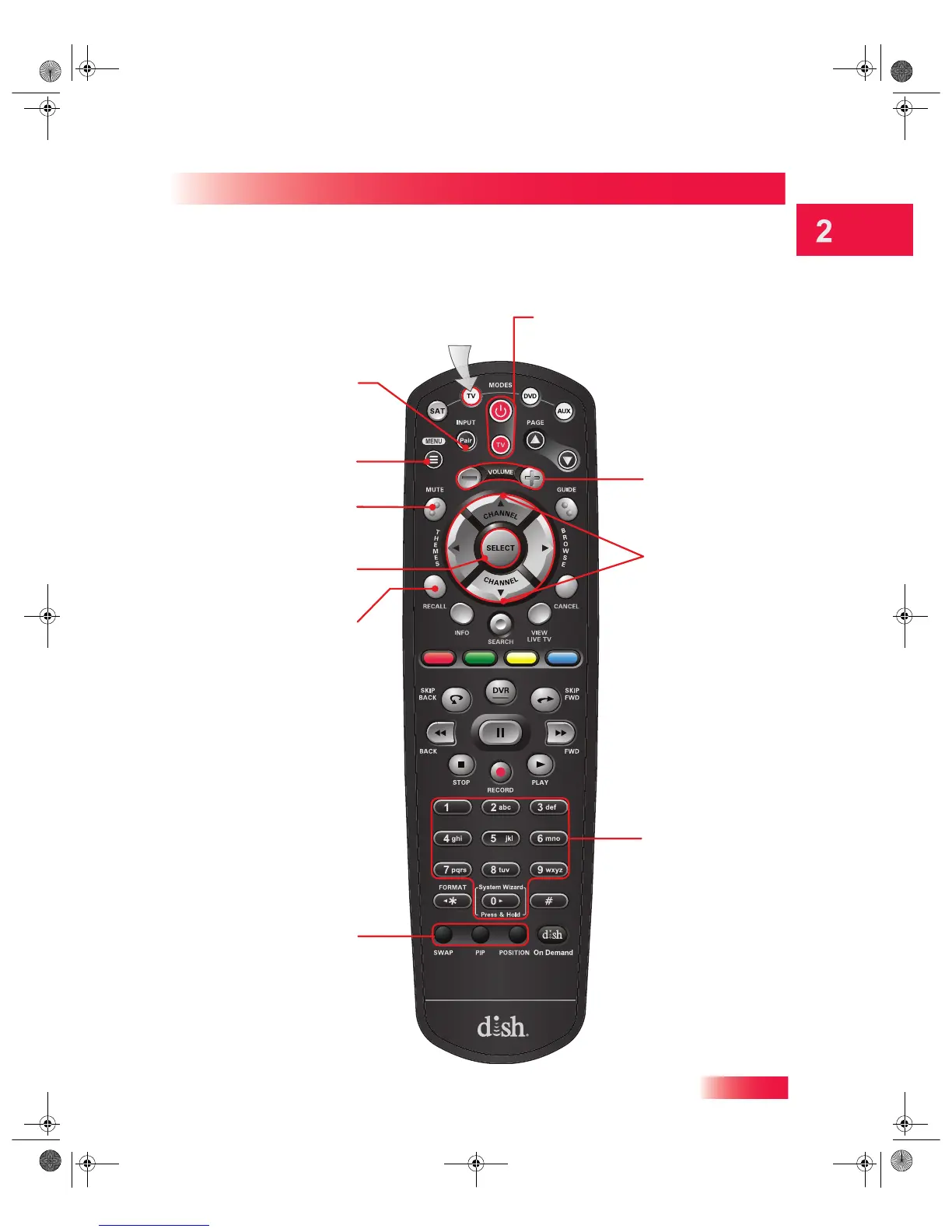
Controlling Other Components
Press this
button for
TV Mode
TV Menu
Access menu features
available on some TVs
Pair/Input
Switch between TV
inputs
(available only for certain
makes and models of TVs)
Mute
Turn TV volume
on or off
Recall
Return to the last
channel viewed
PIP (Picture-In-
Picture) Buttons
Watch two separate
programs at the
same time
(Note: May not be
available)
Power & TV Power
Top Button turns the TV on/off
Bottom button turns the TV on/off
Volume
Control TV volume
Up/Down Arrow
Buttons
Channel up/down on
the TV
Number Buttons
Enter a channel
number
Select Button
Select a program or
menu
TV Mode
913.book Page 23 Tuesday, January 15, 2013 4:57 PM

Table of Contents

Related product manuals