User manual in Original
Doc. ref: 500A_MC_am_en_210602
DISPERATOR AB Tel: 08-724 0160 E-mail: info@disperator.se
Mälarvägen 9, 141 71 Segeltorp Web page: www.disperator.se
28 / 44
8.3.2. Machine Starts but there is no Flushing Water
8.3. Trouble Shooting
8.3.1. Disposer Reduces Speed, Stops or does not Start
A humming sound might be heard from the disposer motor
1. Press the red stop buon (0).
2. Use the main electrical security breaker placed on the wall/bulkhead to disconnect electrical
supply. Lock the breaker with a padlock if you temporarily need to leave the machine before
step 11 below is completed.
3. Use protecve gloves. Open the protecve cover above the disposer inlet. Check if
something is jammed in the disposer grinding unit.
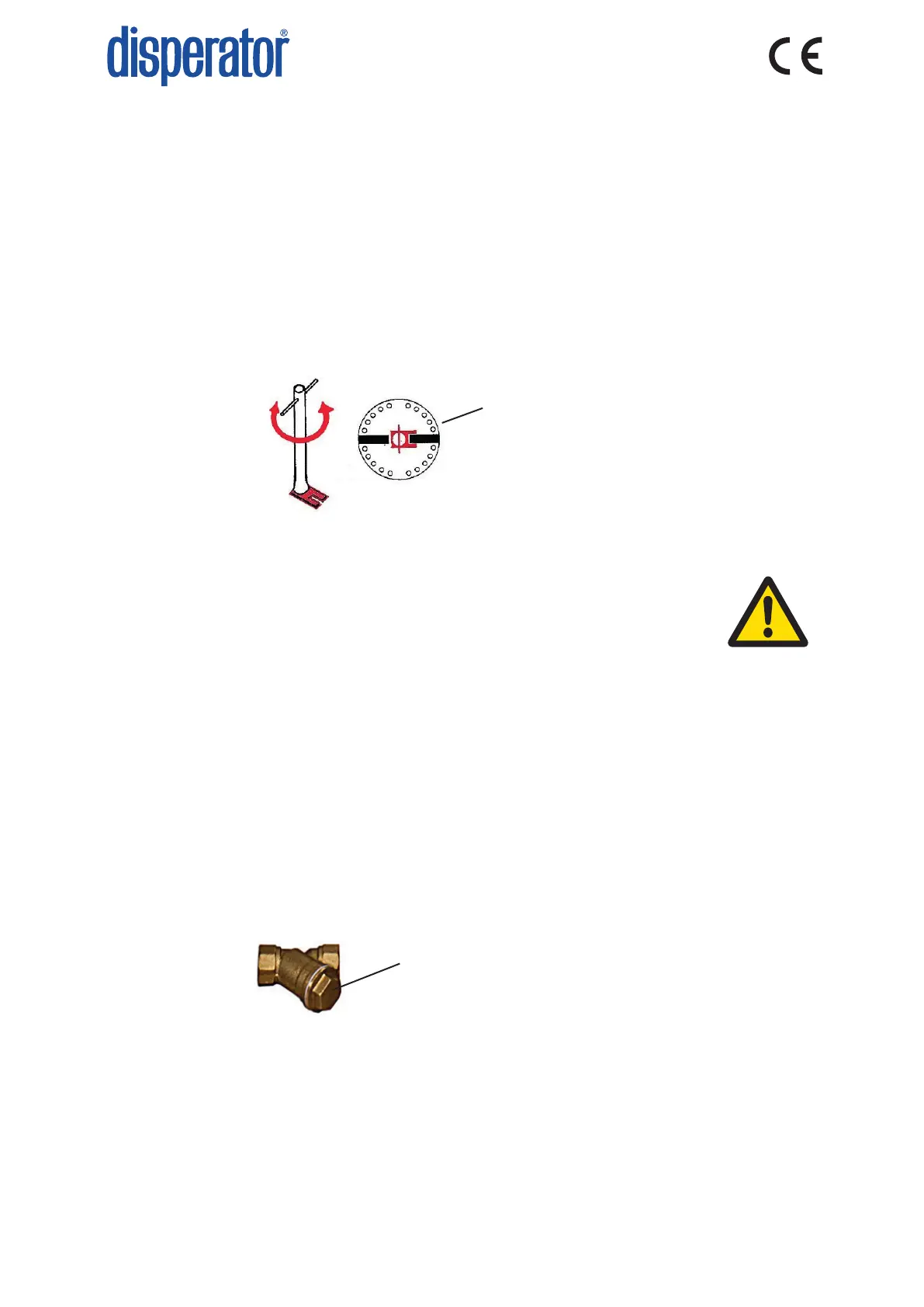
4. If something is jammed, place the jam release wrench on the center washer. The recess on
the lower plate of the wrench should grab one of the two bars on the disc of the grinding
unit, see picture below.
5. Release the disc of the grinding unit by rotang the wrench backwards and forwards unl
this shredder disc rotates freely a complete turn in both direcons. If needed, extend the bar
on the wrench and hit the bar with a hammer/rubber mallet.
6. Remove the jam release wrench.
7. Remove any non-grindable object from the disposer grinding unit, e.g.
cutlery.
8. Close the protecve cover above the disposer inlet, and make sure that
it is completely closed. Also make sure that the related interlock switch
connects.
9. Check wall fuses/automac breakers. Change/reset if needed.
10. Reset motor overload protector by pressing in the red buon (0) on the start & stop unit.
11. Connect the electrical supply on the main electrical security breaker placed on the wall/
bulkhead.
12. Press the green buon (1) to start and empty the machine.
13. Press the red buon (0) - the machine stops.
Grinder and jam release
wrench from above
1. Is the shut o valve in the water supply pipe open? If not, open this valve.
2. Is a clicking sound heard when acvang the solenoid valve (starng the machine)? If not,
change the coil.
3. Is the line strainer clogged? Turn o water supply, open nut on strainer and clean. Close nut
on strainer carefully without damaging the seal, and make sure it is ght when the machine
is restarted.
4. Have mer relay sengs been changed by mistake, or is mer out of order?
Open this nut in order to clean the line strainer
8.3.3. Machine does not Start and makes no Sound
1. Check that the protecve cover above the disposer inlet is in place and properly closed.
2. Check that the main electrical security breaker on the wall/bulkhead is in ON-posion.
3. Make sure the wall fuses / automac breakers are in order and switched on.
4. Check that the motor overload protector for the disposer is reset by pressing in the red
buon (0) on the start & stop unit.
If the fault cannot be remedied, please contact authorized service personnel or Disperator AB /
local representave. Always provide the machine’s serial number when contacng Disperator.



 To Next Page