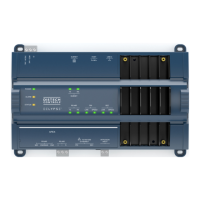
EC-BOS-6
AX
Mounting and Wiring Instructions
Revised: February 2008 Part Number: 05DI-HIBS6AX-10
Replacing the base assembly
Standard Replacement Parts
22
Standard Replacement Parts
Standard replacement parts are listed in Table 4 and can be ordered from stock without restriction. Standard
replacement parts cannot be returned for credit and should be disposed of in an appropriate manner.
Note Screws used for the EC-BOS-6
AX
are standard #6-32 x 3/8" types, which you can obtain locally if lost.
New Replacement Units
To replace a faulty unit, order and install a new EC-BOS-6
AX
—please note that EC-BOS
AX
series products do
not have special “field replacement units,” or FRUs, with separate part numbers.
If the faulty EC-BOS-6
AX
is still in warranty, you can receive credit by returning it to Distech Controls. Be sure
to contact Distech Controls for a return authorization (RMA) number before shipping an item for return credit.
See “Federal Communications Commission (FCC),” page 24, for more details.
Note Before ordering a new EC-BOS-6
AX
, it is strongly recommended that you contact your normal technical
support resource to eliminate the possibility of a software issue or mis-configuration problem.
Replacing the base assembly
Caution Before handling circuit boards, discharge any accumulated static by touching the metal surface of
the EC-BOS-6
AX
. For details, see the “Static Discharge Precautions” section on page 4.
To replace the EC-BOS-6
AX
base assembly in the field, proceed as follows:
Procedure 6 Replacing a EC-BOS-6
AX
base assembly.
Step 1
Using the appropriate Niagara
AX
software tool, back up the EC-BOS
AX
’s configuration to your PC.
Step 2
Remove power to the EC-BOS-6
AX
. The unit should power down automatically.
Note If I/O accessory modules are installed and any I/O points have voltage, turn the devices off or
disconnect power to them.
Step 3
Note positions of all communications and other wiring cables going to the EC-BOS-6
AX
, as well as all
installed accessory modules (if they must be removed). If necessary, label connectors and accessory
modules to avoid mis-connection later, after EC-BOS-6
AX
is replaced.
Table 4 Standard replacement parts.
Part Number
Part NumberPart Number
Part Number Description
DescriptionDescription
Description
10499 NiMH Battery Pack (with battery bracket)—see “Replacing the Battery,” page 20
10027 RS-485 connector plug, 3-position


 To Next Page