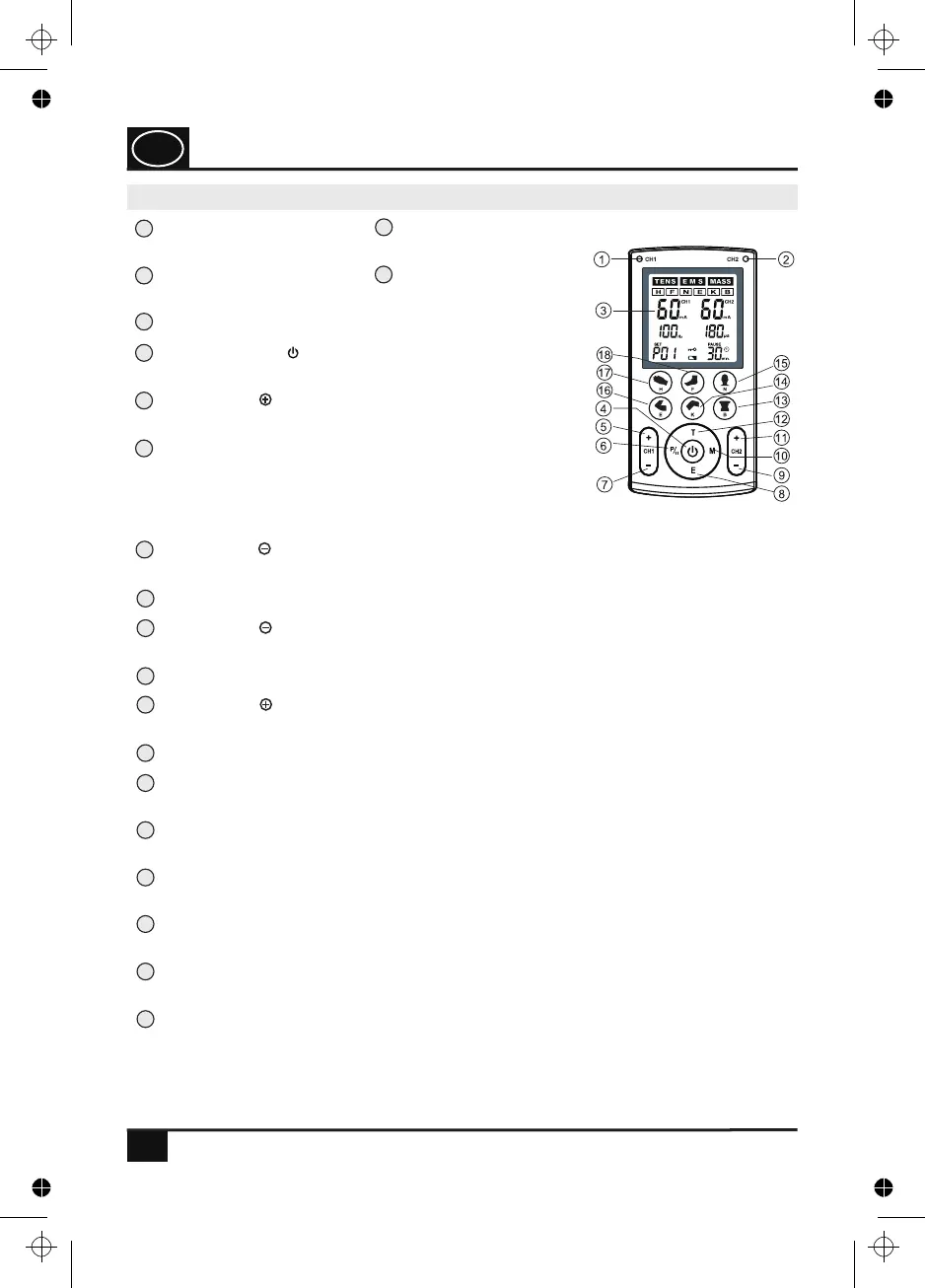
Key (CH2 ) for increasing the output intensity for channel CH2
.
and for
increasing the set values for Hz, µs and min. in the setting mode
Key (CH2 ) for reducing the output intensity for channel CH2 and for reducing
the set values for Hz, µs and min. in the setting mode.
Key (CH1 ) for reducing the output intensity for channel CH1 and for switching
between Hz, .µs and min. in the setting mode
Key (CH1 ) for increasing the output intensity for
channel CH1.
ON/OFF key ( ) for switching on/off the device and
for saving the settings.
1
2
3
4
5
6
7
8
9
10
11
12
15
17
14
13
16
18
14
1
2
Key (F) for selecting 3 pre-programmed programmes and 1 adjustable
programme for the foot.
Key (H) for selecting 3 pre-programmed programmes and 1 adjustable
programme for the hand.
Key (E) for selecting 3 pre-programmed programmes and 1 adjustable
programme for the elbow joint.
Key (N) for selecting 3 pre-programmed programmes and 1 adjustable
programme for the neck.
Key (K) for selecting 3 pre-programmed programmes and 1 adjustable
programme for the knee joint.
Key (B) for selecting 3 pre-programmed programmes and 1 adjustable
programme for the back.
Key (T) for selecting a TENS programme.
Key (M) for selecting a massage programme.
Key (E) for selecting an EMS programme.
Key (P/II): Press this key in the standby mode in
order to select a programme. In order to reach the
setting mode, you must press and hold the key for
several seconds. Press the key during the application
if you wish to pause.
LCD display indicates the current operating status.
The yellow indicator light for channel 2 (CH2)
lights up if the latter is activated.
The yellow indicator light for channel 1 (CH1)
lights up if the latter is activated.
9.0 Designation and functionality of the TENS/EMS device
OVERVIEW OF DEVICE FUNCTIONS
GB
4. PJN157-14_GA-GB_HHD_TEN250_31.03.14
Montag, 31. Mrz 2014 12:10:41


 To Next Page