11.0 Application instructions
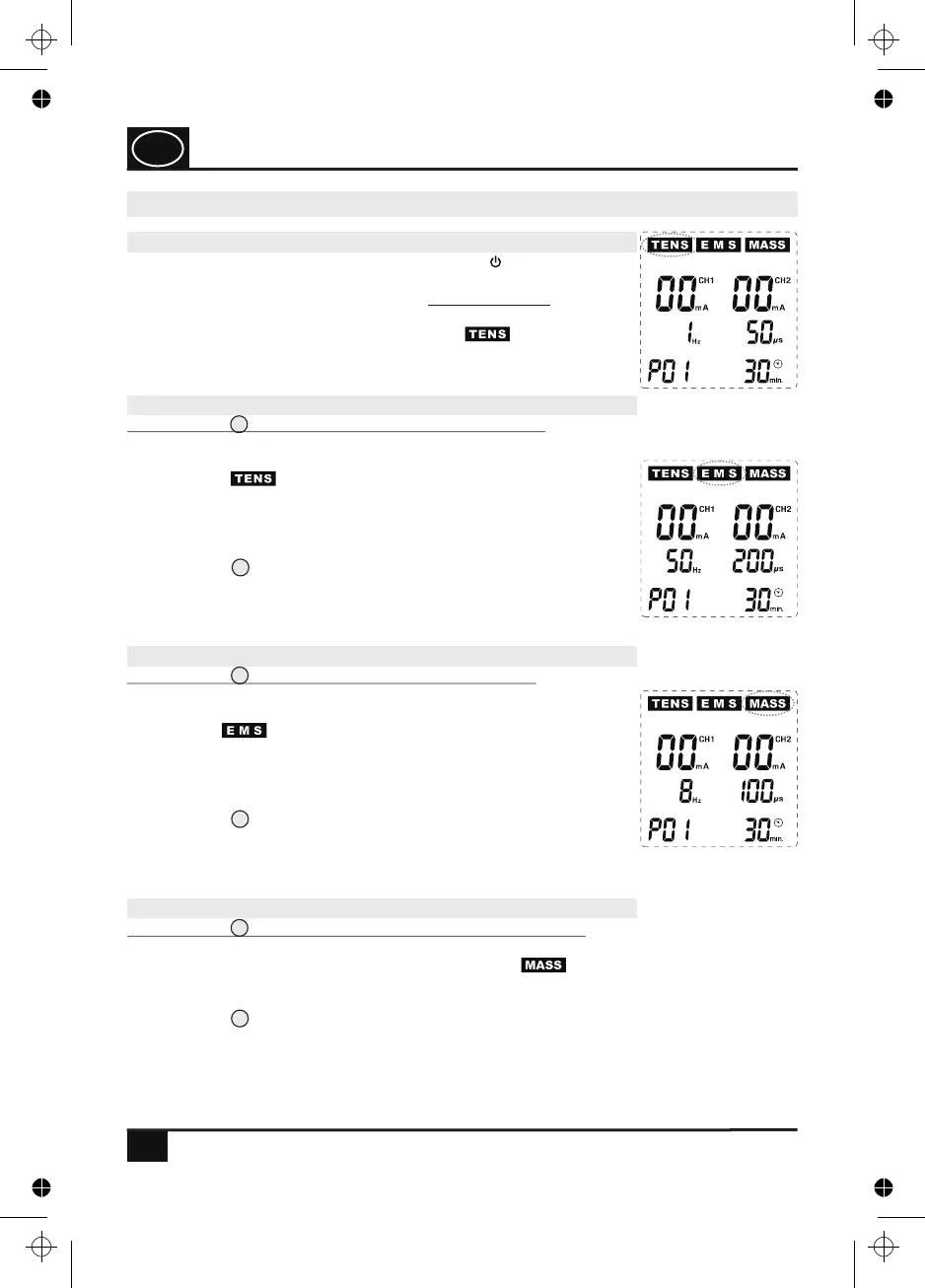
Fig. 5
12
8
10
6
6
6
Fig. 6
Fig. 7
16
11.0 Application instructions11.0 Application instructions11.0 Application instructions11.0 Application instructions
USAGE
11.1 Switching on the device
In order to switch on the device, press the key ( ). The blue
display backlighting switches on and the device is now run in the
basic mode. If you switch on the device for the first time, the
display information corresponds to Fig. 5: The device is now run in
the programme 1 (P01) of the TENS mode ( flashes). If you
have already used the device, the programme used last before the
device has been switched off is shown.
11.2 Programme setting TENS mode
Press the key (T) in order to select the TENS mode. The TENS
mode is activated and information, as shown in Fig. 5, appears on
the display: The device is now run in programme 1 (P01) of the
TENS mode ( flashes at the top on the left of the display).
In the TENS mode, there are a total of 12 programmes (7 pre-
programmed programmes P01 - P07 as well as 5 individual
programmes U1 - U5 whose parameters can be set by the users
themselves (see programme tables, page 22). In the TENS mode,
press the key (P/II) repeatedly in order to first call the
programmes P01 - P07 one after the other and then the
programmes U1 - U5. After programme U5, the programme order
starts from the beginning with P01, P02 etc.
11.3 Programme setting EMS mode
Press the key (E) in order to select the EMS mode. The EMS
mode is activated and information, as shown in Fig. 6, appears on
the display: The device is now run in programme 1 (P01) of the
EMS mode ( flashes at the top in the middle of the display).
In the EMS mode, there are a total of 20 programmes (11 pre-
programmed programmes P01 - P11 as well as 9 individual
programmes U1 - U9 whose parameters can be set by the users
themselves (see programme tables, page 23). In the EMS mode,
press the key (P/II) repeatedly in order to first call the
programmes P01 - P11 one after the other and then the
programmes U1 - U9. After programme U9, the programme order
starts from the beginning with P01, P02 etc.
11.4 Programme setting MASSAGE mode
Press the key (M) in order to select the MASSAGE mode. The MASSAGE mode is
activated and information, as shown in Fig. 7, appears on the display: The device is now
run in programme 1 (P01) of the MASSAGE mode ( flashes at the top on the right
of the display). In the MASSAGE mode, there are 10 programmes P01 - P10 (see
programme table, page 24 - 25) which are all pre-programmed. In the MASSAGE mode,
press the key (P/II) repeatedly in order to first call the programmes P01 - P10.
After programme P10, the programme order starts from the beginning with P01, P02
etc.
GB
4. PJN157-14_GA-GB_HHD_TEN250_31.03.14
Montag, 31. Mrz 2014 12:10:42


 To Next Page