
EasyManua.ls Logo

Dittmann TEN 250 - User Manual

Dittmann TEN 250
40 pages
Print Icon
To Next Page IconTo Next Page
Loading...
Version 2, 2014-03
TEN 250
1
0123
Nerve and muscle stimulation effected with the aid of
stimulation current
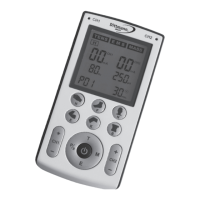
2 channels with LED display for each channel
Blue display backlighting
7 pre-programmed + 5 adjustable application
programmes for TENS nerve stimulation
11 pre-programmed + 9 adjustable application
programmes for EMS muscle stimulation
10 pre-programmed massage programmes
18 pre-programmed + 6 adjustable special programmes
for 6 different parts of the body
Adjustable intensity (for adjustable application
programmes, also frequency, pulse duration and
application time)
Contains: 1 TENS/EMS device TEN 250, 8 adhesive
electrodes, 1 instruction manual, 2 connecting cables,
4 x 1.5 V AAA batteries
Incl. belt clip
Warranty: 24 months
INSTRUCTION MANUAL
TENS/EMS DEVICE TEN 250
GB
4. PJN157-14_GA-GB_HHD_TEN250_31.03.14
Montag, 31. M󾾠rz 2014 12:10:40

Table of Contents

Questions and Answers

  • J
    John RodriguezAug 2, 2025
    What to do if the intensity increases on Dittmann TEN 250 Fitness Equipment?
    • K
      Kayla BarnesAug 2, 2025
      If the intensity of the stimulation current increases even at a low intensity level on your Dittmann Fitness Equipment, it could be due to the adhesive electrodes not being fully applied to the skin. Make sure to firmly press the adhesive electrodes to the skin surface. Alternatively, the adhesive electrodes might be worn out and need replacement.
  • T
    Todd HansenAug 7, 2025
    Why does my Dittmann TEN 250 Fitness Equipment stop working?
    • D
      dianamorrisAug 7, 2025
      If your Dittmann Fitness Equipment stops during use, the batteries may not be providing enough power. Replace them with full batteries, ensuring you observe the correct polarity. Alternatively, there might be a malfunction of the electronic system. Try removing the batteries and re-inserting them after approximately 3 seconds.
  • M
    michaelpattonAug 12, 2025
    How to fix a blank display on Dittmann Fitness Equipment?
    • M
      michaelbrownAug 12, 2025
      If you've inserted batteries into your Dittmann Fitness Equipment but the display shows no information, there might be foreign particles in the battery compartment. Remove any foreign particles and replace the batteries with full ones, ensuring correct polarity. Another cause could be a malfunction of the electronic system. In that case, remove the batteries and re-insert them after about 3 seconds.
  • J
    James GriffinAug 17, 2025
    What to do if Dittmann TEN 250 Fitness Equipment stimulation is weak?
    • H
      Heather CraneAug 17, 2025
      If you feel little stimulation on the adhesive electrodes of your Dittmann Fitness Equipment, despite setting an intensity level, the batteries might not have sufficient power. Replace them with new ones, ensuring correct polarity. Another reason could be impurity of the skin surface; try cleaning it. Also, if the entire adhesive surface of the electrodes is worn out, you will need to replace them with new electrodes.
  • T
    Tabitha EstesAug 22, 2025
    How to troubleshoot current pulses on Dittmann Fitness Equipment?
    • A
      Amber RogersAug 22, 2025
      If the display of your Dittmann Fitness Equipment is working, but the adhesive electrodes aren't transferring any current pulses, the plug connections of the cables might be incorrectly mounted. Check the plug connection on both the device and the adhesive electrodes to ensure they are tight.
  • M
    Michael MasonAug 27, 2025
    What to do if Dittmann TEN 250 causes skin irritation?
    • K
      Krista MejiaAug 27, 2025
      If your skin surface shows changes or is reddened after using Dittmann Fitness Equipment, these changes might be caused by the adhesive electrodes. You should immediately stop the application and consult your doctor.

Summary

Definition of Symbols and Basic Information

Basic Information

Provides fundamental details about the device and therapy.

Characteristics of a TENS;EMS Device

Details the core features and function of the electro-stimulation device.

Information Concerning TENS;EMS Therapy

Explains the principles and application of TENS and EMS therapy.

Safety Instructions

General Safety Instructions

Covers essential safety guidelines and general precautions for device operation.

Usage;Environment Suited for Device

Defines appropriate conditions and settings for using the TENS/EMS device.

Usage;Environment Not Suited for Device

Specifies conditions and environments where the device should not be used.

Applications Suited for the Device

Details the intended uses and therapeutic applications of the TENS/EMS device.

Applications Not Suited for the Device

Lists specific medical conditions and contraindications for using the TENS/EMS device.

Usage by Children and Adolescents

Provides safety guidelines regarding the use of the device by minors.

Usage of the TENS;EMS Device

Details the correct procedures for applying and using the TENS/EMS device.

Adhesive Electrode Placement

Areas Where Adhesive Electrodes May Be Applied

Explains optimal placement of electrodes for effective TENS therapy.

Areas Where Adhesive Electrodes Must Not Be Used

Lists body areas where electrode application is prohibited due to safety risks.

Storage and Maintenance

Storage; Maintenance of the TENS;EMS Device

Provides instructions on storing and maintaining the TENS/EMS device.

Cleaning and Care of the TENS;EMS Device

Details the proper cleaning procedures for the device and electrodes.

Scope of Delivery and Contents

Device Disposal and Battery Management

Disposal of the TENS;EMS Device

Instructions for the proper disposal and recycling of the TENS/EMS device.

Battery Change and Information

Guides on how to replace batteries and important battery information.

LCD Display Explanation

Device Functions Overview

Quick Overview for Commissioning

Application Instructions

Switching on the Device

Step-by-step guide to powering on the TENS/EMS device.

Programme Setting: TENS Mode

Instructions for selecting and setting TENS programmes.

Programme Setting: EMS Mode

Instructions for selecting and setting EMS programmes.

Programme Setting: MASSAGE Mode

Instructions for selecting and setting Massage programmes.

Special Programmes for Body Parts

Explains how to select and use specialized programmes for specific body areas.

Starting Application and Setting Intensity

Guides on initiating therapy and adjusting the stimulation intensity.

Automatic Keylock Function

Describes the automatic keylock function and how to deactivate it.

Weak Battery Warning Symbol

Explains the low battery warning indicator and battery replacement.

Pause Mode and Switching Off

Instructions on pausing therapy and turning off the device.

Mode Settings and User Programmes

Application Instructions and Mode Settings

Details on general application procedures and mode configuration.

Adjustable User Programmes

Information on the device's 5 TENS and 9 EMS adjustable user programmes.

Calling Adjustable Programmes

Steps to select and access the user-defined programmes.

Setting Mode for U Programmes

Explains how to enter the setting mode for user programmes (U programmes).

Selecting and Setting Parameters

Guides on adjusting pulse frequency, duration, and application time.

Deleting Settings

Instructions for resetting adjustable programmes to factory default settings.

Switching Off the Device

Details methods for safely powering down the TENS/EMS device.

Use of Accessories

Lists compatible accessories and their usage with special programmes.

Application Programmes Overview

TENS Application Programmes

Overview of pre-programmed and adjustable TENS therapy programmes.

Pre-programmed TENS Programmes (P01-P07)

Details of the 7 pre-programmed TENS programmes (P01-P07).

Adjustable TENS Programmes (U1-U5)

Details of the 5 adjustable TENS programmes (U1-U5) with their ranges.

EMS Application Programmes

EMS Application Programmes

Overview of pre-programmed and adjustable EMS therapy programmes.

Pre-programmed EMS Programmes (P01-P11)

Details of the 11 pre-programmed EMS programmes (P01-P11).

Adjustable EMS Programmes (U1-U9)

Details of the 9 adjustable EMS programmes (U1-U9) with their ranges.

Massage Application Programmes

Programmed Massage Application Programmes (P01-P10)

Details of the 10 programmed massage programmes (P01-P10).

Special Application Programmes for Body Parts

Pre-programmed Applications for 6 Body Parts

Details of pre-programmed applications for Hand, Foot, Neck, Elbow, Knee, and Back.

Adjustable Applications for 6 Body Parts

Details of adjustable programmes for specific body areas with parameter ranges.

Information on Adhesive Electrode Positioning

Electrode Positioning for TENS Therapy

Electrode Positioning for EMS Therapy

Malfunctions and Troubleshooting

Electromagnetic Immunity Information

Technical Specifications, Symbols, and Pictograms

Terms of Warranty

Dittmann TEN 250 Specifications

General IconGeneral
BrandDittmann
ModelTEN 250
CategoryFitness Equipment
LanguageEnglish