11
17
15
17
14
13
16
18
5
11
5
1
2
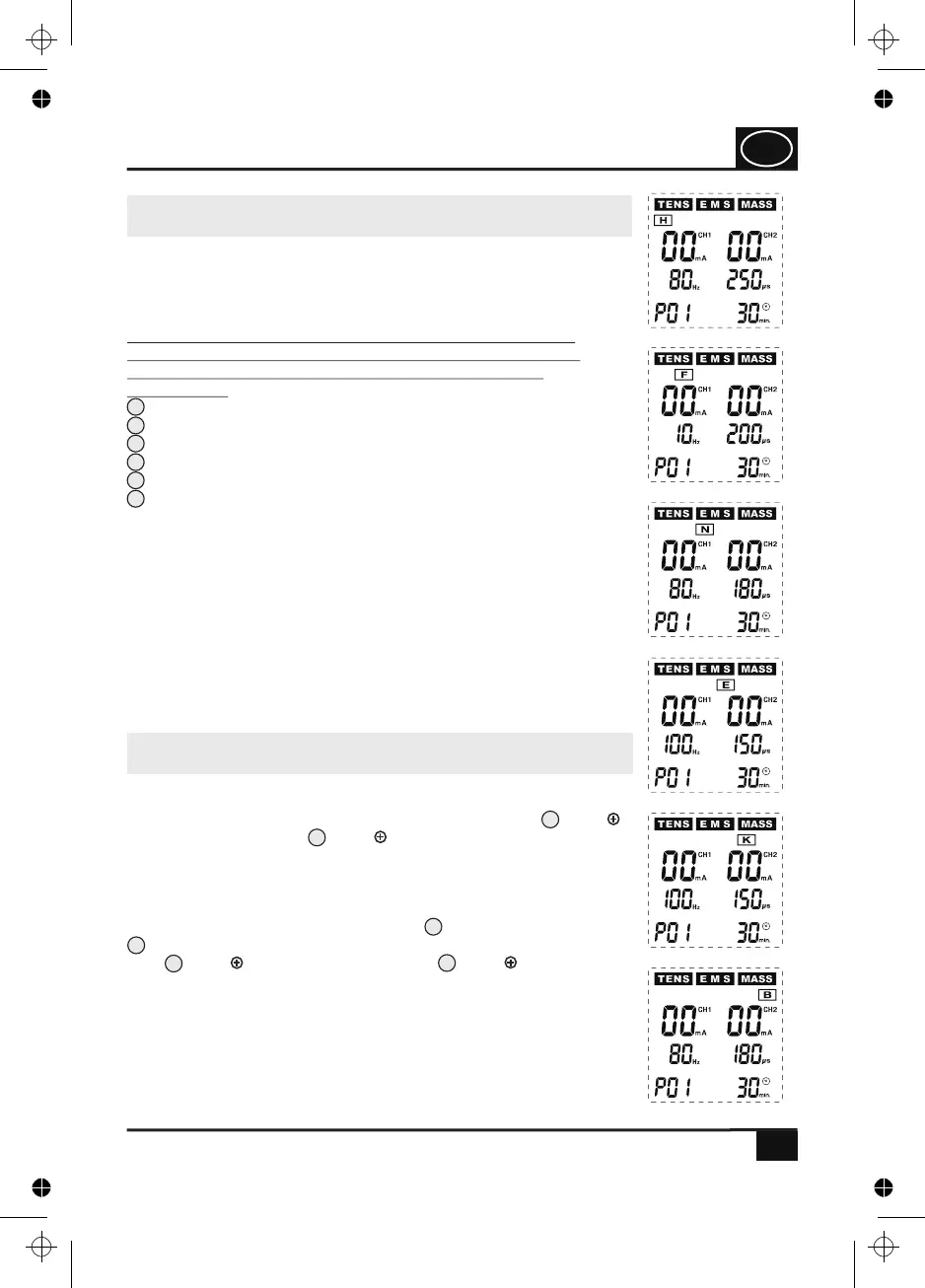
Fig. 8
Fig. 9
Fig. 10
Fig. 11
Fig. 12
Fig. 13
Each of these 6 areas (H) (F) (N) (E) (K) (B) has 3 pre-
programmed therapy programmes as well as one therapy
programme that can be set by the users themselves. By pressing
the respective one-touch key, the therapy programme P01 is
switched on first. By pressing the key again, the next therapy
programme is called. If the four therapy programmes are run
through, the programme order starts from the beginning (P01 >
P02 > P03 > U1 > P01 etc.).
11.5 Programme setting of the special pro-
grammes for six different parts of the body
In addition to the TENS, EMS and massage programmes, the
device is also equipped with 24 special programmes for six
different parts of the body. One-touch keys facilitate the
selection and settings of these special programmes (see also
page 26).
By pressing one of these one-touch keys (H) (F) (N) (E)
(K) (B) for selecting special programmes for different parts
of the body, you can directly select the following special
programmes:
(H): Special programmes for the hand (see Fig. 8)
(F): Special programmes for the foot (see Fig. 9)
(N): Special programmes for the neck (see Fig. 10)
(E): Special programmes for the elbow joint (see. Fig. 11)
(K): Special programmes for the knee joint (see Fig. 12)
(B): Special programmes for the back (see Fig. 13)
After one of these keys has been pressed, information with the
corresponding letter appears on the display (e. g. H if the key (H)
was pressed), as shown in Fig. 8.
USAGE
11.6 Starting the application / setting the
intensity
If you have selected a programme and wish to start with the
application, you must increase the output intensity for one or two
channels from 0 to the desired value by using the keys (CH1 )
for channel CH1 and/or (CH2 ) for channel CH2. If one or two
channels have been activated by this setting of a certain output
intensity (from 1 mA to a maximum of 90 mA), the pulse inten-
sity in mA for the respective channel or for the two channels is
shown on the display and the pulse output is, in addition to this,
confirmed by the yellow indicator lights for channel CH1 and/or
for channel CH2 lighting up. Every time you press one of the
keys (CH1 ) for channel CH1 and/or (CH2 ) for channel
CH2, the displayed value is increased by 1 mA (milliampere) whilst
an acoustic signal is generated. If you press and hold one of these
keys for several seconds, a quick continuous increase of the output
intensity by 10 mA is started, whereas each increase by 1 mA
(milliampere) is confirmed by an acoustic signal. If you release the
respective key, the output intensity remains set to the currently
reached value.
GB
4. PJN157-14_GA-GB_HHD_TEN250_31.03.14
Montag, 31. Mrz 2014 12:10:42


 To Next Page