34
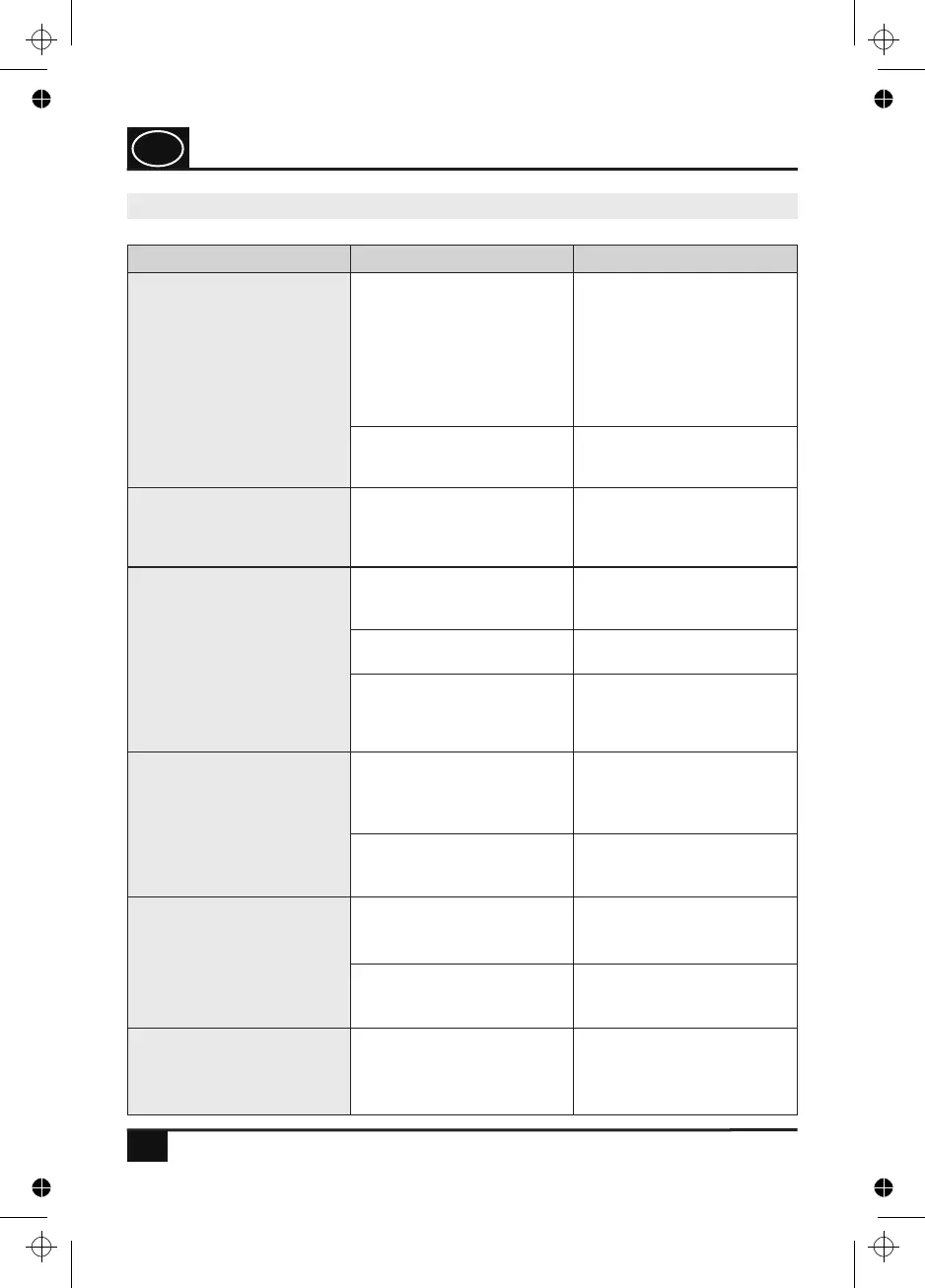
TECHNICAL PROBLEMS
The batteries have been
inserted, but no information
is shown on the display.
There might be foreign
particles in the battery
compartment. Ensure that
the batteries are full and
have been inserted with the
correct polarity.
Check whether the battery
contacts fit closely.
If there are any foreign
particles, they must be
removed.
Replace the empty batteries
by full batteries. Observe the
correct polarity.
There is a malfunction of the
electronic system.
Remove the batteries and
re-insert them after approx.
3 seconds.
The display is working, but
the adhesive electrodes do
not transfer any current
pulses.
The plug connections of the
cables have been mounted
incorrectly.
Check the plug connection
on the device and on the
adhesive electrodes for
tightness.
On the device, an intensity
level has been set; however,
only little stimulation is felt
on the adhesive electrodes.
The batteries did not have
sufficient power.
Replace the empty batteries
by full batteries. Observe the
correct polarity.
Impurity of the skin surface.
The entire adhesive surface
of the electrodes does no
longer have any adhesive
effect and is worn out.
The adhesive electrodes
must be replaced by new
electrodes.
The intensity of the
stimulation current
increases, although a low
intensity level has been set.
The adhesive electrodes
have not been applied
completely on the skin
surface.
Press the adhesive
electrodes firmly to the skin
surface.
The adhesive electrodes
stick only partially to the
skin surface.
The adhesive electrodes are
worn out and must be
replaced by new electrodes.
The device stops while being
used.
The batteries do no longer
provide sufficient power.
Replace the empty batteries
by full batteries. Observe the
correct polarity.
There is a malfunction of the
electronic system.
Remove the batteries and
re-insert them after approx.
3 seconds.
The skin surface shows
changes or is reddened.
The changes to the skin
might have been caused by
the adhesive electrodes.
Immediately stop the
application and consult your
doctor.
20.0 Malfunctions, troubleshooting
GB
4. PJN157-14_GA-GB_HHD_TEN250_31.03.14
Montag, 31. Mrz 2014 12:10:44


 To Next Page