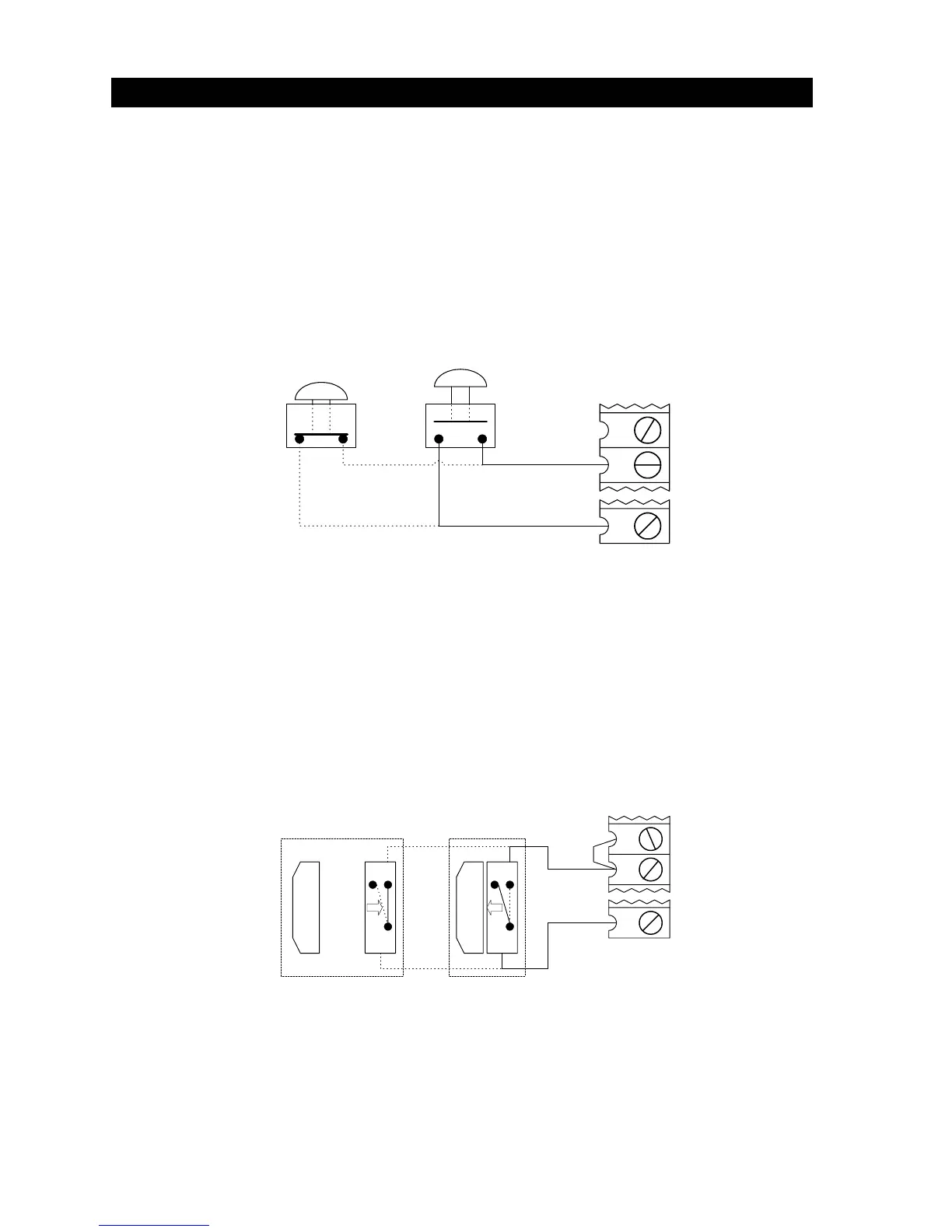
2.6.1 ALARM RESET SWITCH
The gate operator is equipped with a reset switch that will silence the entrapment alarm and return
the operator to normal operation after a hard shutdown occurs. An auxiliary reset button may be
added provided that the following condition is met.
• The alarm-reset button must be located in the line of sight of the gate.
• Connect the normally open alarm-reset switch to auxiliary terminals 11 and 18.
10
11
18
NORMAL
OPERATION
OPERATOR
RESET
AUXILIARY ALARM RESET
PUSH BUTTON
Fi
ure 30
2.6.2 AUXILIARY STOP SWITCH
This circuit creates an auxiliary stop input that will stop a moving gate when activated, or will prevent
the gate operator from starting if the switch is activated. Note that this stop input is normally open
and that a switch closure will activate the stop function. Because this is a normally open
circuit, the stop switch is not intended and should not be used as a safety interlock device.
• This circuit cannot be used if a DoorKing 3 button control station is connected to the operator.
• Place a jumper wire from terminal 8 to terminal 9.
• Connect the stop switch to terminals 9 and 18.
8
9
18
N.O.
N.C.
COM
N.C.
N.O.
COM
NORMAL
OPERATION
OPERATOR
STOPPED
AUXILIARY STOP USING
MAGNETIC SWITCH
AUXILIARY ALARM RESET
Figure 31
20



 To Next Page