EasyManua.ls Logo

DMTech FP9000A - 3. Program Menus and Settings; Menu Structure Overview

DMTech FP9000A
20 pages
Print Icon
To Next Page IconTo Next Page
To Previous Page IconTo Previous Page
Loading...
Instruction manual
Fire Alarm Panel FP9000A
DMTech LTD, 16 N.Haytov Street, Pleven Tel.: 0889992660 e-mail:office@dmtech-ltd.com page - 14 - of 20
ISO 9001:2015 Certified Company
3. Program menus and settings of the fire alarm panel
2 Sys Func
1 Disables
3 Clock
4 Mode
Disable Zone
Disable Addr
2 Test Zone
5 Test indication
1 List
1 Faults
3 Test
4 Zones
Disable Zone
Disable Addr
2 Disables
5 Panel Param
8 Devices status
6 LAN Panel
7 Cоnv Line Pa ram
9 Cоnv Line Status
10 Archive
1 Zone
2 Zone
n Zone
1 Zone Param
2 Devices
3 Out Delay puts w/t
4 Dela Out yed puts
s5 Panel Output
6 Inputs
Lang: English
Earth Check: ON.
LAN Addr: 0000
Panel: Master
1 Loop 1: ON
2 Devices: 6
3 S Current 500hort :
Addr: 001 Zone: 99
Type A1S:
Device: ON Ver: 01
Name:
1 Panel Param
2 Loop Param
3 Devices Param
1 C nv Line: ON/OFFo
2 Zone: n
3 Rem Det:ON/OFFoved
4 N che k: 2o c
access level 2 password
is required
3 Setup
1 Panel Param
2 LAN Param
3 Param Loop
4 Param Devices
5 Conv Line Param
6 Zones
1 1 : Loop ON
2 : 6D evice s
3 Curr sho rt: 5 0 0
Lang: English
Earth Check: ON.
LAN Address: 0000
Panel: Master
1 Cоnv Line ON/ OFF
2 Zone
oved ON/OFF3 Rem Det:
4 N Check: 2 o
5 Interr : 2 А Current m
6 Fire : 10 А Current m
7 Short : 80 А Current m
8 Z Paramone
1 Zone 1
...
n Zone n
1 Zone Param
2 Devices
3 Out s Delayput w/t
4 Delay Out sed put
5 Panel Outputs
6 Inputs
7 Initialization
8 Outputs Check
9 Passwords
10 Default Param
11 Clear Archive
1 Review
2 Add
3 Delete
1 Review
2 Add
3 Delete
1 Review
2 Add
3 Delete
1 C nt Output 1: ON/OFF o r
2 C nt Output : ON/OFFo r 2
3 Relay 1: ON/OFF
4 Relay 2: ON/OFF
1 Out s Delayput w/t
2 Delay Out sed put
1 Review
2 Add
3 Delete
1 Auto Ad rd
2 Manual Addr
3 Read DevicesParam
4 Addr Check
1 Panel Outputs
2 Addr Outputs
1 2Level Pass
2 3Level Pass
access level 3 password is required
- Menu/OK
ESC
- Exit from menu
- (+1) (-1)UP and DOWN
Addr: 001 Zone: 99
Type A1S:
Device: ON Ver: 01
Name:
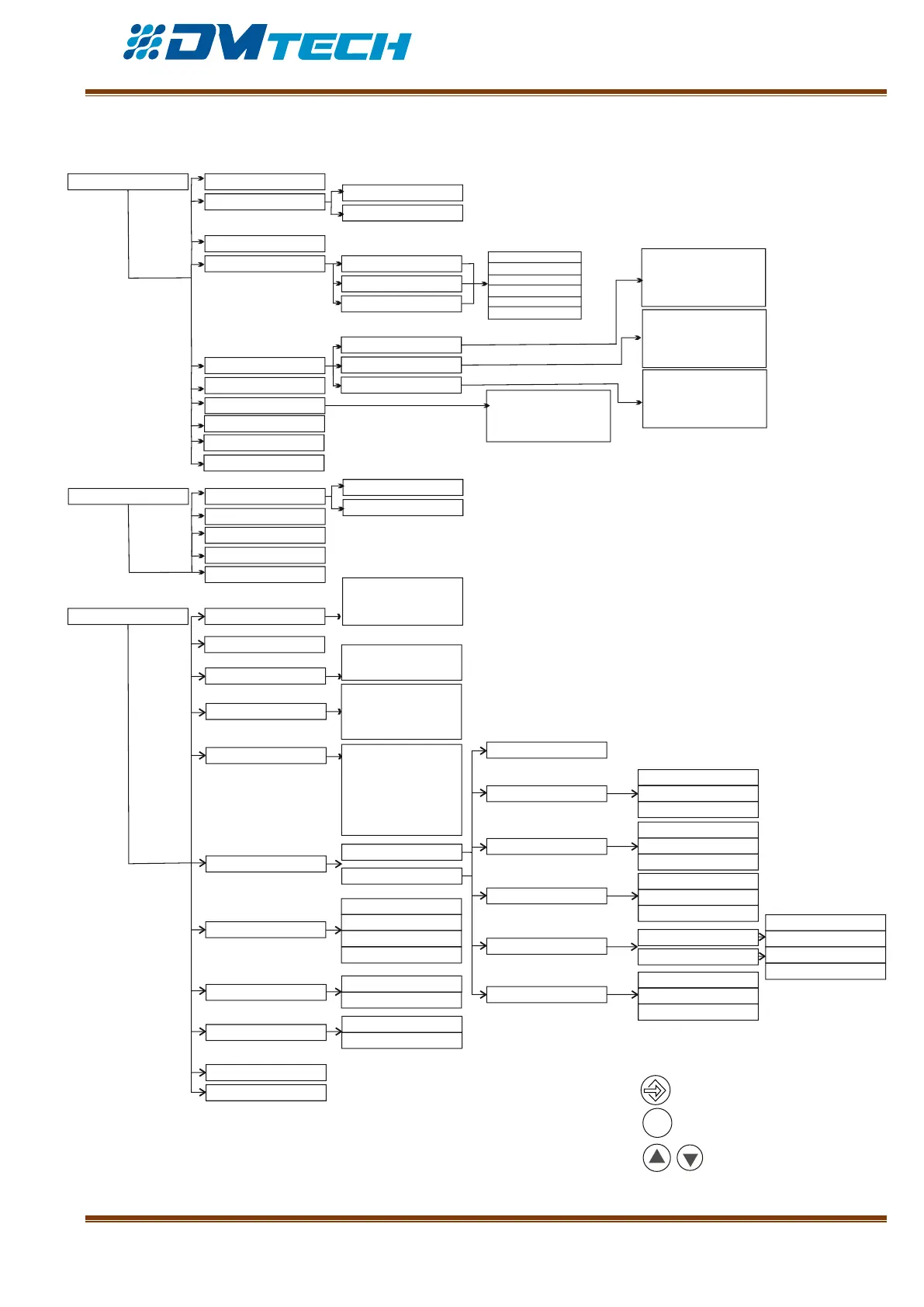
Fig. 11 General diagram of menus