[DP-DS820/DP-DS820 (A) Printer Driver] Instruction Manual (For Windows 11)
2.2.2 Advanced options
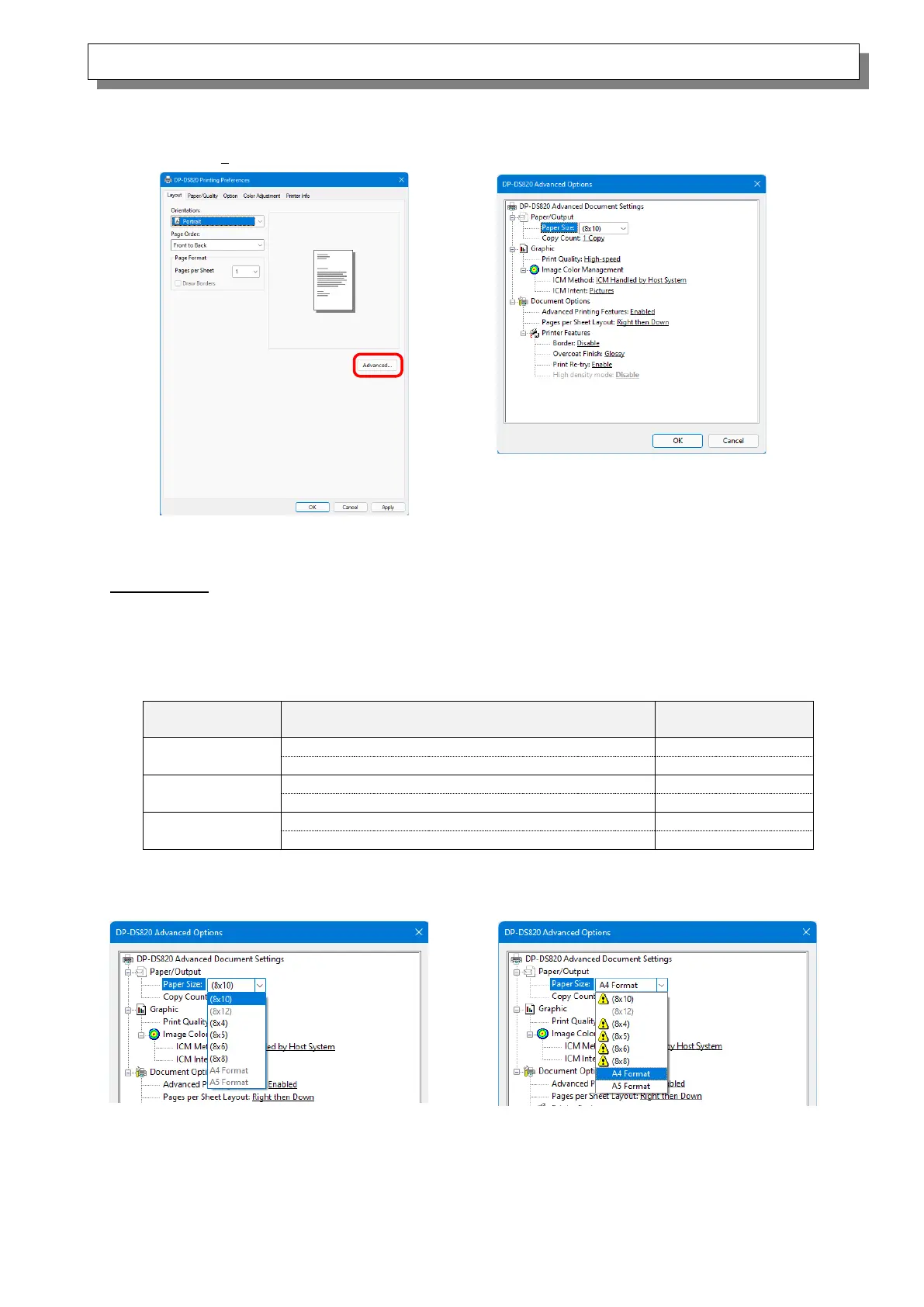
If you select “Advanced...” on the Layout tab, you can configure various advanced options.
Paper/Output
Paper Size
Specify the paper size. The paper size that can be specified depends on the media size that is
loaded in the printer. Multiple layout will be automatically used depending on the specified paper
size.
For details, see <Multiple layout> described later.
A4 Format, 8x6, 8x8, 8x10
*2: For paper sizes that can create
margins on the sides of the output results,
a warning appears.
Figure 2.2.2.4 Incompatibility media size
(Warning indication)
*1: Paper sizes that cannot be used for
printing are grayed out.
Figure 2.2.2.3 Incompatibility media size
(Gray out indication)
Figure 2.2.2.2 Advanced options tab
Figure 2.2.2.1 Advanced settings



 To Next Page