EasyManua.ls Logo

DNP DS?RX1 - Chapter 2 Properties; Opening Printer Properties

DNP DS?RX1
33 pages
Print Icon
To Next Page IconTo Next Page
To Previous Page IconTo Previous Page
Loading...
12
Dai Nippon Printing Co.,Ltd.
[DS-RX1 Printer Driver] Instruction Manual for Windows Vista
C
C
h
h
a
a
p
p
t
t
e
e
r
r
2
2
P
P
r
r
o
o
p
p
e
e
r
r
t
t
i
i
e
e
s
s
Various printer settings can be made using the DS-RX1 Driver properties. Before operation, be sure to have a good understanding
of the contents. Login by administrator authority is required for operation. Depending on application of the use, operation from
print setting of the application is necessary.
2
2
.
.
1
1
O
O
p
p
e
e
n
n
i
i
n
n
g
g
P
P
r
r
i
i
n
n
t
t
e
e
r
r
P
P
r
r
o
o
p
p
e
e
r
r
t
t
i
i
e
e
s
s
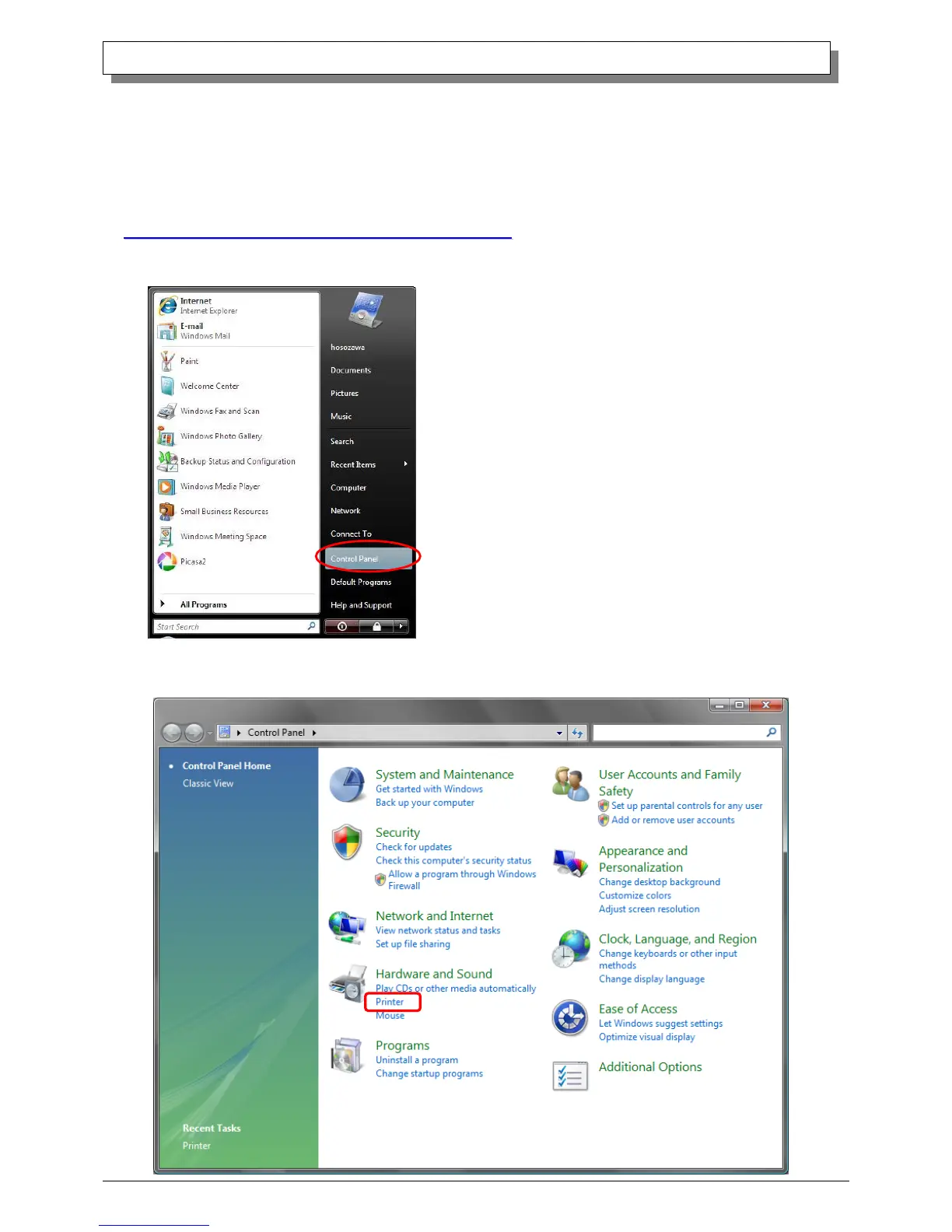
1. Click Start ⇒ Control Panel ⇒ open the control panel
2. In the control panel, select Printer⇒open the Printer window