Page 7 of 25
Menu Review
Main Menu
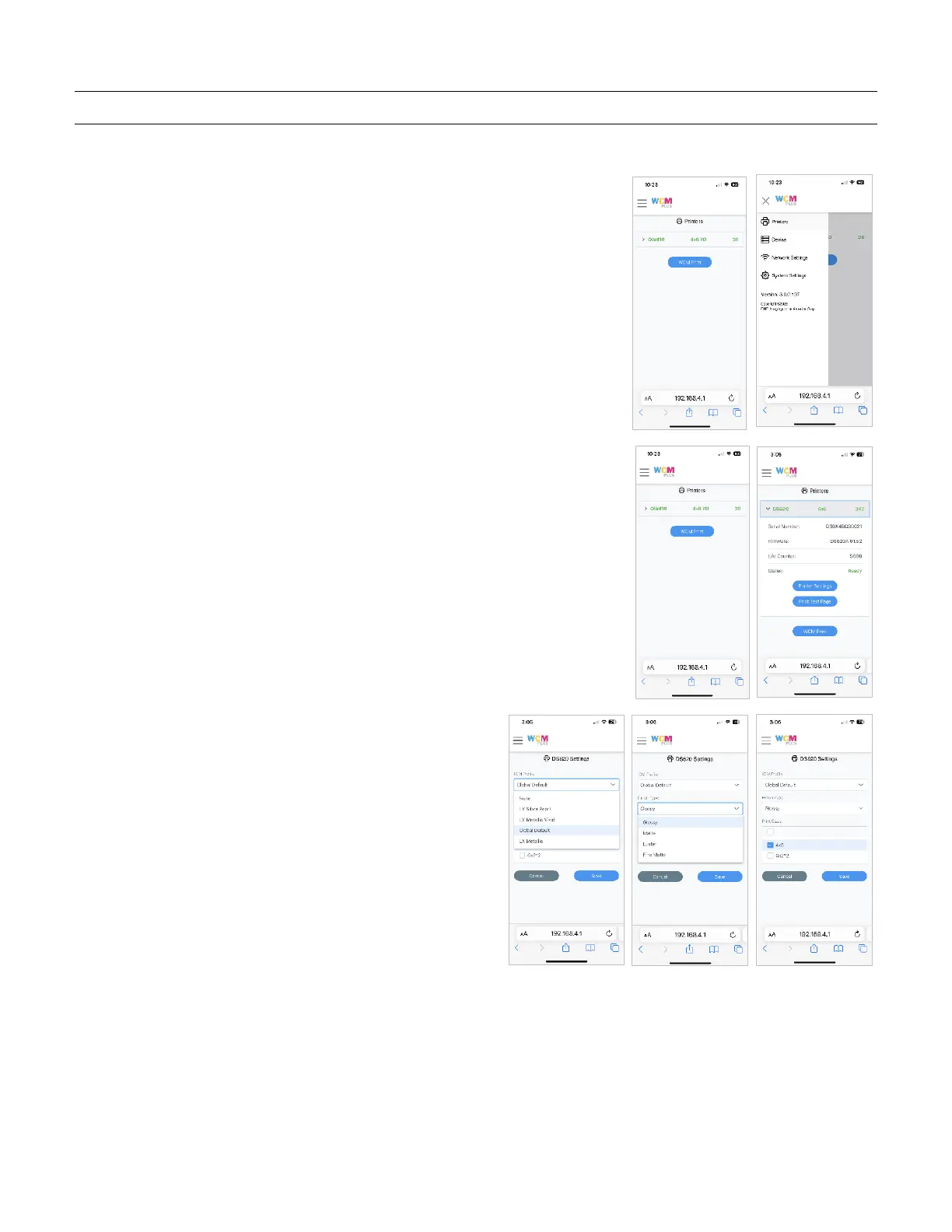
The Main Menu is accessed from the menu bars in the upper left corner of
the screen
Printers
The printer menu provides a quick display showing the printer, media loaded
and remaining prints. If you tap on the printer, the dropdown menu provides
information about the printers, including:
• Printer serial number
• Printer Firmware version
• Printer Life Print Count
• Current Printer Status
• Access to Printer Settings
• Ability to Print a Test Page
Tap Printer Settings to access optional available ICM
Profiles, Finish Type, and available Print Sizes.
• ICM Profiles are available to support different
media types
• Finish Types allow you to select glossy, matte, or
any other available finishes.
• Print Sizes show all available print sizes available
for the loaded media. Check the print sizes you
want to be available when using the WCM. This can
help keep the menu from becoming cluttered with
print sizes that are not frequently used.
Tap Save to keep any changes.



 To Next Page