28 29
5. Operation
5.1 Commissioning
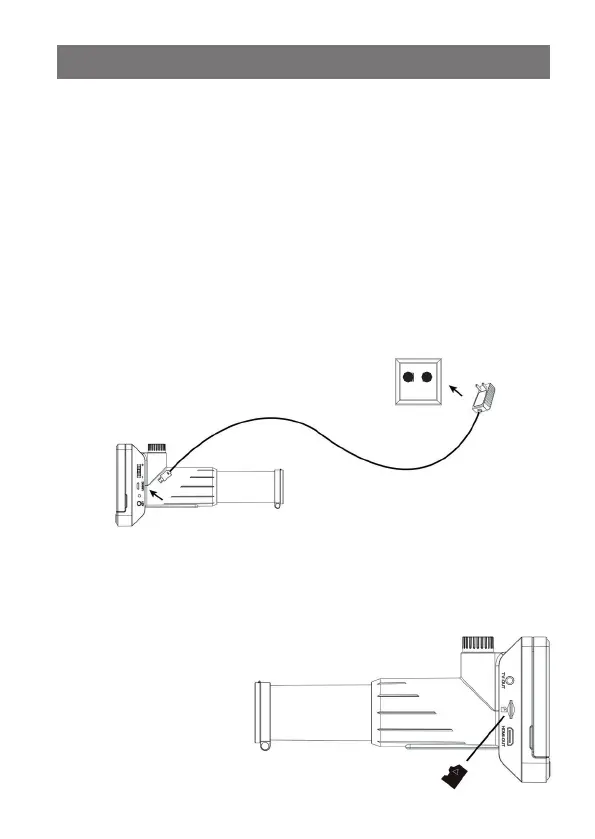
Charge the battery
- Before using for the first time, charge the internal battery with the supplied power
adapter.
- To do this, connect the USB port (12) of the device to the 5 V-USB-charging-output
of the power adapter using the supplied USB cable and plug it into a mains socket.
- Leave the device switched off while charging.
- The active charging process is indicated by the red charging display (13): Glowing
red: charging is in progress
Off: battery fully charged
- Disconnect the charging cable from the device after charging.
- The charging time for a full charge is approx. 3 hours. Up to 3 hours of operation
are possible with a fully charged battery.
Insert the SD card
- Switch off the device and insert a microSD card in the exact position according to
the graphic into the card slot until it clicks into place. Do not force it in, a wrong
position can damage the card and slot mechanism!
- The memory card has to be
formatted before use. How
you do this, you find in the
„Menu“ chapter.
„Format SD card“.


 To Next Page