34 35
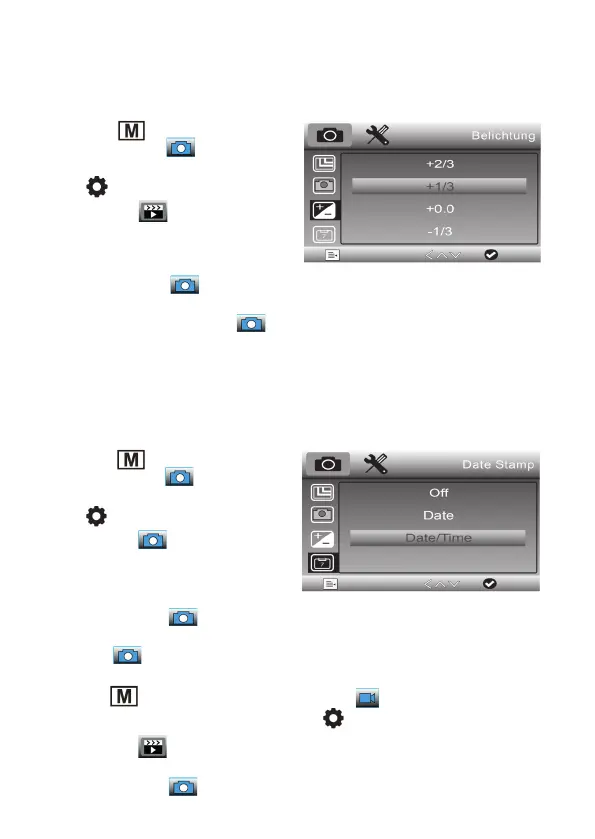
Set exposure compensation value
With this setting you can make an exposure correction depending on the shooting
situation.
- Use the
button to select single
image recording (
).
- Then select the menu of the device with
the
button. Now the first menu page
appears, the
symbol is highlighted
in blue.
- Use the / arrow buttons to select
the „Exposure“ line and confirm the
selection with the
button.
- Now select the desired exposure compensation with the arrow buttons / and
confirm the selection with the
button.
Set date stamp, date stamp for video recording
With this setting you can determine whether the time, date/time should be superim-
posed on the recordings or not.
- Use the
button to select single
image recording (
).
- Then select the menu of the device with
the
button. Now the first menu page
appears, the
symbol is highlighted
in blue.
- Use the arrow buttons
/
to select
the line „Date display“ and confirm the
selection with the button.
- Now select the desired option with the arrow buttons
/
and confirm the selection
with the button.
You can switch the date stamp display on and off separately for recording videos:
- Use the
button to select the video recording ( ).
- Then select the menu of the device with the
button. Now the first menu page
appears, the
symbol is highlighted in blue.
- Use the arrow buttons
/
to select the line „Date display“ and confirm the
selection with the button.


 To Next Page