36 37
with the button. Now the first menu page appears, the symbol is
highlighted in blue.
- Use the / arrow buttons to select the „HDR“ line and confirm your selection
with the
button.
- Now select the desired option with the arrow buttons / and confirm the
selection with the button.
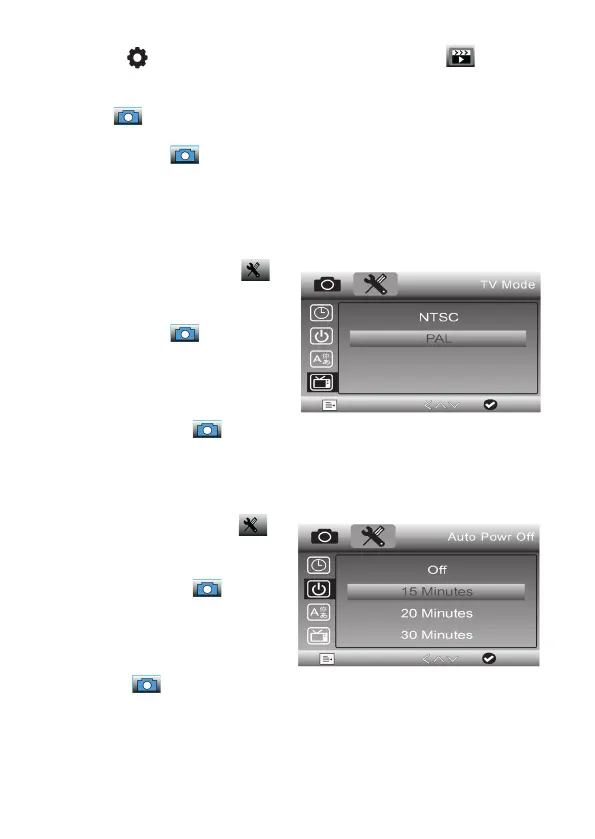
Set TV standard
- Select the second menu page:
- Use the arrow button / to select
the line „TV mode“ and confirm the
selection with the button.
- In the settings menu, use the
/ arrow buttons to select the
desired standard depending on the
connected TV/monitor and confirm
the selection with the button.
Set automatic shutdown
- Select the second menu page:
- Use the / arrow buttons to
select the „Auto Off“ and confirm
the selection with the button.
- In the settings menu, use the /
arrow buttons to select the desired
switch-off time (Off = no automatic
switch-off) and confirm the selecti-
on with the button.
- If a switch-off time is selected, the
device switches off automatically if
no operator action or recording has
taken place in the selected time.


 To Next Page