30 31
5.2 Basic settings/menu functions
- Select the device menu with the button . Now the first menu page appears,
the symbol
is highlighted in blue.
- You reach the second menu page by pressing the button again . Now the menu
changes to the second page:
.
Note:
From all submenus you can use the
to return to normal operating
mode if changes are to be saved. If changes are to be discarded, press
the button
to go back.
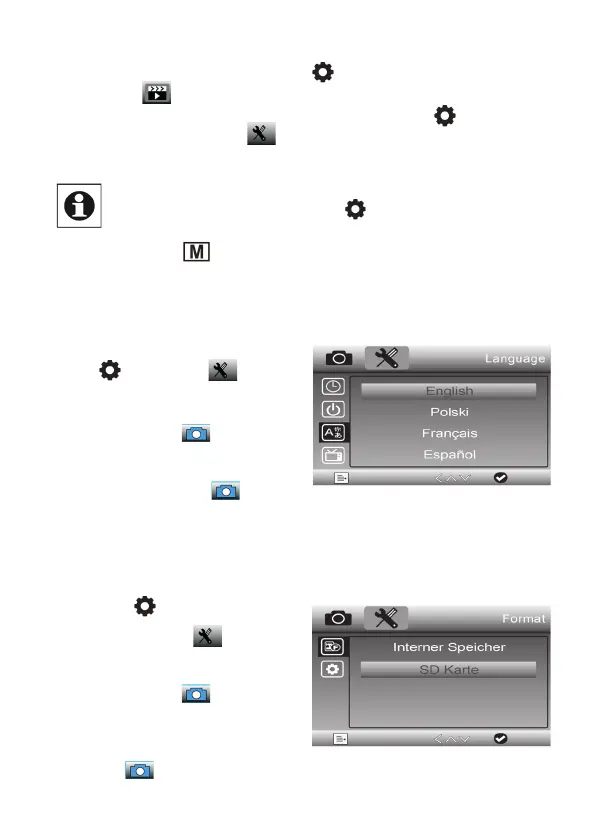
Choose a language
- Go to the second menu page by pressing
the
button twice:
- Use the / arrow buttons to select
the „Language“ line and confirm the
selection with the
button.
- Now use the / arrow buttons to
select the „German“ line and confirm
your selection with the button.
- Now the menu language changes to
German.
Format the SD card
- Press the
button twice to go to the
second menu page:
- Use the / arrow buttons to select
the „Format“ line and confirm your
selection with the button.
- Now use the / arrow buttons to
select the „Internal memory“ or „SD
card“ line and confirm your selection
with the button
- Now use the / arrow buttons to


 To Next Page