Operation Manual
VacuDAP 2002
2002BA01e.DOC / 22.07.2004 17 of 22
As shown in the program flowchart (Figure 2), the parameter changing menu
SETTINGS
can be accessed by simultaneously pressing
Print
Reset
and applying the supply voltage (plugging the power pack connector into the
display unit).
For the further operations see the program flowchart Figure 5, Changing settings.
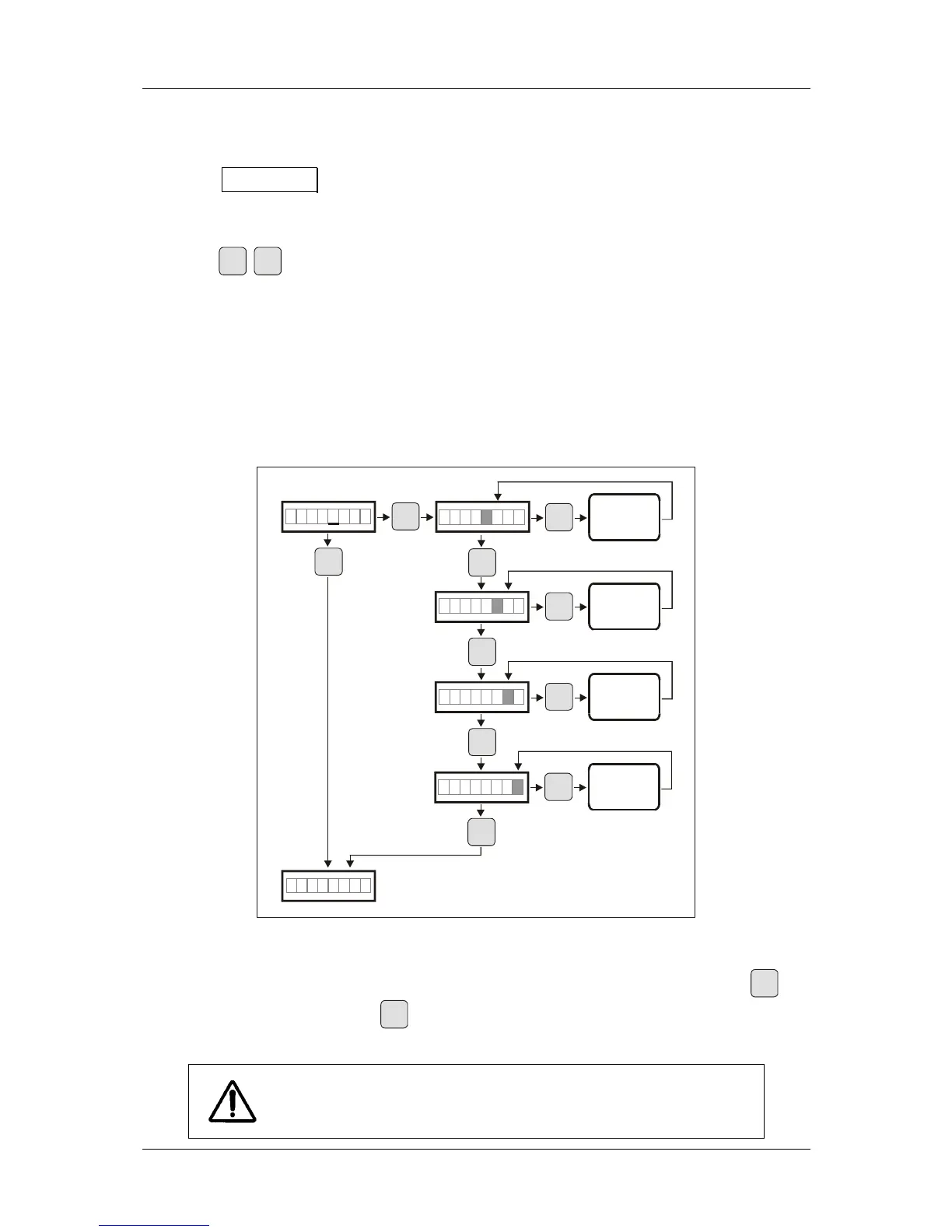
Figure 4, Changing a parameter, shows how the value of a parameter can be changed (example:
entering a new test value
TEST_VAL). Parameter TEST_VAL is required to be changed when the
ionization chamber of the measuring system needs to be replaced (e.g. for repair work).
POSITION
Print
Print
Print
Print
Print
Reset
Reset
Reset
Reset
Reset
TEST VAL
VAL:abcd
VAL:abcd
VAL:abcd
VAL:abcd
a + 1
b + 1
c + 1
d + 1
Fig. 4: Changing a parameter (example: TEST_VAL)
During the process, the digit, which flashes, i.e. a (in Fig. 4: grey), can be changed. Pressing
Print
increases the digit (
1, ... 9, 0), while
Reset
selects the next digits b,c and d.
Changed Parameters have to be saved with
SAVE (see Fig. 5, Changing
settings), otherwise they will be ineffective.


 To Next Page