19
Replacing the sprocket
CAUTION:
Protective gloves must be put on.
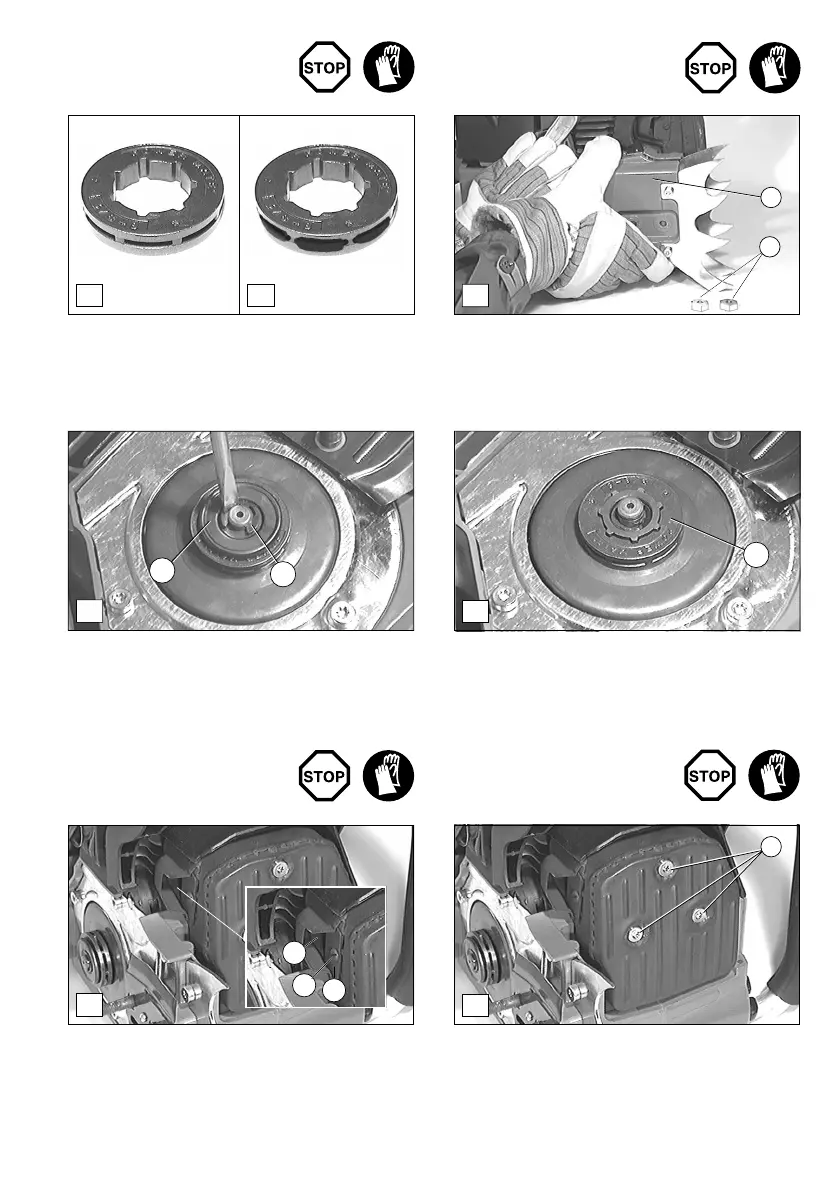
Check the sprocket before mounting a new chain (A).
Worn out sprockets (more than 0,2 mm) (B) may damage the
new chain and must therefore be replaced.
- Loosen the fastening nuts (C/1).
- Pull off the sprocket guard (C/2).
- Take off the sprocket (F/5) from the clutch drum.
- Position the new, slightly oiled sprocket and remount all
parts in the reverse order.
Checking the sprocket
- Use the universal wrench to remove the locking washer
(D/3).
CAUTION:
The locking washer might jump out on removing.
- Remove the thrust washer (D/4) underneath it.
The spark arrester screen should be checked and cleaned
regulary.
- Remove the screw (F/6), defl ector plate (F/7) and arrester
screen (F/8).
Caution: Do not use sharp or pointed objects for screen cleaning.
Damaged or misformed screen wires may result.
Replacing/cleaning the
spark arrester screen
Checking the muffl er screws
- Regularly check the three fastening screws (G/9) for
tightness.
A
B
D
E
4
5
3
F
8
6
7
C
2
1
G
9


 To Next Page