Q3 & Qht Controls for Direct Expansion Systems Programmable Functions
L-2516 ENGLISH 11
13: Software Revision Level
This setting displays the software version and revision level of the system. It will display a 2-digit number such as “05” for
version 5. Have this information ready prior to calling a dealer or the factory for service assistance.
14: Determining Your Product Type
This setting displays the product type of the system being used. Have this information ready prior to calling a dealer or the
factory for service assistance. “dE” displays for marine Direct Expansion Self-Contained and Remote Products; “CH” displays
for Chilled Water or Modulating Air Handlers.
15: Low-Pressure Switch Test
The Low-Pressure Switch Test is used to test the low-pressure circuit for a fault or to test for low charge in system. This test can
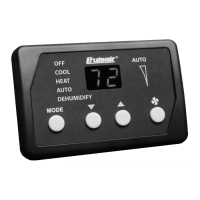
also be used to charge a system. Press the MODE button to enter the Low-Pressure Switch Test. During the test, the unit will
operate in Cool Mode at high fan speed, and the display will show “OA” (closed circuit) if the low-pressure switch circuit is OK or
“FA” (open circuit) if the low-pressure switch circuit has a fault or system is low on charge. Press the FAN button to exit this test
mode.
.
16: High-Pressure Switch Test
The High-Pressure Switch Test is used to test the high-pressure circuit for a fault or to test for an overcharged system or loss of
water flow. Press the MODE button to enter the High-Pressure Switch Test. During the test, the unit will operate in Cool Mode at
high fan speed, and the display will show “OA” (closed circuit) if the high-pressure switch circuit is OK or “FA” (open circuit) if the
high-pressure switch circuit has a fault or system is overcharged or has loss of water flow. Press the FAN button to exit this test.
.
17: LED/LCD SegmentTest
Press the MODE button to test the display. All LED segments (Q3) or LCD graphics (Qht) should display. Press the FAN button
to exit this test.
18: Sleep Mode
(Factory Default: On)
You can set the Q3’s LED brightness level to dim or you can set the Qht’s backlight to be on or off. Select “SL” for Sleep Mode
and the LEDs will remain dim or the backlight will remain off until a key is pressed, which will temporarily brighten the display.
Select “On” and the Q3’s LEDs will stay at the current brightness setting or the Qht’s backlight will stay on.
Table 3: Recommended Humidity Control Settings
Outside Temperature Relative Humidity Time Period Dehumidification Time
Below 80° F (27°C) 75-85% 12 hours 10 minutes
Above 85% 8 hours 20 minutes
80° - 90° F (27°- 32°C) 75-85% 10 hours 30 minutes
Above 85% 6 hours 40 minutes
Above 90° F (32°C) 75-85% 8 hours 40 minutes
Above 85% 6 hours 60 minutes
WARNING
During this test, low- and high-pressure faults are ignored. The system must be monitored closely during this test, and
the system must be shut down immediately if pressures exceed 425 psi for R-417A or 575 psi for R-410A. The system
should only be operated for a brief period of time if pressures fall below 30 psi for R-417A or 60 psi for R-410A.
WARNING
During this test, low- and high-pressure faults are ignored. The system must be monitored closely during this test, and
the system must be shut down immediately if pressures exceed 425 psi for R-417A or 575 psi for R-410A. The system
should only be operated for a brief period of time if pressures fall below 30 psi for R-417A or 60 psi for R-410A.












 To Next Page