42
Networking (2 of 3)
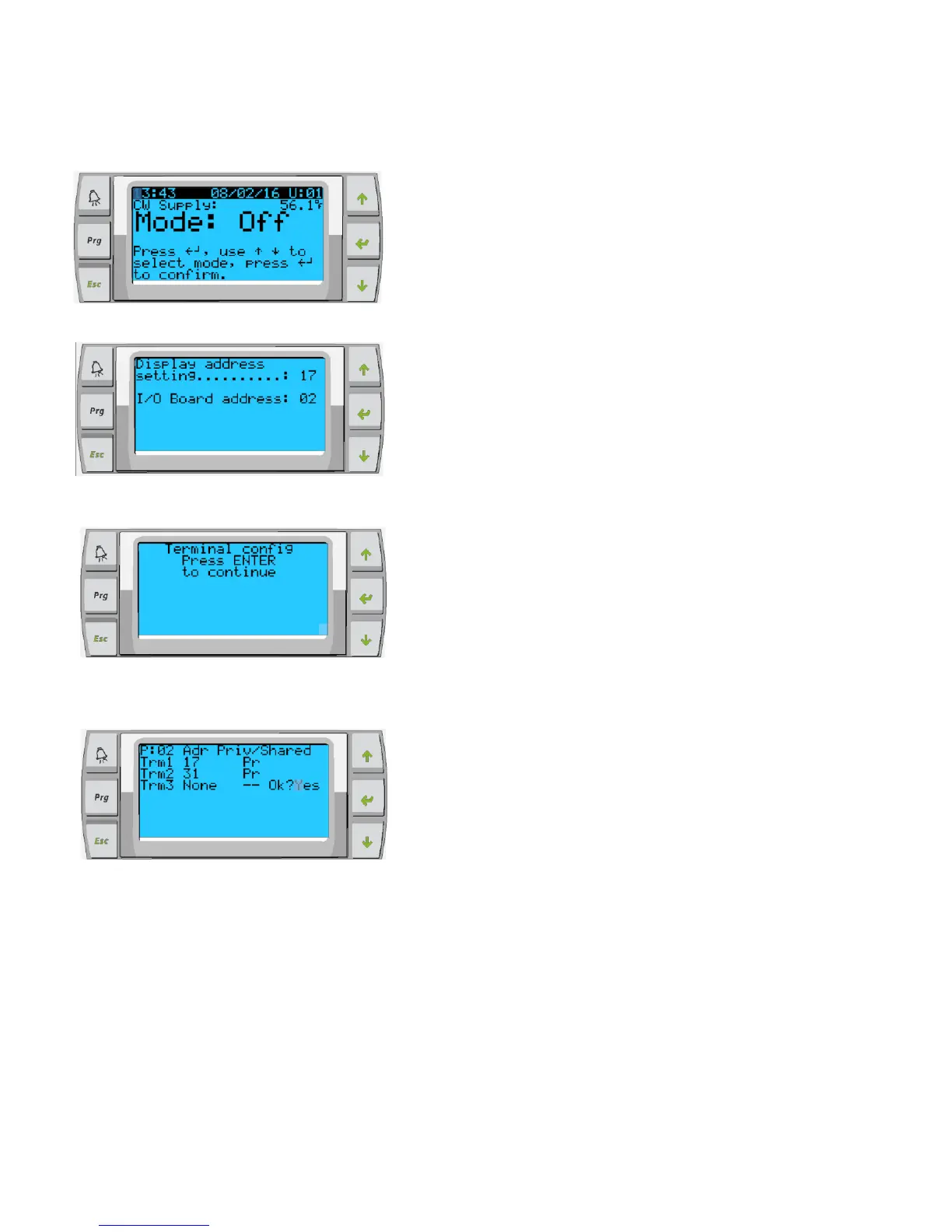
Chiller stage 2 needs to have a display address of
17, chiller stage 3 will be 18 and 4 will be 19. I/O
Board address should reflect the change you have
just made
Press and hold Up, Down and Enter
simultaneously until screen changes, about 6
seconds
At this point screen may go blank, if it does, start
from step 1 again (above) and ensure display
address and I/O board address is correct for stage.
Press enter to go into the terminal config settings
Trm1 = 17 for stage 2, 18 if stage 3 etc… and Pr
ID 32 & Sh - this will allow for PGD1 control if used.
ID 31 & Pr – this will allow for touchscreen if used.
Only enable controls that are being utilized in the
working system.
Press enter until you get to OK? Change to Yes to
save settings.
Power down stage and repeat process for all stages, once all complete. Turn on stage 1
and repeat this page (only) ensuring Trm1 = 16 Pr



 To Next Page