73
MicroController Control System Troubleshooting
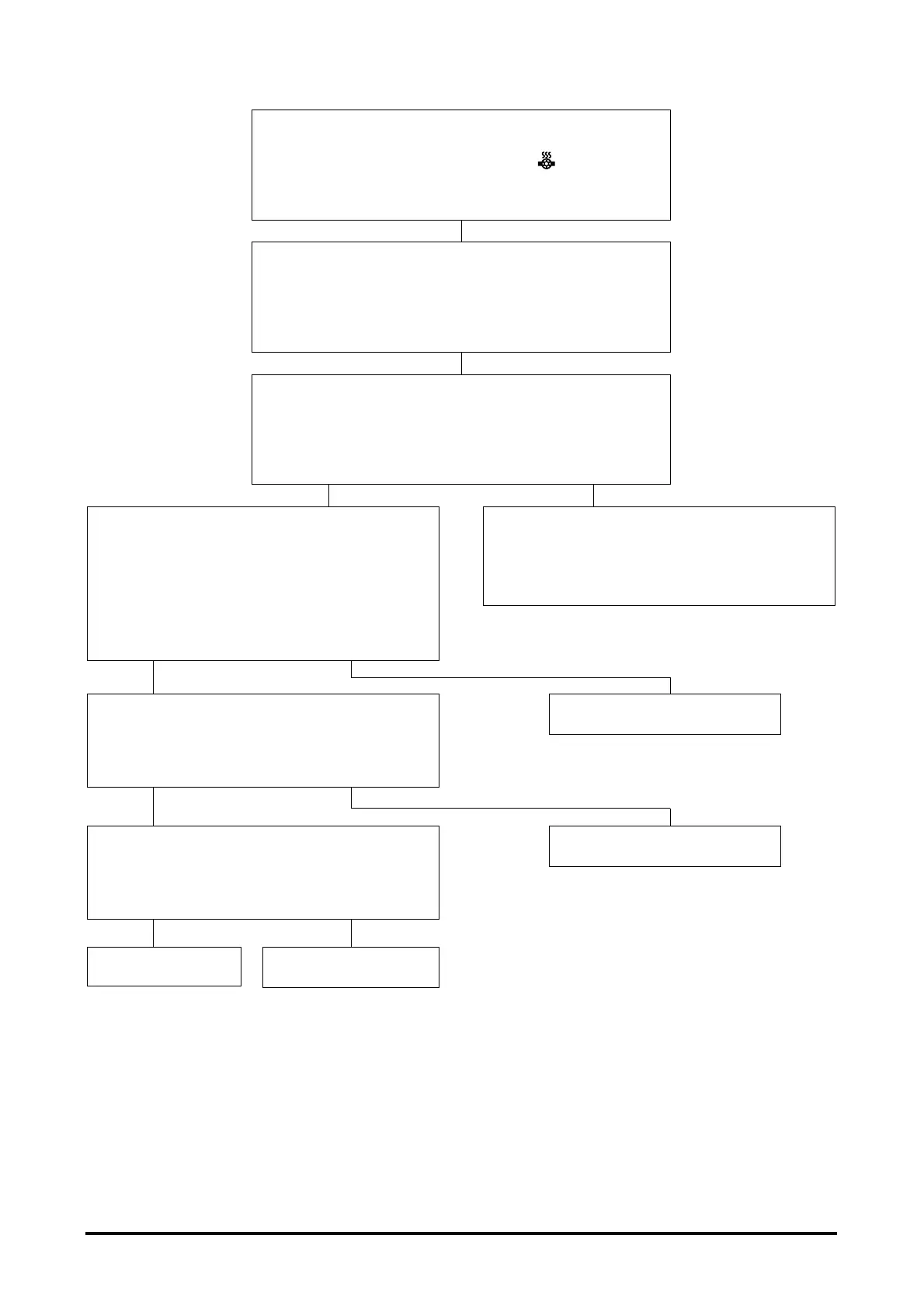
PROBLEM 20
Overtemperature is ON and Display = and Ed.
Pump and power steering operation normal.
Acceleration slow.
POSSIBLE CAUSE
Drive motor overheated; Drive motor thermostat (thermal
switch) defect; Open wiring; Display defect;
Logics defect.
CHECKS
Let the truck cool for 15 minutes.
Overtemperature indicator ON Normal display
Disconnect the battery. With the drive motor
at close to room temperature, disconnect the
drive motor thermal switch connector.
Check continuity of thermal switch.
Should have continuity below 123°C (253°F)
Continuity No continuity
Check continuity of wire #43 between drive
motor thermal switch to DE-2.
Continuity No continuity
Repair or replace switch.
Replace logics.
Drive motor was overheated, resume normal
operation. If repeats occur, check drive motors
current draw or operating cycle for excessive
ramp climbing or towing.
Check continuity of wire #4 between drive motor
thermal switch to DD-2.
Continuity No continuity
Repair or replace wire.
Repair or replace wire.


 To Next Page