Operation Section
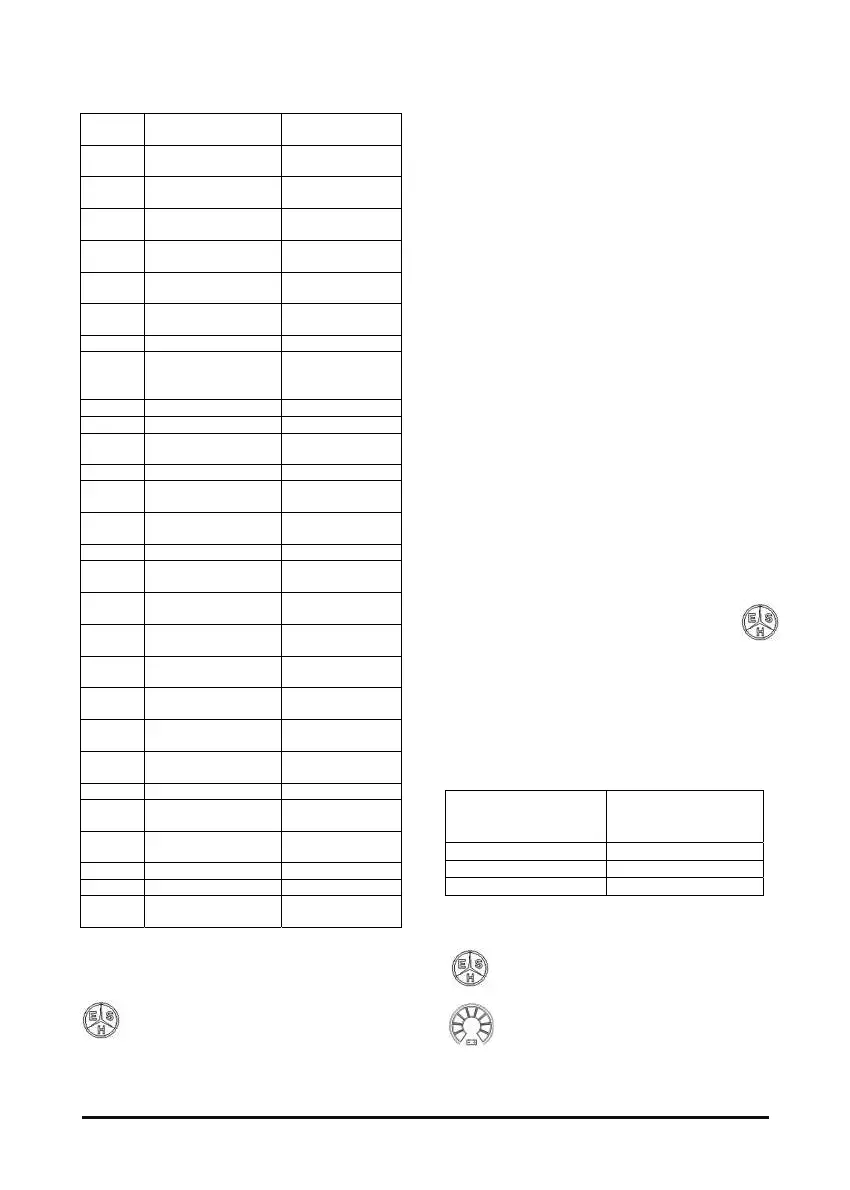
G 48
A
Capacitors not
charged
CAP NOT
CHARGED
E1
Drive right module
Overtemperature
R-INV
OVERTEMP
E2
Drive left module
Overtemperature
L-INV
OVERTEMP
E3
Pump module
Overtemperature
P-INV
OVERTEMP
E4
Drive right motor
Overtemperature
R-MOTOR
OVERTEMP
E5
Drive left motor
Overtemperature
L-MOTOR
OVERTEMP
E6
Pump motor
Overtemperature
P-MOTOR
OVERTEMP
EE Wrong start WRONG START
EE
(FLASI
NG)
Seat switch SEAT SW OPEN
EL Low battery voltage
LOW BATT VOLT
F Wrong Eeprom EEPROM FAULT
F
WD Timer/Enable
micro signals
WD TIMER
FAULT
F Serial communication COMM FAULT
F0
Maximum battery
voltage
MAX BATT VOLT
F1
Minimum battery
voltage
MIN BATT VOLT
F2 Pedal trimmer fault ACCEL FAULT
F3
Drive right module
Desat/overcurrent
R-INVERTER
FAULT
F4
Drive left module
Desat/overcurrent
L-INVERTER
FAULT
F5
Pump module
Desat/overcurrent
P-INVERTER
FAULT
F6
Drive right motor
current Offset
R-MOTOR I
OFFSET
F7
Drive left motor
current Offset
L-MOTOR I
OFFSET
F8
Pump motor current
Offset
P-MOTOR I
OFFSET
F9 Steer sensor fault
STEER SENSOR
OUT
FA 5V encoders not ok 5V NOT OK
Fc
Drive right motor
Encoder
R-MOTOR
ENCODER
Fd
Drive left motor
Encoder
L-MOTOR
ENCODER
FE 24V out 24V NOT OK
FH 12V out not ok 12V NOT OK
FL
Pump input on at the
start
PUMP SIGN ON
Lift truck operation mode
Pressing E-S-H button, you can set
energetic operating mode for your
system.
This function is enabled using EYE menu named
Calibration – ESH, to select desired operating
mode. In particular you can choose between E-S-H
or PROGRAMMABLE WORKING :
- Pressing E-S-H (economic, standard, high) button,
you change energetic mode and update related
parameters with a value, corresponding to
selected operating mode, that operator can’t
modify.
- Pressing PROGRAMMABLE WORKING you can
manage 3 further options (limit 1, limit 2, and limit
3). You can set parameters value, that are
expressed in per cent of high energetic mode;
changing active limitation (among L1, L2 or L3),
related per cent data are used to calculate actual
parameters value.
NOTE: Percent values can be modified only with
EYE Calibration – E-S-H menu.
NOTE: Pressing PROGRAMMABLE WORKING
you can manage economic, standard or
high operating mode too.
COMPACT display shows different symbols in
function of selected energetic mode:
- E-S-H management disabled: no symbol
visualised.
- E-S-H management enabled: active mode
is indicated by symbol.
- PROGRAMMABLE WORKING management
enabled: in case you have chosen one of L1, L2
or L3 operating modes, and lift truck is stopped,
one of the segments of speed indicator symbol
(see Table 5 ) blinks to show selected energetic
mode.
Table 6 : selected energetic mode
DISPLAY
VISUALISATION
(from symbol left side)
OPERATING MODE
1st segment L1 (Limit 1)
5st segment L2 (Limit 1)
9st segment L3 (Limit 1)
Otherwise symbol indicates, as usual,
selected operating mode.
NOTE: as usual, if lift truck is moving,
symbol indicates speed level



 To Next Page