A-13
RESET MODE (PRESET PROGRAMMING)
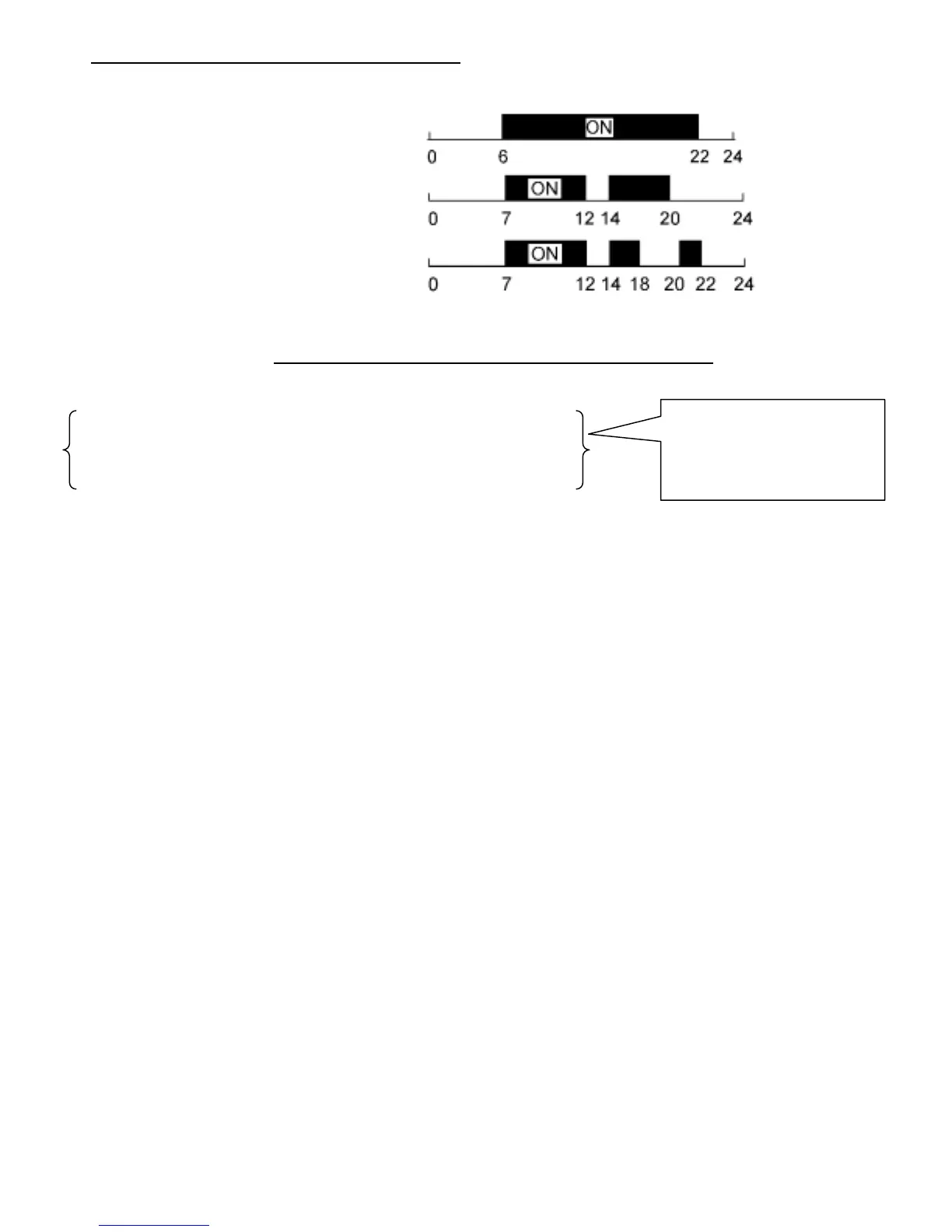
This mode includes 3 programs. (P01, P02 and P03). These programs cannot be modified by the
user.
P01 Monday to Sunday (1X ON/OFF)
P02 Monday to Sunday (2X ON/OFF)
P03 Monday to Sunday (3X ON/OFF)
Note: `ON' = Proofer and `OFF' = Refrigeration
SEQUENCE TO FOLLOW FOR THE RESET MODE
1. Press ‘Reset’ button
2. Select 24h or AM/PM (with + or -) and confirm with ‘OK
3. Set hour (with + or -) and confirm with ‘OK’
4. Set minutes (with + or -) and confirm with ‘OK’
5. Set week day (with + or -) and confirm with ‘OK’
6. Select preset program such that described above this, P01, P02 or P03 (with + or -)
7. Two options are now possible :
! Press ‘Menu’ = terminate programming
! Press ‘OK’ = Going through preset programs to modify selection
! This adds programming personalized to that preset (See in following page for the
personalized programming)
These steps are used to
adjust the hour. If the hour
is correct, press `OK' until
step 6


 To Next Page