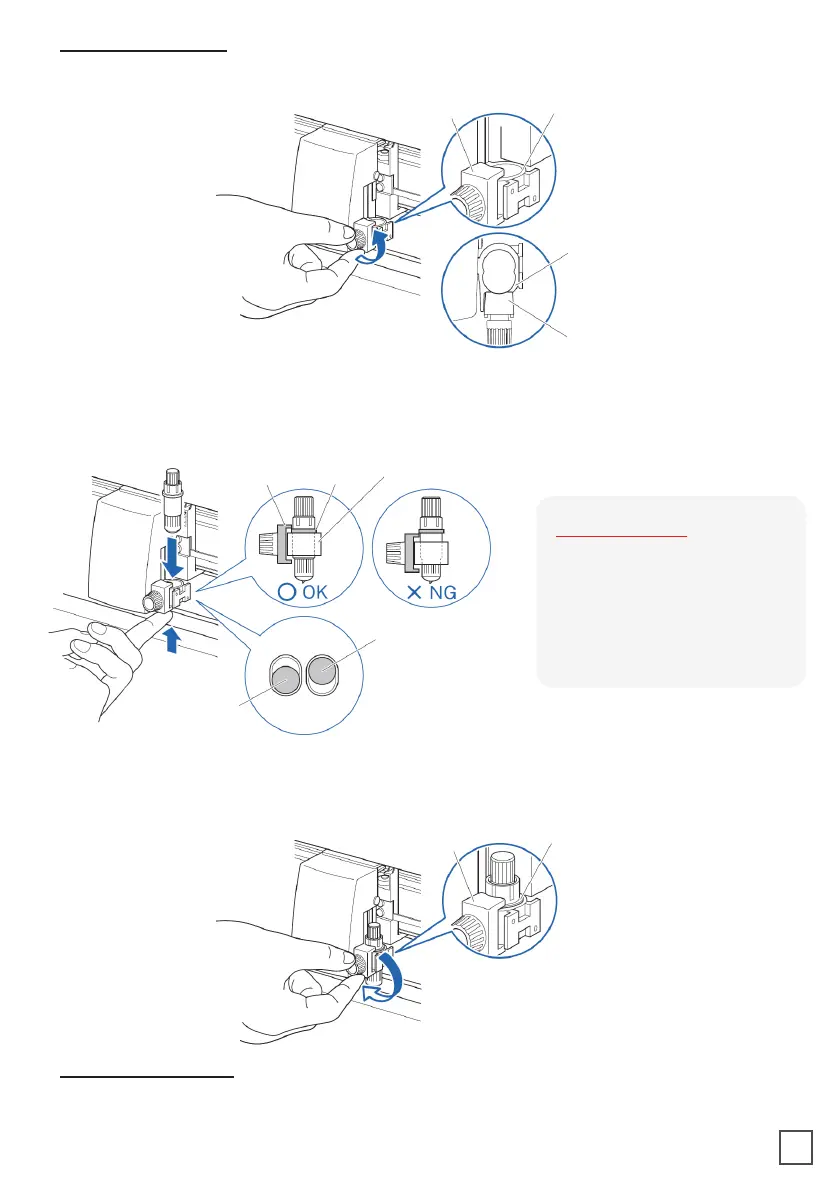
Bracket to
hold tool
Flange
1. Loosen the tool holder screw.
Mounting the tool
of the holder.
screw.
When removing the tool, turn it counterclockwise to remove the tool.
Removing the tool
Bracket to hold tool Tool holder
Tool holder
Bracket to hold tool
TOP
Bracket to
hold tool
Flange
Tool holder
Tool holder 1
(Backward: Half cutting/
Plotting Pen)
Tool holder 2
(Forward: Using cutting)
SUPPLEMENT:
When using with half cutting
and plotter pen, set the seal
in Tool Holder 1 (backward),
and when using cutting out
(perforated cut), set the seal
in Tool Holder 2 (forward).
26



 To Next Page