DQ Technologies, Inc., phone: 512.248.8324 - www.dqtech.com
20
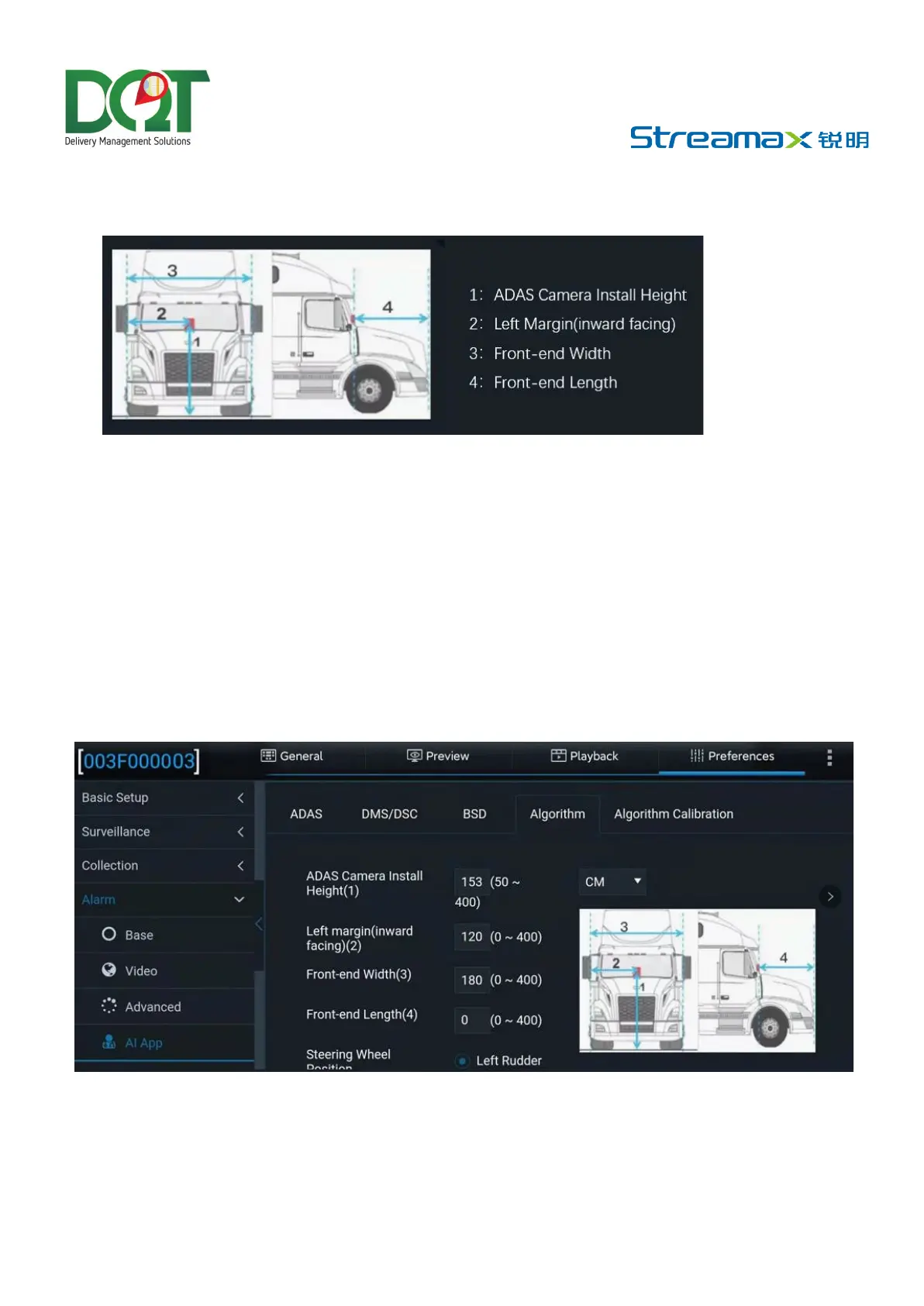
• Then, measure the front width (the distance between the outermost edges of both tires) and the
front length (the horizontal distance from the ADAS lens to the license plate). Refer to the figure
below for an example of how to measure these distances.
Note: When the vertical height from the ground to the lens for road condition monitoring of
AD Plus2.0 is measured, read the height value after making sure that the tower ruler or tape
is perpendicular to the ground.
ADAS Lens Calibration
Calibration parameter setting
• After entering the operation screen of the Veyes app, tap Preferences > Alarm > AI App >
Algorithm, as shown in the figure below:
• The ADAS calibration height can be in cm or in inch. In the parameter input boxes, fill in
the ADAS lens installation height, the left margin of the ADAS lens, and the front end
width and front end length taken in the previous step. Tap Save after filling in the
parameters.



 To Next Page