22 Technical manual | X-am® 3500/8000
Operation
WARNING
Incorrect measured values!
Only for diffusion mode: If water seals the gas inlets on the gas detector (e.g. in
heavy rain or if the gas detector is submerged in water), incorrect measured values
may be returned.
► With the display facing downward, shake the gas detector to remove the water.
CAUTION
High readings outside of the LEL display range or a blocking alarm may indicate an
explosive concentration.
If the concentrations of combustible materials are too high, this may be the result of
a lack of O
2.
4.7.1 Monitoring measuring mode
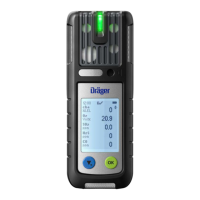
In normal measuring mode, the measured values are displayed for every
measurement gas (see Graphic E on the fold-out page). The operation signal
sounds at regular interval (configurable), and the green LED pulses (e.g. visual
operation signal or D-light feature).
If a measuring range is exceeded or not reached, the respective symbol is
displayed instead of the measured value. For further information, see the following
chapter: "Symbol explanations", page 16
If, in measuring mode, a event (e.g. an alarm) occurs, the respective symbol is
displayed in the status bar (after the event is acknowledged, if necessary).
4.7.1.1 Displaying the measuring channel
To display an individual measuring channel:
1. Select in measuring mode.
2. Use ▲ or ▼ to view the individual measuring channels.
3. Select to navigate to the measuring channel overview.
4.7.1.2 Opening the event report
The following events are counted and displayed: A1/A2, STEL, shocks, incorrect
password entries.
If the gas detector is switched off and then on again, the event report is deleted.
To open the event report:
1. Select > Info > Device information in measuring mode.
2. Use ▲ or ▼ to scroll through the individual pages until the event report.
The symbol indicates a failed sign-on only after 5 attempts.


 To Next Page
 Loading...