Device settings
15
en
7.6 Replacing the dust and water filter
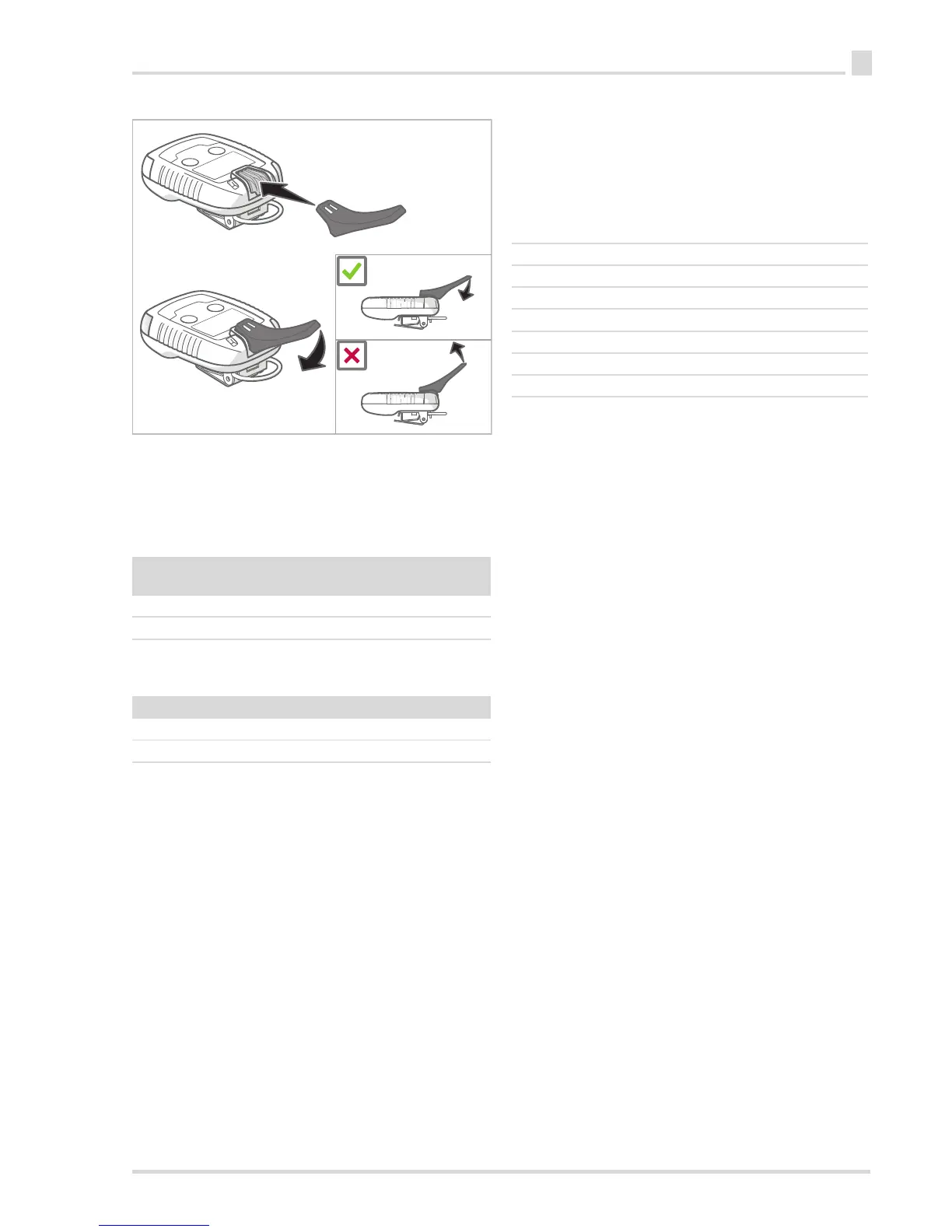
1. Place the special tool on the dust and water separator.
2. Press the lever on the special tool downward and then
remove the dust and water separator.
3. Insert a new dust and water separator. The dust and water
separator must click into place.
For special gases (ozone, phosgene), the entire front casing,
including the special diaphragm, must be replaced due to the
special diaphragm.
8 Device settings
Only trained and qualified personnel may change the device
settings.
8.1 Factory setting
The factory settings may differ for customised orders.
Sensor grille:
4 units
Order no.:
40 units
Order no.:
Pac 6xx0 83 26 853 83 26 857
Pac 8xx0 83 26 852 83 26 859
Front casing: Order no.:
Pac 8000 ozone 83 26 851
Pac 8000 phosgene 83 26 854
Bump test mode Quick bump test
Vibration alarm On
Bump test interval Off
Operation signal On
D-Light On
Switch off Always
Data logger interval 1 min
Usage duration (user) Off









 To Next Page