Note:
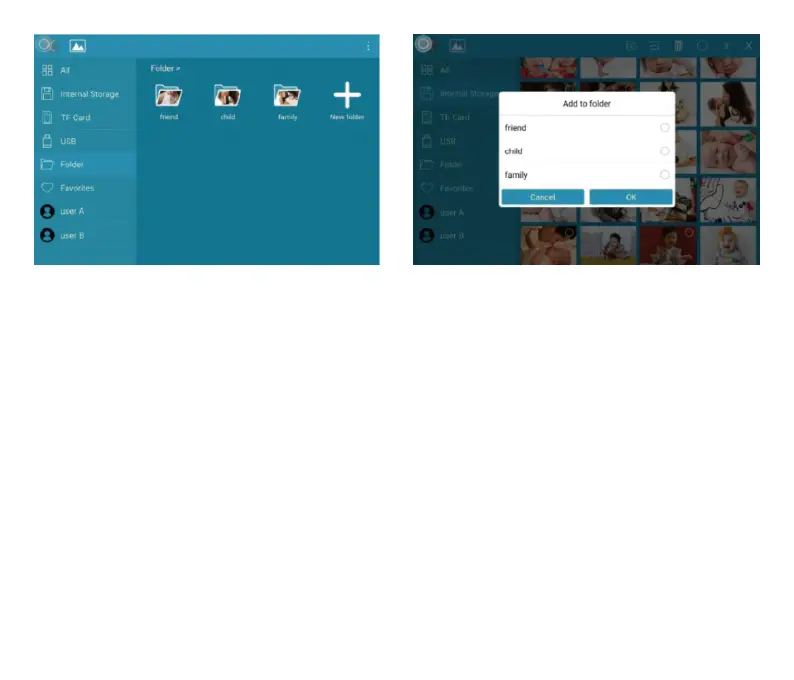
➀ Only pictures stored in the internal storage can be added into folders and to “Favorites”.
➁ To delete pictures, we highly recommend you do this under the “Internal Storage”setting,
instead of “All”; Or please remove external device while deleting so as to avoiddeleting
files stored in “USB” or “TF Card” by mistake.
➂ Not all models support external drive. Please prevail in kind.
During the slideshow, you will have more tools to customize the slideshow simply by touch-
ingthe screen. There will be an operation column at the bottom.
The contents are as follows: Rotate, Full screen display, Pause, Delete, Zoom in, Settings,
Information, Add to favorites, and Slit screen display.
You have the option to tap the "♡" icon to add the picture to your "Favorites" and enable-
multi-display for an enjoyable experience. You can also customize the slideshow transition
effects and interval according to your preference. In addition, you can pause the slide-show
to keep displaying the current photo.
18



 To Next Page