39
EN
name is entered, press the key and when the “Save
the name?” message appears, conrm with the
key
or cancel with the
key, e.g.
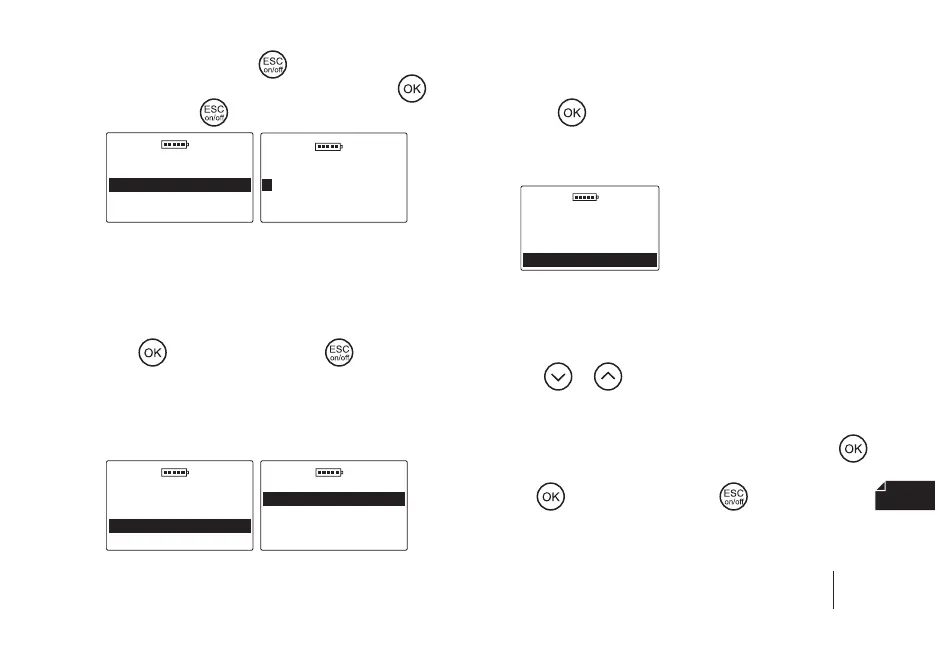
DOD 01.01.2019
Animals
Change animal
Sort animals
New animal
Delete animal
DOD
01.01.2019
< _ 0 1 2 3 4 5 6 7 8 9
A B C D E F G H I J K L
N O P Q R S T U V W X Y Z
Animal name:
c) Delete animal – to delete an animal from the device’s
memory, together with the measurements stored for it,
go to the Main menu / Animals / Delete animal, then
select the appropriate animal from the list and conrm
with the
key or cancel with the key (Note! the
animal and its measurements will be irreversibly delet
-
ed from the device, therefore if the data is important,
remember to rst transfer it to the computer using spe
-
cial software), e.g.
DOD 01.01.2019
Animals
Change animal
New animal
Sort animals
Delete animal
DOD 01.01.2019
Delete animal
TINA
LASSIE
d) Sort animals – to sort previously saved animals, go
to Main menu / Animals / Sort animals and conrm
with the
button. The animals included in the list
are shown in the order of their entry and will be sorted
alphabetically.
DOD 01.01.2019
Animals
Change animal
New animal
Delete animal
Sort animals
3. Results
To view the results stored in the device’s memory, go to
the Main menu / Results and then scroll through them
using the
or key (the results are arranged chron-
ologically starting with the newest ones). You can also
delete individual results. To do this, use the arrows to in
-
dicate the result you would like to delete and use the
key, and when the “Delete?” message appears, conrm
with the
key or cancel with the key, e.g.
SECTION 10 | MAIN MENU


 To Next Page