42
5.3 Number of measurements
We recommend that the measurement cycle consists of
3 readings, while in the case of very restless bitches that
are dicult to hold during the test, it is possible to set 1
reading in the instrument menu, which signicantly short
-
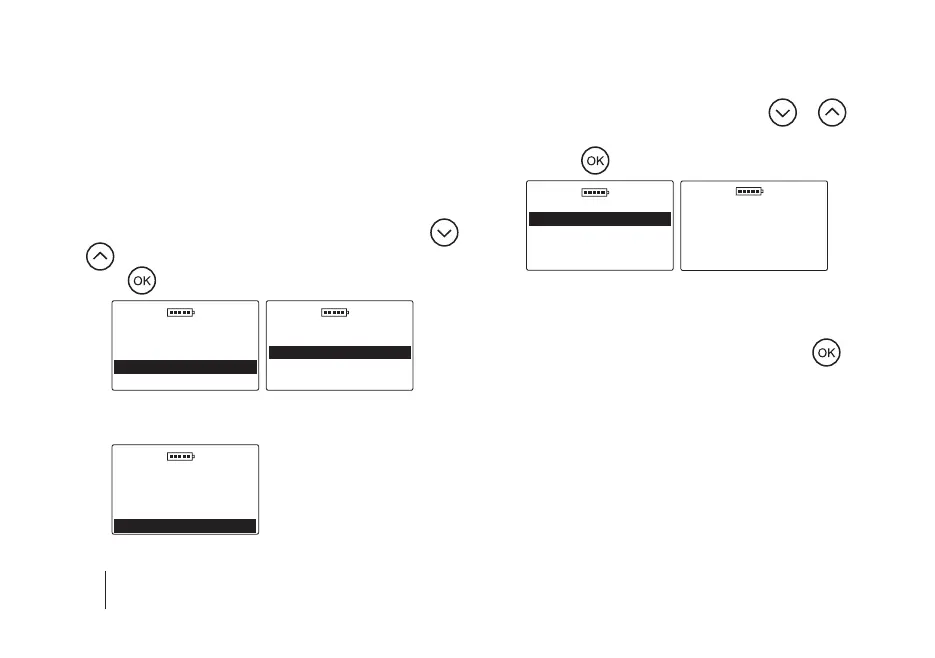
ens the time of the entire test. To change the number of
readings in the measurement cycle, go to the Main menu
/ Settings / Number of measurements, then use the
or
key to select the appropriate number and conrm
with the
key, e.g.
DOD 01.01.2019
Settings
Language
Display
Number of measureme
Memory
DOD 01.01.2019
Number of measurem
1 x
3 x
5.4 Memory
DOD 01.01.2019
Settings
Language
Display
Number of measureme
Memory
5.4 a) Available memory – to check the current amount
of free space in the device’s memory, go to the Main
menu / Settings / Memory, use the
or key
to select the Available memory option and conrm
with the
key, e.g.
DOD 01.01.2019
Memory
Available memory
Delete results
Erasing memory
DOD 01.01.2019
Available memory
Animals
98/100
Results
5.4 b) Delete results – to delete all results stored in the
device’s memory, go to the Main menu / Settings
/ Delete results, and conrm with the
key.
This option deletes the results from all animals
stored in the device (the animals will not be delet
-
ed). Note! Examination results will be irretrievably
deleted from the device, so if the data is important,
remember to rst transfer it to the computer using
special software.
SECTION 10 | MAIN MENU


 To Next Page