44 SECTION 10 | MAIN MENU
DOD 01.01.2019
Date & time
Set date
Set time
Date notation
DOD 01.01.2019
Year
2017 2099
2019
Set date
DOD 01.01.2019
Month
2
1
Set date
DOD 01.01.2019
Day
1
1
Set date
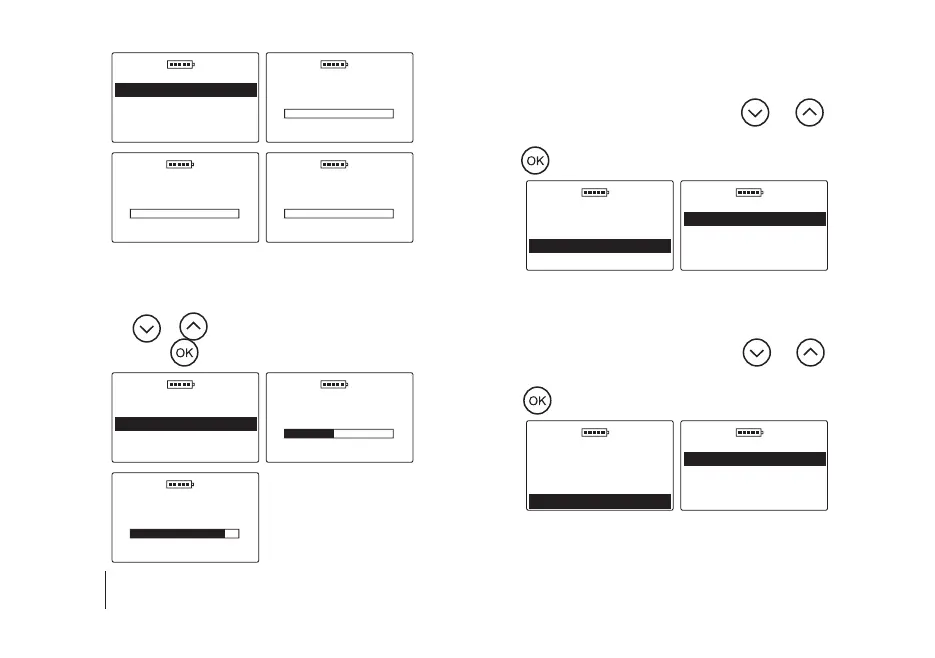
5.6 b) Set time – to set the current time, go to the Main
menu / Settings / Date & time / Set time, then use
the
or
key to select the appropriate value and
press the key to conrm the hour/minutes, e.g.
DOD 01.01.2019
Date & time
Set date
Set time
Date notation
DOD 01.01.2019
Hour
3
11
Set time
DOD 01.01.2019
Minute
9
50
Set time
5.6 c) Date notation – to change the format of date dis-
play, go to the Main menu / Settings / Date & time
/ Date notation, then use the
or key to
select the appropriate option and conrm with the
key, e.g.
DOD 01.01.2019
Date & time
Set date
Set time
Date notation
DOD 01.01.2019
Date notation
Metric
U.S.
5.6 d) Time notation – to change the format of date dis-
play, go to the Main menu / Settings / Date & time
/ Time notation, then use the
or
key to
select the appropriate option and conrm with the
key, e.g.
DOD 01.01.2019
Date & time
Set date
Set time
Date notation
DOD 01.01.2019
Time notation
24H
12H


 To Next Page