40
DOD 01.01.2019
Main menu
Turn o!
Animals
Results
Operating mode
820
DOD
LASSIE
01.01.19
31.12.18
30.12.18
29.12.18
11:50:15
01.01.2019
11.50
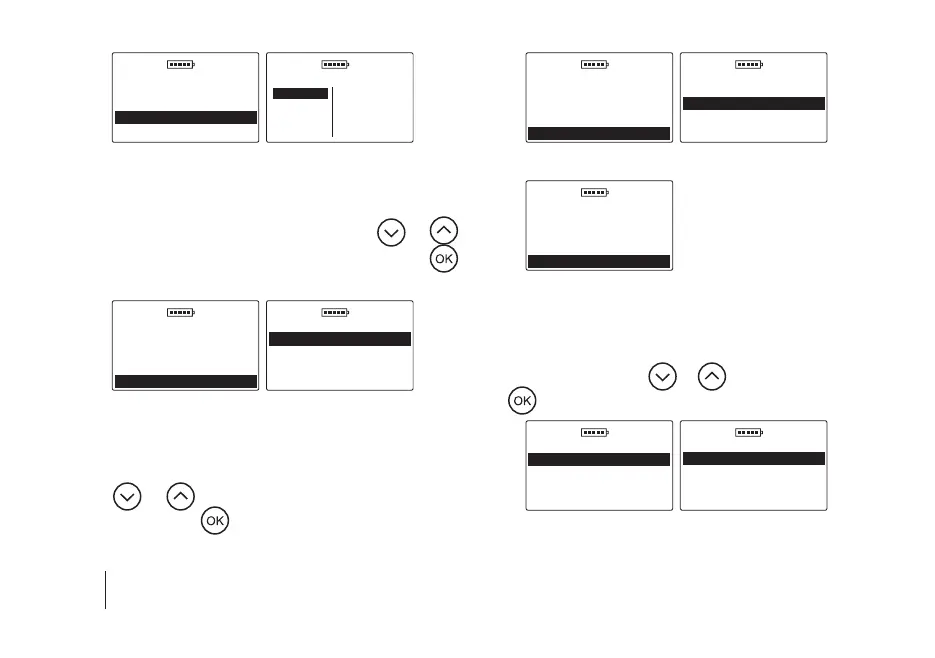
4. Operating mode
a) Basic – in order to facilitate the operation of the device
and use only the basic menu functions, go to the Main
menu / Operating mode, then using the
or
key select the Basic option and conrm with the
key, e.g.
DOD 01.01.2019
Main menu
Turn o!
Animals
Results
Operating mode
DOD 01.01.2019
Operating mode
Basic
Advanced
b) Advanced – in order to enable all the options of the de-
vice such as real time clock, saving measurements, etc.
go to the Main menu / Operating mode, then using
the
or key select the Advanced option and
conrm with the
key, e.g.
DOD 01.01.2019
Main menu
Turn o!
Animals
Results
Operating mode
DOD 01.01.2019
Operating mode
Basic
Advanced
5. Settings
DOD 01.01.2019
Main menu
Animals
Results
Operating mode
Settings
5.1 Language
To change the language version of the device, go to the
Main menu / Settings / Language, then select the lan
-
guage version using the or key and conrm with
the
key, e.g.
DOD 01.01.2019
Settings
Language
Display
Number of measureme
Memory
DOD 01.01.2019
Language
English
Polski
Deutsch
Français
SECTION 10 | MAIN MENU


 To Next Page