41
EN
SECTION 10 | MAIN MENU
5.2 Display
DOD 01.01.2019
Settings
Language
Display
Memory
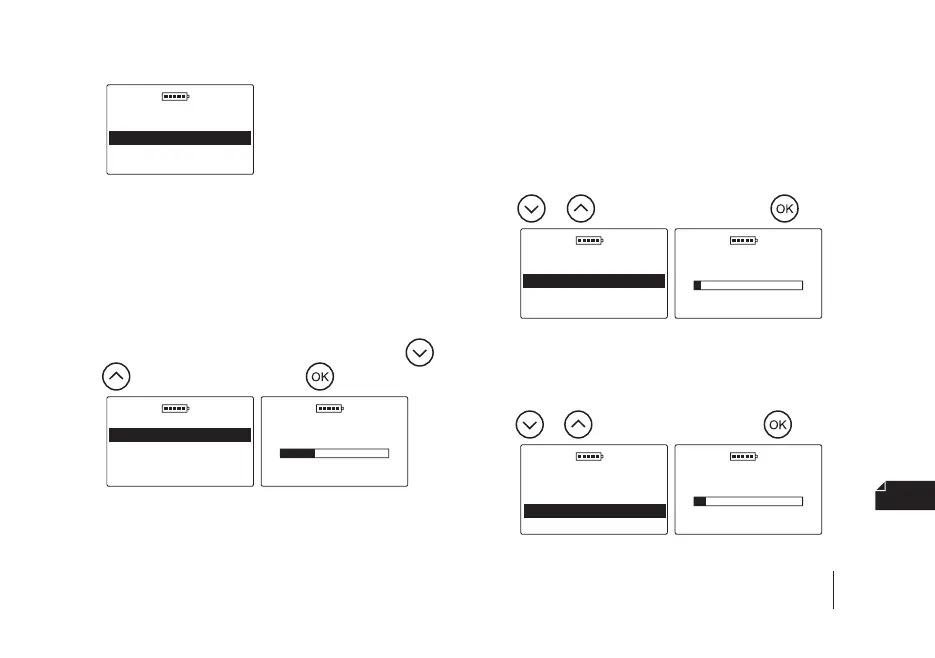
5.2 a) Backlight intensity – we used energy-saving LED
backlighting but remember that stronger backlight
-
ing is associated with increased power consump-
tion, which leads to a faster discharge of the battery.
To change the backlight intensity, go to the Main
menu / Settings / Display / Backlight intensity,
then select the appropriate value using the
or
key and conrm with the key, e.g.
DOD 01.01.2019
Display
Backlight intensity
Backlight o time
LCD contrast
DOD
01.01.2019
0 100
30%
Backlight intensity
5.2 b) Backlight o time – adjustment of the time after
which the backlight of the display is o and the
device goes into the idle state waiting for the key
-
board to be used again (the time is counted from
the last click/use of the key on the keyboard of the
device). To change the backlight o time, go to the
Main menu / Settings / Display / Backlight o
time, then select the appropriate value using the
or key and conrm with the key, e.g.
DOD 01.01.2019
Display
Backlight intensity
Backlight o time
LCD contrast
DOD 01.01.2019
Backlight o time
3 250
20sec
5.2 c) LCD contrast – to change the contrast of the display,
go to the Main menu / Settings / Display / LCD con
-
trast, then select the appropriate value using the
or key and conrm with the key, e.g.
DOD 01.01.2019
Display
Backlight intensity
Backlight o time
LCD contrast
DOD 01.01.2019
LCD contrast
10 30
12


 To Next Page