VigorN65 User’s Guide
25
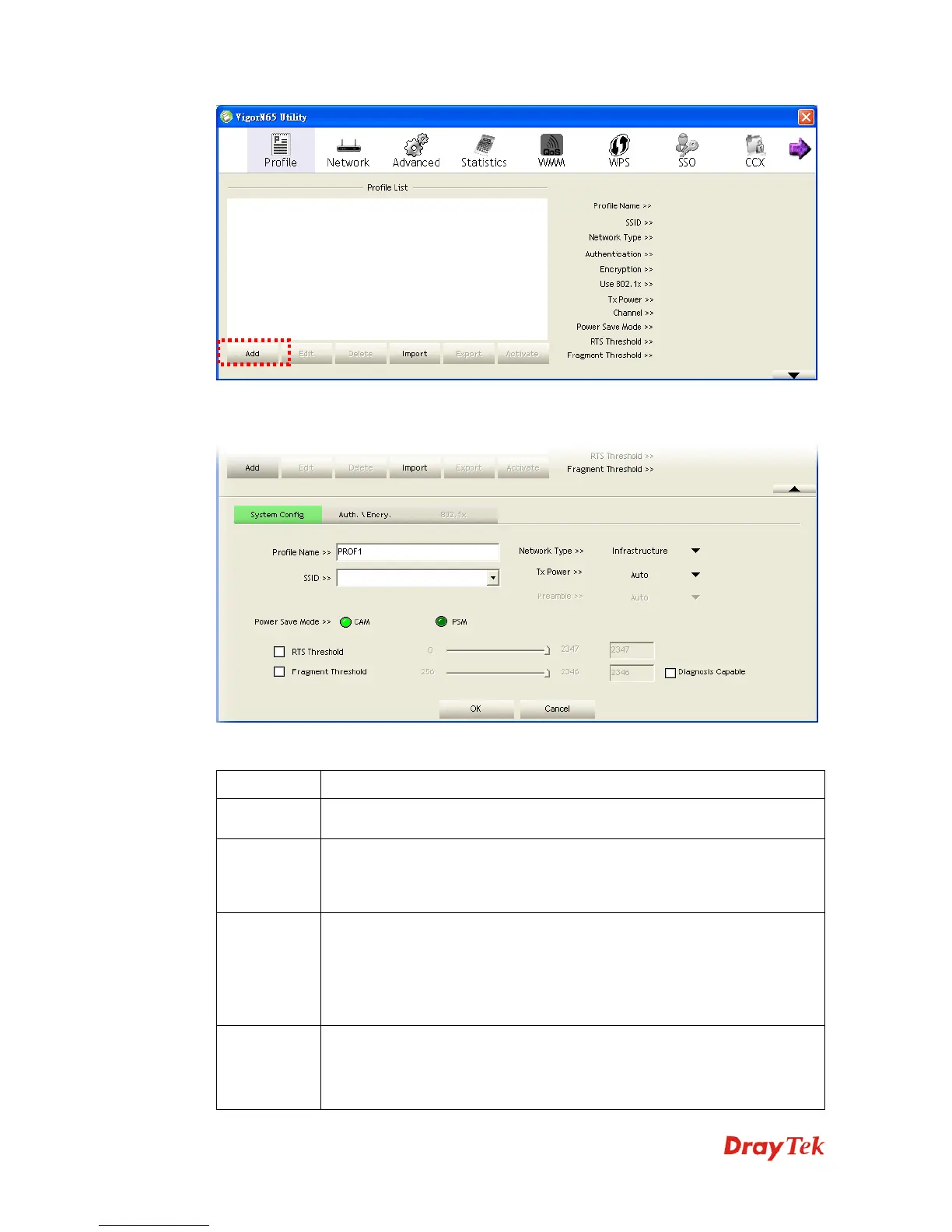
The setup utility will expand:
Here are descriptions of System Config tab:
Item Name Description
Profile Name You can give this profile a name. Every profile needs a unique name.
SSID Please input the SSID of this access point. If you selected an access point
from the list, and its SSID is not hidden, the SSID will be filled
automatically; however, you can modify the SSID by yourself.
Network
Type
Please select the network type: Ad hoc or Infrastructure. If you’re
connecting to an access point, please select Infrastructure; for
point-to-point wireless connection (i.e. connecting to another computer
using Ad Hoc mode), please select Ad hoc here. If you selected an access
point from the list above, please keep this field unchanged.
Tx Power You can select the wireless output power here. If you’re not too far from
access point (good signal reception), you can select a lower output power
to save energy; for a distant access point, you can select a higher output
power. It’s suggested to select Auto to let setup utility decide the best



 To Next Page