VigorN65 User’s Guide
35
3
3
.
.
2
2
.
.
2
2
E
E
d
d
i
i
t
t
a
a
n
n
e
e
x
x
i
i
s
s
t
t
i
i
n
n
g
g
p
p
r
r
o
o
f
f
i
i
l
l
e
e
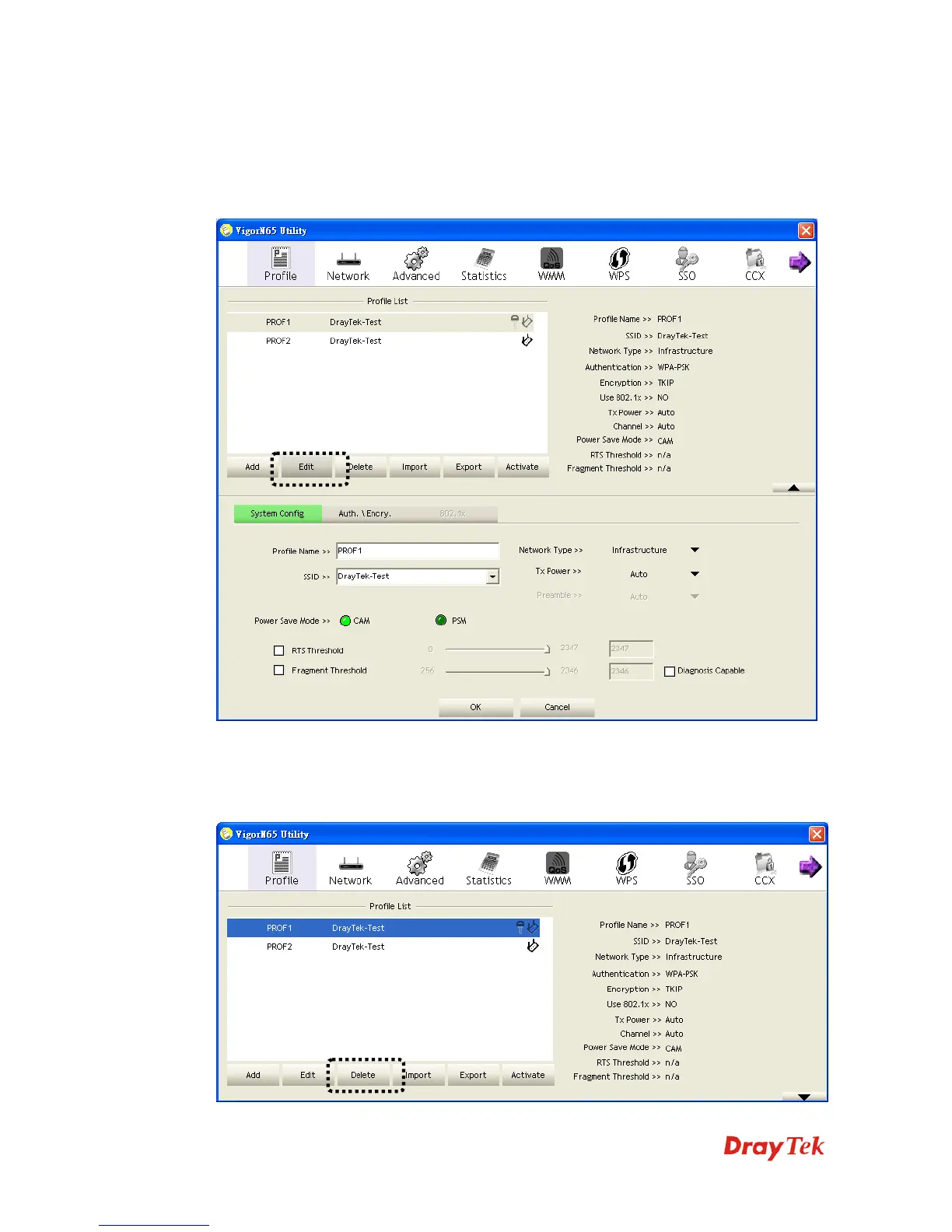
If you have added a profile before, and you wish to change the content of the profile, you can
use this function. Please select a profile from the list first, then click Edit button. You’ll be
provided with the contents of selected profile, and you can edit them. Click OK to save
changes, or click Cancel to discard changes.
3
3
.
.
2
2
.
.
3
3
D
D
e
e
l
l
e
e
t
t
e
e
a
a
n
n
e
e
x
x
i
i
s
s
t
t
i
i
n
n
g
g
p
p
r
r
o
o
f
f
i
i
l
l
e
e
If you no longer need a profile, you can delete it. Select the profile you wish to delete from the
list, and click Delete button to delete it.


 To Next Page