VigorN65 User’s Guide
43
3
3
.
.
7
7
S
S
S
S
O
O
SSO stands for Single Sign-on. Please follow the following instructions to configure the
settings for SSO.
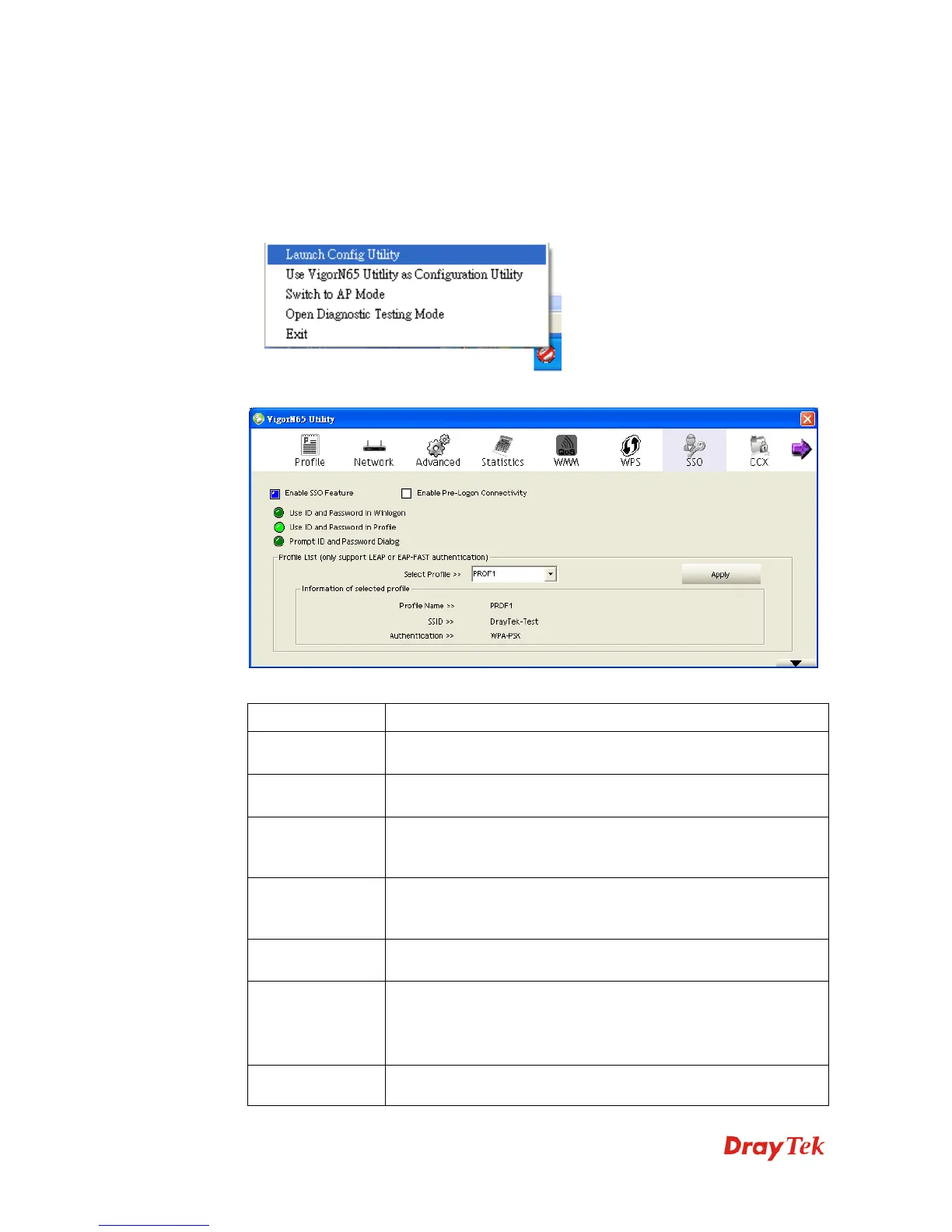
1. Right-click VigorN65 configuration utility icon located at lower-right corner of computer
desktop and then click Launch Config Utility.
2. Click SSO menu, and the following settings will appear.
Here are descriptions of every setup item:
Item Name Description
Enable SSO
Feature
Click it to enable SSO feature. You have to choose one of the
SSO methods to log on.
Enable Pre-Logon
Connectivity
Click it to enable pre-logon connectivity.
Use ID and
Password in
Winlogon
Use the ID and Password in Windows logon.
Use ID and
Password in
Profile
Use the ID and Password defined in a profile.
Prompt ID and
Password Dialog
Use the ID and Password in pop-up authentication dialog.
Profile List Select Profile: Select a profile containing LEAP or EAP-Fast
authentication
Information of selected profile: Contain the information listed
in the profile such as profile name, SSID, and so on.
Apply Make the settings effective.



 To Next Page