VigorN65 User’s Guide
44
3
3
.
.
8
8
C
C
C
C
X
X
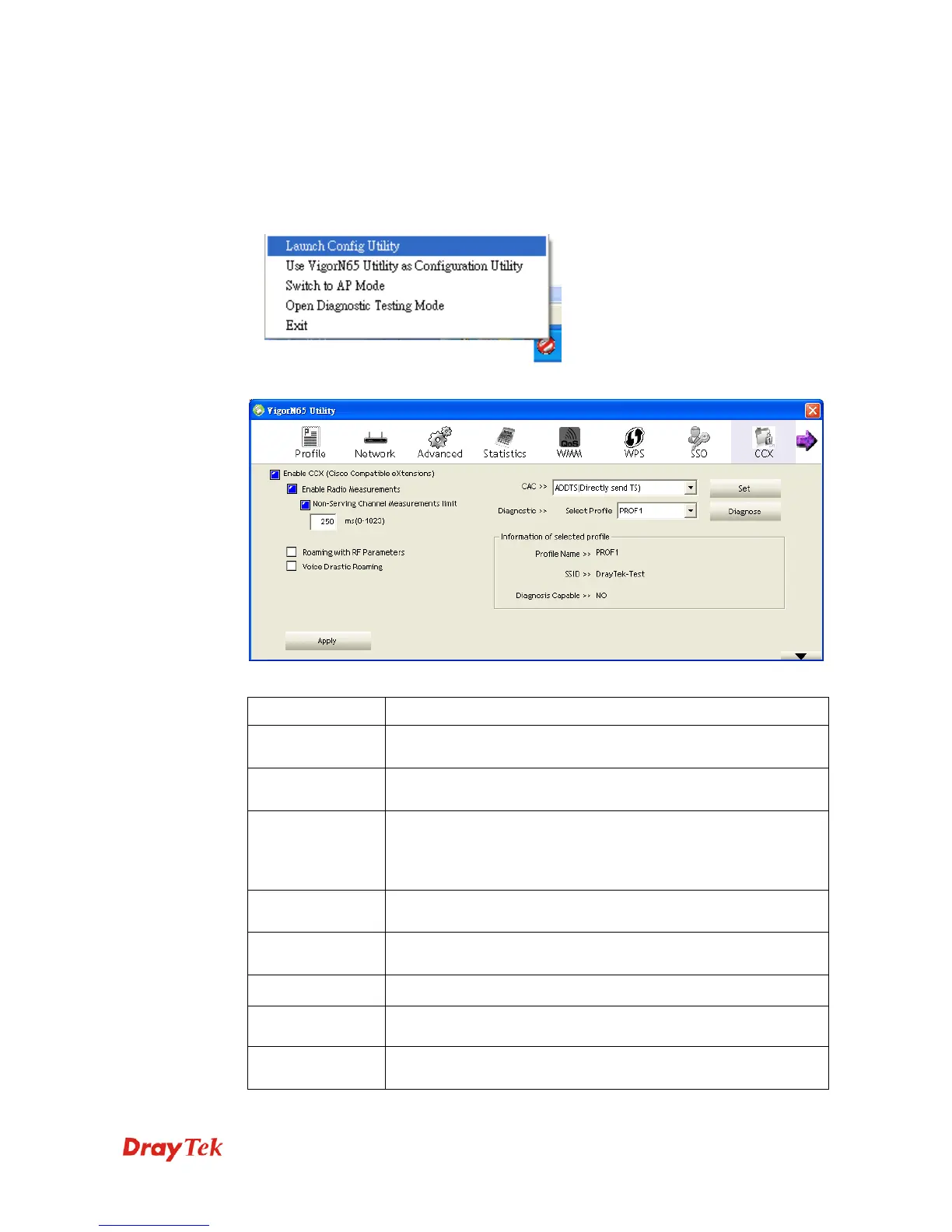
CCX stands for Cisco compatible eXtensions. To set relational CCX settings, please follow
the following instructions to configure it:
1. Right-click VigorN65 configuration utility icon located at lower-right corner of computer
desktop and then click Launch Config Utility.
2. Click CCX menu, and the following settings will appear.
Here are descriptions of every setup item:
Item Name Description
Enable CCS Choose whether Cisco compatible eXtensions are supported or
not.
Enable Radio
Measurements
Enable the radio measurement.
Non-Serving
Channel
Measurement
limit
Non-serving channel measurement limit is between 0 and 1023
milliseconds.
Roaming with RF
Parameters
Check the box to make roaming by a set of RF parameters from
AP.
Voice Drastic
Roaming
Check the box to diagnose roaming function by voice traffic test
CAC>> Choose one of the CAC profiles.
Set Hit the button to enable the call admission control.
Diagnostic
>>Select Profile
Select a profile that the user wants to diagnose, then hit the
Diagnose button to perform the diagnostic test.


 To Next Page